
I struggled to update my ten year old iPhone because it didn’t have enough free storage. I followed this guidance (from Perplexity) to create some free space. (I also temporarily deleted the Apple Music app and reinstalled it after the operating system update.)
Notes of Zoom meeting – 23rd June 2022

First off can I thank Sianed for taking over the meeting for the “round the screen” session which enabled me to take notes and have the fun of “lifting my hand” to speak.
There was not much to report back on from the previous meeting. I mentioned that I’d come to a determination that all media and messages in WhatsApp (and Signal) was held on the phone that was registered to WhatsApp (or Signal); the images on the desktop (and the iPad for Signal) were synced to the phone. This it was agreed could cause some phones to easily run out of memory.
As far as News was concerned there were just a couple of items that I’d already added to the Flipboard magazine – one on moving chat histories from an Android phone to an iPhone, and another about new features that were to be added to Apple’s Homekit (for developers), which we might find some use of in our use of Smart devices in the future. [NB We need to give this area much more attention and look at the Smart home more.]
I then thanked everyone who’d replied to the survey about a future venue for our face-to-face meetings. Not unexpectedly, nothing came out as a definite area of agreement for everyone, but some things did come through – no preference for room layout; a desire for a bit of social distancing (and good ventilation) from a couple of members; and no real need for catering. Taking these into consideration, it appeared to me that if we could return to URC that would be a good solution – probably using the Upper Room (rather than Meeting Room 1). I suggested that the meeting after next we should meet at URC and try the venue out – so that’s where we’ll meet on 21st July, our last meeting of the year. [Subsequently, I’ve re-visited URC, have been impressed that they have a new projector system for the Upper Room and I’m now working with them (Bob) to perhaps enhance the WiFi system which they badly want to improve themselves. Watch this space!
We then had a very short break and Sianed took over!
Paul returned to the issue he’d been having with Resources and Chrome; in discussion with Ted it became apparent that there was a need for a comprehensive article on where videos were stored in WhatsApp and I undertook to write such a post. [Following the meeting I did post a few links on Signal, which might be useful in the meantime.]
David reported that his screen sharing from his iPad to the TV was now working well for his Bridge-playing Tutorials [a link to this is on Signal – thanks David].
Ralph thanked Paul for the advice he’d given on driving licence renewal.
Steve recommended investigating the use of iCloud – it’s not very expensive to get 50Gb of cloud storage – if you’re an Apple user.
Christine reported that after a bit of a quiet period, the scams had started again and she’d had ones from Amazon and Paypal [I would recommend everyone consider subscribing to the Which Scam Alert Service] and perhaps one from Welsh Water, but there was some discussion over whether this was the Priority Registration Service – which is worth joining in case there’s a disruption in water supply, or indeed joining the similar registers for our utilities. [We’ve done this.]
Fred had gone to the recent General meeting (Roald Dahl) and learnt a few things, and had also renewed his driving licence following Paul’s advice.
Jim was still not sure about where WhatsApp/Signal stored images etc. and reserved the right to comment later, following my investigations.
Renee reported that the online portal for registering a change in marital status was a nightmare. No further comment – we suspected that very few (if any) of us were likely to be needing to use that portal 🙂
Ann had got into a pickle with downloading photos to her Google account that had then filled up her allotted storage and mail had stopped working. I sent a few links (on Signal) to help her work this one out but again promised to wrire n article on that as soon as possible.
I had nothing to report – I’d been too busy in the garden!
I then gave a brief review on the internet browser and search engine markets, the links I used are on Flipboard, but I will try and write an article about this too.
Just like me, Sianed didn’t report on anything – something I too often forgot to do.
That’s about it. A couple of articles for me to write which I’ll try and do as soon as I can.
Our next meeting will be on July 7th which will be an outdoor social meeting at The Castle Coffee bar, where we met before. Pleas try and come along if you can.
Finally, you’ll remember that I left the WhatsApp group and left Jim as the Admin. I asked him last week whether there had been any relevant activity on it. He reported that there had not. Therefore we agreed that he should close it, and that he’ll do shortly. Anyone not using Signal, I strongly encourage you to download the app and start using it. Let me know and I’ll add you to the Computer Group group on Signal.
Changes to Google Storage

If you’ve got a Google account – you use Google Photos, Google Drive (and the Google Docs suite) or Gmail – you’ll probably have received an email telling you about the changes that Google are making to the way it calculates how much of the 15Gb of storage the company allocates to you has been used. They have also spelled out clearly when they will delete content that has been inactive for more than two years.
This post relies heavily (almost verbatim) on information already available on Google’s Help Pages – which should always be taken as the main source for information.
Currently each Google Account includes 15 GB of free storage quota, which is shared across Gmail, Google Drive, and Google Photos. You can add to your storage quota by purchasing a Google One membership (where available). To learn more about your quota, see what items count towards your storage.
Prior to June 1, 2001
The following items count against your storage quota
- Original quality photos and videos backed up to Google Photos
- Gmail messages and attachments, including your Spam and Trash folders
- Most files in Google Drive, including PDFs, images, and videos
If you go over your storage quota
- You can no longer upload new files or images to Google Drive
- You can’t back up Original quality photos and videos to Google Photos
- Your ability to send and receive email in Gmail may be impacted
- You can still sign into and access your Google Account
After June 1, 2001
The following additional items will count against your storage quota:
- High quality and Express quality photos and videos backed up to Google Photos after June 1, 2021. Learn more about this change.
- Files created or edited in collaborative content creation apps like Google Docs, Sheets, Slides, Drawings, Forms and Jamboard.
- Only files created or edited after June 1, 2021 will count against your quota.
- Files uploaded or last edited before June 1, 2021 will not count against your quota.
And this is how your usage impacts your data
If you do not use Gmail, Google Drive (including Google Docs, Sheets, Slides, Drawings, Forms or Jamboard) or Google Photos for 2 years, your content within the inactive product(s) may be deleted (after reasonable advance notice).
If you go over your storage quota
- You can’t upload new files or images to Google Drive.
- You can’t back up any photos and videos to Google Photos.
- Your ability to send and receive email in Gmail can also be impacted.
- You can’t create new files in collaborative content creation apps like Google Docs, Sheets, Slides, Drawings, Forms and Jamboard. And until you reduce your storage usage, neither you nor anyone else can edit or copy your affected files.
- You can still sign into and access your Google Account.
When you have been over your storage quota for 2 years, your content in Gmail, Google Drive (including Google Docs, Sheets, Slides, Drawings, Forms and Jamboard files) and Google Photos may be deleted.
So it’s time to do a stock take of what Google Storage you’re using. You’ll see something like this if you’ve got an active Google account …
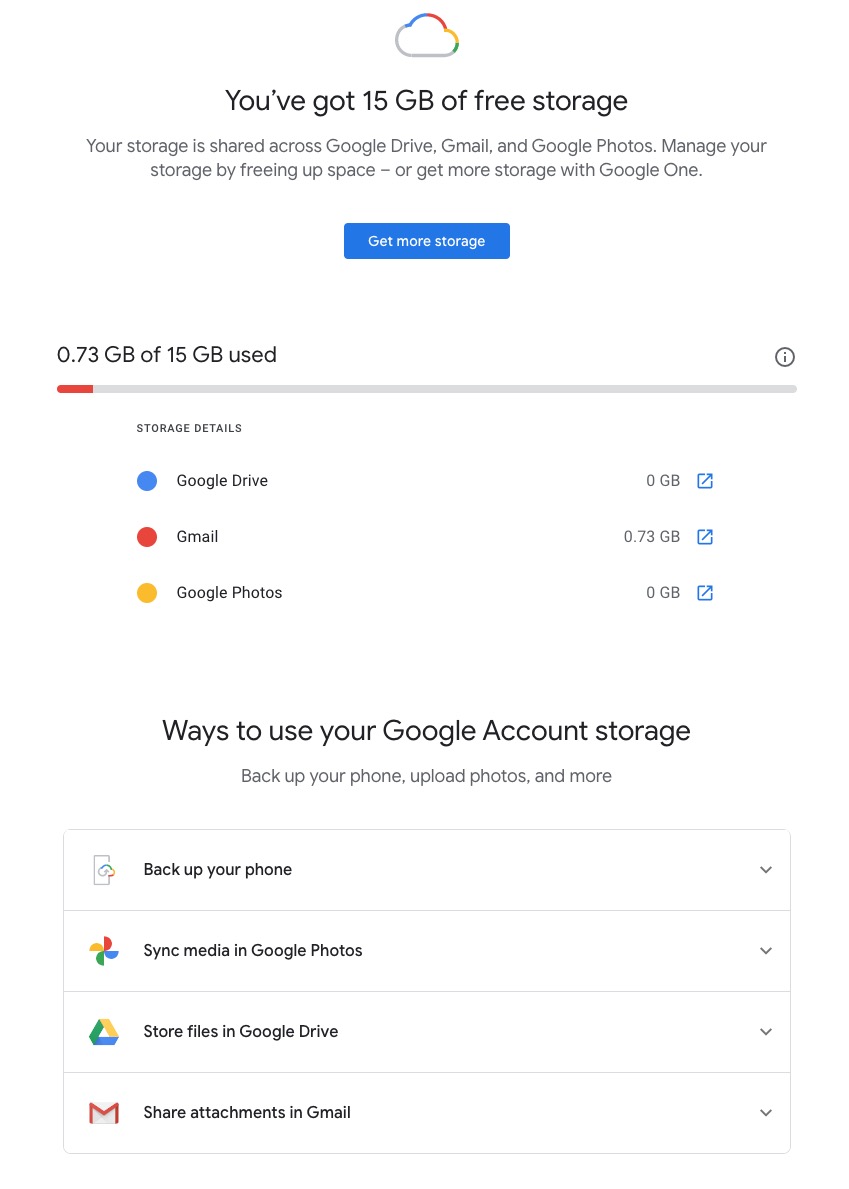
Seeing how you may be using your Google Storage, with June 1st approaching might seem pretty frightening to you, so you might need some help to know what you should do, and whether purchasing a Google One plan might be right for you …
What happens when you’re over quota
When you’re over quota, it means you’re using more storage space than you have available. If you’ve been over quota for 2 years or longer, and you have not freed up or purchased more space to get back under quota, all of your content may be removed from Gmail, Drive and Photos. But before that happens, we will:
- Give you notice using email and notifications within the Google products. We will contact you at least three months before content is eligible for deletion.
- Give you the opportunity to avoid deletion (by paying for additional storage or removing files)
- Give you the opportunity to download your content from our services. Learn more about how to download your Google data.
How to go back under quota
We provide access to storage management tools that help you identify ways to free up storage space at https://one.google.com/storage. Another option to free up space is to download your files to your personal device and then delete them from your cloud storage.
However …
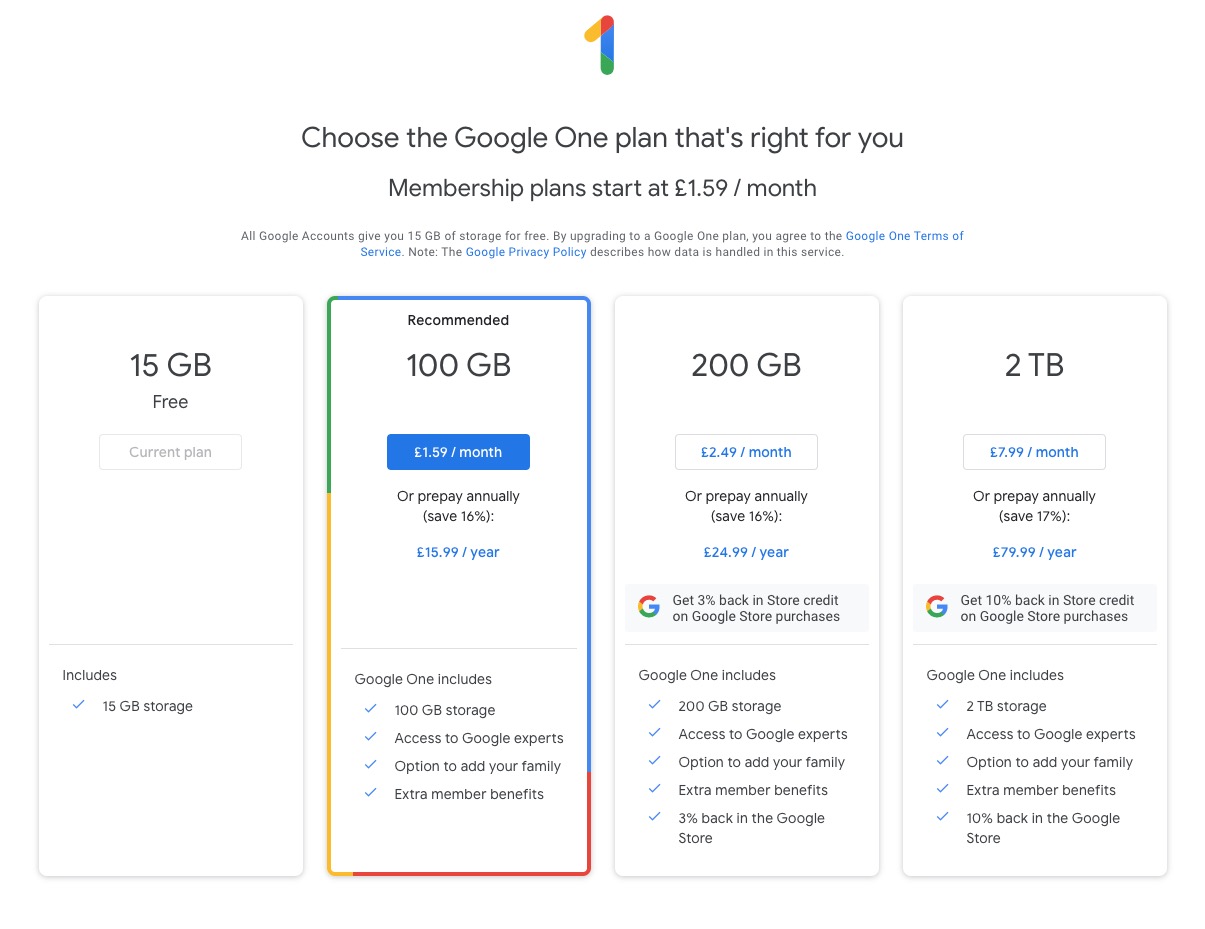
If you want more storage space for Gmail, Drive, and Photos, you can upgrade to a larger storage plan with Google One. You can click on the link “Get more storage” from the page that you should have arrived at above, and you’ll be offered the opportunity of purchasing a Google One Storage Plan …
But what happens when you’re inactive?
When you have been inactive in Gmail, Google Drive (including Google Docs, Sheets, Slides, Drawings, Forms, Jamboard or Sites files) or Google Photos for 2 years, all of your content may be removed from that product. But before that happens, we will:
- Give you notice using email and notifications within the Google products. We will contact you at least three months before content is eligible for deletion.
- Give you the opportunity to avoid deletion (by becoming active in the product)
- Give you the opportunity to download your content from our services. Learn more about how to download your Google data.
If you’re a Google One member with no outstanding payment or quota issues, you are considered active.
Important: As an example, if you’re inactive for 2 years in Photos, but still active in Drive and Gmail, only your Google Photos content will be deleted. Content in Gmail and Google Drive (including Google Docs, Sheets, Slides, Drawings, Forms and Jamboard files) will not be deleted if you are active in those products.
How to stay active in these products
The simplest way to keep your data active is to periodically visit Gmail, Google Photos, and Google Drive (and/or collaborative content creation apps like Google Docs, Sheets, Slides, Drawings, Forms, Jamboard and Sites) on the web or through a Google app. Make sure you’re signed in and connected to the internet.
- For Gmail: Android; iOS; mail.google.com
- For Google Drive: Android; iOS; drive.google.com
- For Google Photos: Android; iOS; photos.google.com
Please note that you may have multiple accounts set up on your device. Activity is considered by account, not by device. Make sure you’re using the services for all accounts on which you wish to remain active.
The article from Google concludes with some FAQ which you might like to refer to, including one answer on how to preserve content from a loved one if they pass away and the use of their Inactive Account Manager.
In another article, I will attempt to answer the vexed question of how to delete photos from Google Photos in your storage plan, your computer and your device the way that you want them to be deleted, ie not deleting them all, just deleting them from the place you want them deleted!!!!
Lastly, here’s a link to how to delete files (and reduce the count against your quota) from Google Drive.
Online buying and selling; Fb still in the news and meeting notes – 12th April 2018
Issues
-
You can recall a message in Gmail for a limited time after you’ve sent it – as long as you’re using the browser version or the Gmail app; will not work with email clients, such as Outlook, or Apple Mac Mail.
-
Problems with Spam from BTinternet – investigated; could not find anything specifically that is a current problem.
-
How do you clone Mac – if you want to rebuild your system; resolved and answer given to Renee
-
Topics for the future
-
Cookies and internet history – managing them
-
Buying a new system; transferring your old system to a new one on a Windows PC. This has been covered for the Mac in response to Renee viz. cloning.
News
-
Facebook still in the news – Mark Zuckerburg appears before Congress, will he come to Westminster? Nope!
https://www.facebook.com/settings?tab=privacy in a browser
What do you use different forms of storage for?
-
Internal hard disk drive
-
External hard drive
-
Solid-state drive
-
USB Memory Sticks, and Memory Cards (SD Cards, Compact Flash)
… and then there’s …
-
Cloud storage
Topics