In the early hours of this morning a hacker from America tried to get into my Microsoft account. I am pleased to say he / she was unsuccessful. I have decided to close the account (I am a Mac user). It’s important to check “recent activity” on your account. You’ll be surprised to see a string of (hopefully) unsuccessful sign-ins, and from which countries.
Nita’s WhatsApp Hack
My what’s app has just been hacked and wondering if there is anyone here that can help me as I have no idea how I can get all my groups n messages back
I have not backed up on iCloud so that is not an option
I have not linked onto my laptop either so cannot access on laptop
What else can anyone suggest to get my account and messages pls
I replied …
You have few options left I’m afraid. Your messages are stored on your phone, that is the primary message store, so if you haven’t backed up your message store, there is little you can do – as I understand it – to recover your account.
This is what Claude told me, using the text you typed above …
I’m sorry to hear your WhatsApp account has been compromised. This can be stressful, but there are steps you can take to recover your account and possibly your messages.
Here’s what you can do:
1. First, try to regain control of your WhatsApp account by verifying your phone number again. Open WhatsApp and follow the verification process.
2. If you’re locked out completely, contact WhatsApp support through their official website or app.
3. Unfortunately, without a backup (either on iCloud or Google Drive), recovering past messages is very challenging. WhatsApp doesn’t store your messages on their servers once delivered.
4. For your groups: once you regain access to your account, you may still see your groups listed, though you might not have the message history.
5. Ask friends or family members who are in the same groups if they can add you back to any groups you’ve been removed from.
6. For future protection, I’d recommend enabling two-step verification in WhatsApp settings once you regain access.
7. You should also consider changing passwords for any accounts that might share similar passwords to your compromised account.
Would you like more specific information about any of these steps? Have you been able to verify your phone number again in the app?
… and Perplexity …
If your WhatsApp account has been hacked and you don’t have backups on iCloud or a linked laptop, follow these steps:
Log Out All Linked Devices: Open WhatsApp, go to “Settings” > “Linked Devices,” and log out of all unknown devices.
Re-register Your Account: Uninstall and reinstall WhatsApp. Enter your phone number to receive a verification code via SMS. This will log out the hacker as WhatsApp allows only one active device per account.
Two-Step Verification: If a PIN is requested and you didn’t set it up, the hacker may have enabled two-step verification. You can reset the PIN via the “Forgot PIN” option if an email is linked to your account.
Contact WhatsApp Support: Email support@whatsapp.com detailing the situation with “Lost/Stolen” in the subject line for further assistance.
Recover Messages Locally: If using Android, check local storage under Internal Storage/WhatsApp/Databases for backups (e.g., msgstore.db.crypt14) and restore them during reinstallation.
Inform your contacts about the hack to prevent further misuse of your account.
Nita replied …
The email account is compromised as cannot change my password
I think I am back up having reinstalled the what’s app
Just need to check other social media accounts if compromised
AI and cataracts. Hi, I’m finding all sorts of ways to use Chat GPT. Yesterday I asked it to find me some private clinics that offered cataract surgery near Cardiff and to give me some idea of the prices, and it did just that. In seconds. I could have found the same information trawling through websites but this is so much quicker.
Do you need a paid subscription to open an Apple account and be able to Sign in with Apple?
No, you don’t need a paid subscription to open an Apple account or use Sign in with Apple. Creating an Apple ID (Apple account) is completely free and allows you to: • Sign in with Apple on third-party websites and apps • Access basic Apple services like the App Store • Use iCloud’s free tier (with 5GB of storage) • Make purchases in Apple’s digital stores Paid subscriptions like Apple One or individual services (Apple Music, iCloud+ storage, etc.) are optional add-ons to your free Apple ID account. To create an Apple ID, you just need an email address, a password, and some basic personal information. You can sign up directly on an Apple device or through the Apple website.
What about Hide my Email address?
You’re asking about a good feature! Hide My Email is part of Apple’s privacy features, but it has different availability: Free version: • You can use Hide My Email when signing up for services with “Sign in with Apple” – this gives you a randomly generated email address that forwards to your real one • This basic functionality is available to anyone with a free Apple ID Paid version (requires iCloud+ subscription): • The full-featured Hide My Email service that lets you create and manage multiple private email addresses anytime (not just when signing up for services) • Create unlimited email addresses • Manage all your private email addresses in Settings • Use custom domain names with iCloud Mail iCloud+ subscriptions start at $0.99/month for the 50GB plan, which includes the expanded Hide My Email functionality. The subscription also includes other privacy features like Private Relay and expanded HomeKit Secure Video support.
What a question! Total of course might be the first answer, but is it actually the right one. It’s an entirely personal choice, and you have to weigh up how much you want to share of yourself online, how much personal information you need to share online, and how to secure that which you have to provide online to obtain services. Yes – it’s not an easy question to answer! But first some highlights …
So where should we start. Well … I thought I’d just ask Perplexity and Claude to help me …
Perplexity advise me thus …
The amount of privacy you need or want depends on your personal values, lifestyle, and circumstances. Here are some considerations:

Factors Influencing Privacy Needs

	1.	Personal Boundaries: Privacy allows you to maintain control over sensitive information about yourself, such as financial, medical, or personal details.

	2.	Life Stage: Adolescents often need privacy to explore their identity and independence, while adults may seek it to protect personal data or maintain emotional boundaries.

	3.	Cultural and Social Context: In some environments, privacy can be a matter of safety (e.g., journalists in authoritarian regimes), while in others, it may be less critical.

Balancing Privacy and Openness
        •       Online Privacy: Use tools like password managers, VPNs, and privacy-conscious apps to protect your data.
	•	Relationships: Healthy relationships respect privacy but avoid secrecy that harms trust.
	•	Public Interactions: Avoid oversharing in public spaces or online forums to maintain control over your personal information.

Practical Steps
	•	Define what information you’re comfortable sharing.
	•	Use privacy tools to secure digital data.
	•	Communicate clearly about boundaries with others.
Ultimately, the right level of privacy is subjective and should align with your comfort level and values.
… whilst Claude “goes the extra mile” and provides me with a Comprehensive Personal Privacy Guide …
# Digital Privacy Mastery: Protecting Your Online Presence
## Digital Privacy Landscape
### Understanding Digital Privacy Digital privacy is about controlling your personal information in the online world, protecting yourself from: - Data collection and tracking - Unauthorized access to personal information - Potential misuse of your digital footprint - Cybersecurity threats - Online surveillance and profiling
### Digital Privacy Threat Landscape
#### Primary Digital Privacy Risks 1. **Data Harvesting** - Corporate data collection - Targeted advertising - Behavioral tracking - Comprehensive digital profiling
2. **Cybersecurity Vulnerabilities** - Personal data breaches - Identity theft - Financial fraud - Unauthorized account access
3. **Online Tracking Mechanisms** - Cookies and tracking technologies - Social media data mining - Search engine tracking - Cross-platform data sharing
### Digital Privacy Assessment Levels
#### Basic Digital Privacy (Beginner Level) - Limited awareness of online tracking - Minimal privacy settings - Using default browser and app configurations - Sharing personal information freely online
#### Intermediate Digital Privacy (Aware Level) - Understanding basic tracking mechanisms - Selective social media sharing - Using some privacy tools - Aware of potential online risks - Implementing basic security measures
#### Advanced Digital Privacy (Expert Level) - Comprehensive online protection strategy - Minimal digital footprint - Advanced encryption and anonymity tools - Proactive threat monitoring - Strategic online information management
### Comprehensive Digital Privacy Toolkit
#### 1. Personal Information Management - Audit existing online accounts - Minimize personal data sharing - Use alternative/temporary contact information - Create dedicated email addresses for different purposes
#### 2. Authentication and Access Control 1. **Password Management** - Use complex, unique passwords - Implement password manager - Enable two-factor authentication - Regularly update passwords
2. **Account Security** - Review app and service permissions - Disconnect unused accounts - Use privacy-focused authentication methods - Implement login alerts
2. **Tracking Prevention** - Block third-party cookies - Use anti-tracking browser extensions - Disable location tracking - Limit browser fingerprinting
#### 4. Social Media and Online Presence 1. **Platform Privacy Settings** - Minimize public profile information - Restrict personal data visibility - Control tagging and sharing permissions - Regularly audit connected applications
2. **Content Strategy** - Be selective about online sharing - Use pseudonyms when appropriate - Understand platform data policies - Implement content self-censorship
#### Digital Privacy Mindset - Treat personal data as valuable asset - Develop critical thinking about online sharing - Stay informed about privacy technologies - Cultivate a proactive privacy approach
#### Continuous Privacy Improvement 1. Regular privacy audits 2. Stay updated on emerging threats 3. Adapt privacy strategies 4. Learn from privacy best practices 5. Invest in privacy education
### Legal and Ethical Dimensions - Understand data protection regulations - Know your digital rights - Recognize ethical data use - Support privacy-focused initiatives
### Conclusion: Your Digital Privacy Journey Digital privacy is an ongoing process of: - Awareness - Strategic management - Continuous learning - Technological adaptation
**Key Takeaway**: Your digital privacy is a personal responsibility and a fundamental right in the digital age.
### Action Plan 1. Conduct immediate privacy audit 2. Implement basic protection tools 3. Develop privacy-conscious habits 4. Continuously educate yourself 5. Regularly reassess your digital privacy strategy
… so with that, I might as well stop and let AI take over!!!! Here’s Claude’s presentation …
# Securing Your Digital Privacy
## Table of Contents 1. Understanding Digital Privacy 2. Risks in the Digital Landscape 3. Protective Strategies 4. Essential Tools and Techniques 5. Best Practices for Everyday Protection
---
## 1. Understanding Digital Privacy
### What is Digital Privacy? Digital privacy is the protection of personal information in the online world, encompassing: - Personal data protection - Control over personal information sharing - Prevention of unauthorized access to digital identities - Maintaining anonymity and security in digital interactions
### Why Does Digital Privacy Matter? - Prevent identity theft - Protect personal and financial information - Maintain personal autonomy - Avoid targeted manipulation - Safeguard professional and personal reputation
---
## 2. Risks in the Digital Landscape
### Common Digital Privacy Threats - Data breaches - Phishing attacks - Social engineering - Tracking and profiling - Unauthorized data collection - Malware and ransomware
### Potential Consequences - Financial fraud - Personal information exposure - Reputation damage - Stalking and harassment - Professional and personal discrimination
---
## 3. Protective Strategies
### Personal Information Management - Minimize personal data sharing - Use privacy settings on social media - Be cautious about online forms and surveys - Regularly audit online accounts and permissions
### Digital Footprint Reduction - Use pseudonyms when possible - Limit personal information in public profiles - Be mindful of location sharing - Regularly delete unnecessary online accounts
### Practical Privacy Tips - Use two-factor authentication - Regularly update software and devices - Be skeptical of unsolicited communications - Use unique passwords for each account - Enable encryption on devices - Avoid public Wi-Fi without VPN protection
### Online Behavior - Think before posting - Limit personal information sharing - Be aware of app permissions - Regularly review privacy settings - Use privacy-focused search engines
---
## Additional Resources
### Recommended Websites - [Electronic Frontier Foundation (EFF)](https://www.eff.org/) - [Privacy Tools](https://privacytools.io/) - [Have I Been Pwned](https://haveibeenpwned.com/)
### Learning More - Take online privacy courses - Follow cybersecurity blogs - Stay informed about latest privacy technologies
---
## Conclusion
### Your Digital Privacy is Your Right - Be proactive - Stay informed - Continuously educate yourself - Protect your digital identity
*Remember: Digital privacy is an ongoing process, not a one-time solution!*
… that’s just too much to take-in isn’t it, so I think I still have a place, and I’ll simplify things down to just a few points – but please take note of both of these AI contributions as a checklist to visit and re-visit on a regular basis.
So my plan is to cover the following:
Safeguarding
Cookies – Deny usually works (but you may need to temporarily switch off adblockers if the site is of particular value/importance to you – but remember to switch it back on afterwards. Alternatively – look for a different site that doesn’t impose that requirement. It’s nearly always imposed to get marketing information from you – what you’re doing, what you’re looking at, where you are, what you’re buying etc etc.
Adblockers – these protect you from yourself to some extent, as you won’t see adverts that you might be tempted to click on; but they also remove invasive ads from appearing on your screen and interrupting your reading. They should also prevent pop-ups (in small windows) appearing – but be aware that some websites have this facility hard-wired into their code, so the best solution is to avoid such websites as you can’t switch-off the pop-ups. Claude gives advice on the best ad blockers available …
Choosing the best ad blocker depends on your specific needs, such as browser compatibility, customization options, and additional features like privacy protection. Here are some of the top ad blockers for different scenarios:

## Top Ad Blockers for 2025

### 1. **AdGuard**
   - **Best For:** System-wide ad blocking and broad compatibility across multiple browsers and devices.
   - **Features:** Offers robust app coverage, parental controls, browsing security, and a VPN. It has a user-friendly interface and provides detailed statistics on blocked ads.
   - **Compatibility:** Browsers, Windows, macOS, Android, and iOS.
   - **MV3 Compliance:** Yes, with a compliant beta extension for Chrome.
   - **Cost:** Starts at $29.88, with plans covering up to nine devices[1][2].

### 2. **uBlock Origin**
   - **Best For:** Customization and Firefox users.
   - **Features:** Highly customizable with the ability to add custom filters and scripts. It is free and open-source.
   - **Compatibility:** Primarily for browsers.
   - **MV3 Compliance:** No.
   - **Cost:** Free[1][3].

### 3. **Total Adblock**
   - **Best For:** Ease of use and YouTube/Facebook ad blocking.
   - **Features:** Blocks third-party trackers, improves page load times, and offers a premium plan with antivirus software.
   - **Compatibility:** Browsers.
   - **MV3 Compliance:** Currently unaffected but lacks a clear transition plan.
   - **Cost:** Free version available, with premium starting at $1.59/mo[2].

### 4. **Surfshark CleanWeb**
   - **Best For:** Unlimited devices and VPN integration.
   - **Features:** Blocks ads across multiple devices, including smart TVs, and offers VPN benefits like data encryption and phishing protection.
   - **Compatibility:** Unlimited devices, including smart TVs.
   - **MV3 Compliance:** Unaffected.
   - **Cost:** Bundled with Surfshark VPN[2].

### 5. **Ghostery**
   - **Best For:** Privacy-focused users.
   - **Features:** Offers anti-tracking features and detailed ad-blocking statistics.
   - **Compatibility:** Chromium-based browsers, Android, and iOS.
   - **MV3 Compliance:** Yes.
   - **Cost:** Free, with premium options available[1][3].

### 6. **Adblock Plus**
   - **Best For:** General ad blocking with acceptable ads feature.
   - **Features:** Allows acceptable ads to support websites, with a user-friendly interface.
   - **Compatibility:** Chrome and other browsers.
   - **MV3 Compliance:** Not specified.
   - **Cost:** Free[8].

### Comparison Table

| Ad Blocker | Best For | Compatibility | MV3 Compliance | Cost |
|------------|---------|---------------|----------------|------|
| AdGuard    | System-wide blocking | Browsers, Windows, macOS, Android, iOS | Yes | $29.88+ |
| uBlock Origin | Customization, Firefox | Browsers | No | Free |
| Total Adblock | Ease of use, YouTube/Facebook | Browsers | Unaffected | $1.59/mo+ |
| Surfshark CleanWeb | Unlimited devices, VPN | Unlimited devices | Unaffected | Bundled with VPN |
| Ghostery | Privacy features | Chromium-based browsers, Android, iOS | Yes | Free+ |
| Adblock Plus | General ad blocking | Chrome and other browsers | Not specified | Free |

Each of these ad blockers offers unique benefits depending on your priorities, whether it's customization, privacy, or ease of use.

Sources
[1] Best Ad Blockers of 2025 - Cookies https://www.aboutcookies.org.uk/ad-blockers
[2] Best Ad Blockers That Still Work in Chrome March 2025 https://allaboutcookies.org/best-ad-blockers-for-chrome
[3] The Best Ad Blockers for 2025 - PCMag https://www.pcmag.com/picks/best-ad-blockers
[4] What is the best AdBlocker for Chrome? (browser opinions aside) https://www.reddit.com/r/Adblock/comments/1ex5hyq/what_is_the_best_adblocker_for_chrome_browser/
[5] Best ad blockers of 2025 - TechRadar https://www.techradar.com/pro/best-ad-blockers
[6] AdBlock — block ads across the web - Chrome Web Store https://chromewebstore.google.com/detail/adblock-%E2%80%94-block-ads-acros/gighmmpiobklfepjocnamgkkbiglidom
[7] Best Ad Blocker 2025 | My top choices that REALLY work! - YouTube https://www.youtube.com/watch?v=92ITOpOxRcQ
[8] Adblock Plus | The world's #1 free ad blocker https://adblockplus.org
… add to this Magic Lasoo if you use Apple kit with the added benefit that it blocks ads on YouTube if you view through Safari [otherwise you’ll need to consider purchasing YouTube Premium at £12.99pm, which might be worth it if you’re a big YouTube watcher].
Password managers
A subject we’ve looked at before; recommended password managers would be one from this article, 1Password has my son’s recommendation; but as you know I rely on the less feature-rich but very effective – within a 100% Apple environment – Password app (using iCloud Keychain)
Two factor authentication (2FA)
You might care to look at this page from the BBC on 2FA as well – I would recommend using Authy, if you go down the third-party authenticator route
[A Postscript from Signal – 28/03/2025]
I don’t think I mentioned it yesterday but with an increasing number of apps, the two above included, you don’t need to provide login credentials, you can “Login with Apple” or Google, and I think Microsoft for some. This means the app account is tied to your Apple account (or whatever) and an anonymous userId is created which provides privacy as well as not needing to create a password as well.
Don’t proceed with Free option, or 7-day trial if ads appear immediately you take your first step (eg I followed after research a link to the best recommended software for a particular purpose, but after I downloaded it – no problems, I was immediately bombarded by ads when I started the app up with the plea to pay for an ad-free version), and don’t take the 10% off next purchase offer – this is a particularly insidious “trick” often linked to travel websites, where you are offered 15% off your next purchase, only to find that by clicking on the link you have to provide information, or permission, to send personal information to other businesses.
Be mindful of links on purchase sites – similar to the above, but just be aware that the re-direction takes you away from the original website where you might have felt relatively safe. On that not, always use a Credit Card for online purchases (or Apple or Google Pay, or Paypal) as you’re provided with some protection against fraud.
Beware of location tracking – switch-off all that don’t need your location to work. In your apps just be aware that not all apps need to know where you are – maps … yes; weather – maybe; asda – not really!
Privacy settings in apps – Facebook, Google
Facebook (from Perplexity) …
To enhance your privacy on Facebook, here are key settings to adjust:

1. Control Who Sees Your Posts
Go to Settings & Privacy > Settings > Privacy.
Adjust the audience for your posts: choose "Friends," "Only Me," or customize it further. Avoid "Public" for maximum privacy.

2. Manage Profile Visibility
Edit your "About" section to limit shared details like work, education, and contact info. Set visibility to "Friends" or "Only Me".
Turn off search engine linking to your profile under Settings & Privacy > How People Find and Contact You.

3. Secure Your Account
Enable two-factor authentication and use a strong password.
Regularly review apps connected to your account and remove unnecessary ones.

4. Limit Old Posts
Use the "Limit Past Posts" option in Privacy Checkup to restrict visibility of older posts.

5. Control Tags and Posts on Your Profile
Under Profile and Tagging, decide who can post on your profile and who can see tagged posts. Set to "Friends" or stricter options.

6. Ad Preferences
Turn off personalized ads by reviewing ad preferences in Settings & Privacy > Ad Preferences.

Review these settings periodically for better privacy control!
… and remember my advice to logout from Facebook and Instagram after use. A belts and braces protection of your privacy.
Google offers several privacy settings to help users control their data and online experience. Here are key privacy settings you should consider adjusting:

Web & App Activity
Turn off this master privacy control to limit Google's collection of your search history, location data, and app usage. To do this:
Go to any Google website
Click on your profile picture
Select "Google Account"
Navigate to "Data & Privacy"
Find "Web & App Activity" and turn it off

Location History
Disable location tracking by turning off both Web & App Activity and Timeline (formerly Location History). This prevents Google from storing detailed information about your movements.

Auto-Delete Options
If you prefer to keep some features enabled, set up auto-delete for your data:
Go to "Privacy & Personalization"
Select "Web & App Activity" or "Timeline"
Choose "Auto-delete" and set your preferred time period

Ad Personalization
Limit targeted advertising by adjusting these settings:
Go to "Privacy & Personalization"
Find "Ad Personalization"
Turn off personalized ads

Chrome Privacy Settings
For Chrome users, consider these adjustments:
Disable automatic sign-in: Settings > Sync and Google Services > Turn off "Allow Chrome Sign-In"
Sign out of Chrome: Click your profile picture > Sign out
Manage sync settings: Settings > Sync and Google Services > Manage What You Sync

Additional Controls
Review and limit data sharing with third-party apps and services
Use Google's Privacy Checkup tool to review and adjust your settings
Explore the "Data & Privacy" section in your Google Account for more options

Remember, while these settings can enhance your privacy, they may also affect some Google services' functionality. Regularly review and update your privacy settings to maintain your desired level of data protection.
Options you might consider …
Subscription rather than free – a hobby horse of mine! If it’s worth using, it’s worth paying for – especially if it prevents your information being sold on to other sites, or marketing organisations.
Privacy focussed solutions as a choice – Proton vs Google;
Open source as a consideration – always investigate whether there is a FreeWare or DonationWare option, and then consider offering a subscription is requested – Wikipedia, Signal, Libre, etc etc
Wise choices when downloading – be sure of the website before you download software
Here are some of the best sites for downloading safe freeware:

1. **FileHippo**
   - **Features**: Offers a wide range of current apps, categorized for easy navigation. Provides older versions of software, which can be useful if newer versions cause issues.
   - **Benefits**: Properly labels any additional software offers, making it easy to avoid unwanted downloads[2].

2. **Softpedia**
   - **Features**: Over 1 million software titles, regularly updated and checked for malware. Offers mirrors for previous versions of programs.
   - **Benefits**: Detailed descriptions, user reviews, and editor ratings help ensure safe downloads[1][2].

3. **MajorGeeks**
   - **Features**: Long-standing reputation for reliability, with a curated list of top freeware picks.
   - **Benefits**: Known for its trustworthiness, despite a somewhat outdated interface[2].

4. **SnapFiles**
   - **Features**: Highlights a "Freeware Pick" and a "Random Pick" to discover new apps. Includes user reviews and warnings about bundled software.
   - **Benefits**: Offers a section for portable programs, ideal for running apps without installation[2].

5. **Ninite**
   - **Features**: Allows downloading multiple apps at once, automatically rejecting toolbars and unwanted software.
   - **Benefits**: Ideal for setting up new PCs or reinstalling software securely, with background updates[2].

6. **Tucows**
   - **Features**: Established reputation with a wide range of software available.
   - **Benefits**: Known for reliability and safety, though less frequently updated[1].

7. **Portable Freeware**
   - **Features**: Curated directory focusing on portable freeware with comprehensive descriptions and user comments.
   - **Benefits**: Ensures software runs without installation and leaves no traces on the host machine[3].

8. **Chip.de/Chip.eu**
   - **Features**: Offers a variety of software with hints about potential toolbars or adware within the software itself.
   - **Benefits**: Known for avoiding adware wrappers in downloads[1].

9. **Nonags**
   - **Features**: Specializes in non-adware freeware, ensuring safe downloads.
   - **Benefits**: Ideal for those seeking software without bundled unwanted programs[1].

10. **GitHub**
    - **Features**: A platform primarily for open-source software development, offering a wide range of free and safe software.
    - **Benefits**: Software is often reviewed and audited by the community, ensuring safety and quality[3].

Sources
[1] what's your trusted site for freeware? (sourceforge ect.) : r/software https://www.reddit.com/r/software/comments/1xwokn/whats_your_trusted_site_for_freeware_sourceforge/
[2] Safest Websites to Download Windows Software - Bug Zero https://blog.bugzero.io/safest-websites-to-download-windows-software-ffff6b2e152b
[3] Best Website for downloading Freeware Software? - Bogleheads.org https://www.bogleheads.org/forum/viewtopic.php?t=404839
[4] The best free software that's completely safe (we've checked) https://www.which.co.uk/news/article/the-best-free-safe-software-ajW7U4V3dBVU
[5] CNET Download: Free Software Downloads and Reviews for ... https://download.cnet.com
[6] The 10 Safest Free Software Download Sites for Windows in 2023 https://www.youtube.com/watch?v=KCaTww_6YcY
[7] Top 10 Sites to Download Free PC Games Completely Safe and Legit https://www.movavi.com/learning-portal/sites-to-download-free-pc-games.html
A VPN offers a degree of protection (even with a cell connection)
Using a VPN while connected to a cellular internet connection is not strictly necessary but is highly recommended for several reasons:

### **Why Use a VPN on Cellular Data?**
1. **Enhanced Privacy**:
   - Cellular providers can track and log your online activity. A VPN encrypts your data, preventing your Internet Service Provider (ISP) from monitoring or selling your browsing habits[2][3][4].

2. **Increased Security**:
   - While cellular networks are generally more secure than public Wi-Fi, they are not immune to threats like phishing or malicious attacks. A VPN adds an extra layer of encryption to protect sensitive information[1][2][3].

3. **Bypass Geo-Restrictions and Throttling**:
   - A VPN allows you to spoof your IP address, enabling access to region-specific content or bypassing ISP throttling during high-bandwidth activities like streaming or gaming[2][3].

4. **Protection Against ISP Tampering**:
   - Some ISPs compress or modify website content for mobile browsing. A VPN ensures you access unaltered content[1].

### **When You Might Not Need a VPN**
- If your primary concern is casual browsing or using apps like WhatsApp or Facebook, and you trust your cellular provider, a VPN might not feel essential[5].
- Using a VPN increases data usage (by 5–15%) and can drain your battery faster, so it may not be ideal if you're on a limited data plan or low battery[1][2][4].

### **Conclusion**
While cellular networks are safer than public Wi-Fi, using a VPN enhances privacy and security. It is particularly valuable if you frequently handle sensitive data, want to avoid ISP tracking, or access geo-restricted content. However, consider the trade-offs in terms of data usage and battery life.

Sources
[1] Does a VPN work on mobile data? - Surfshark https://surfshark.com/blog/does-vpn-work-on-cellular-data
[2] Should you use a VPN when connected to cellular data? | Tom's Guide https://www.tomsguide.com/computing/vpns/should-you-use-a-vpn-when-connected-to-cellular-data
[3] Does VPN work on mobile data? - Cybernews https://cybernews.com/what-is-vpn/does-a-vpn-work-on-mobile-data/
[4] Does a VPN work without Wi-Fi? - NordVPN https://nordvpn.com/blog/does-vpn-work-without-wifi/
[5] Who here uses VPN when on mobile data? - Reddit https://www.reddit.com/r/VPN/comments/n8x2kv/who_here_uses_vpn_when_on_mobile_data/
[6] Do you need a VPN on your phone? Here's the truth. - Mashable https://mashable.com/article/do-you-need-a-vpn-on-your-phone
[7] Why You Need a VPN on Your Smartphone | McAfee Blog https://www.mcafee.com/blogs/mobile-security/privacy-please-why-a-vpn-on-your-smartphone-may-be-a-smart-move-for-you/
[8] Do I Really Need a VPN at Home? - PCMag https://www.pcmag.com/how-to/do-i-need-a-vpn-at-home
So it’s up-to-you – how much privacy do you actually want; how much privacy do you need!
[Corrected information for Gemini in comparative section of post.]
A practical session following some demonstrations to encourage you to try out using Chatbot apps as an alternative to using a search engine. Of course most of the browsers and search engines now have the ability to “chat” added to them, ie Ecosia Chat and DuckDuckGo – which has the additional plus of you being able to choose which chatbot to use …
Claude tells me (as of October 2024) that the Edge, Opera, Chrome, Brave, Firefox and Arc browsers have this functionality, and Bing, Google (through Gemini), DuckDuckGo and Perplexity search tools have this functionality.
You can generate images too – but this is not the subject of today’s session. Look at Jonathan’s AI-generated avatar …
… or Phil’s set of images generated by Le Chat, from this script …
Screenshot
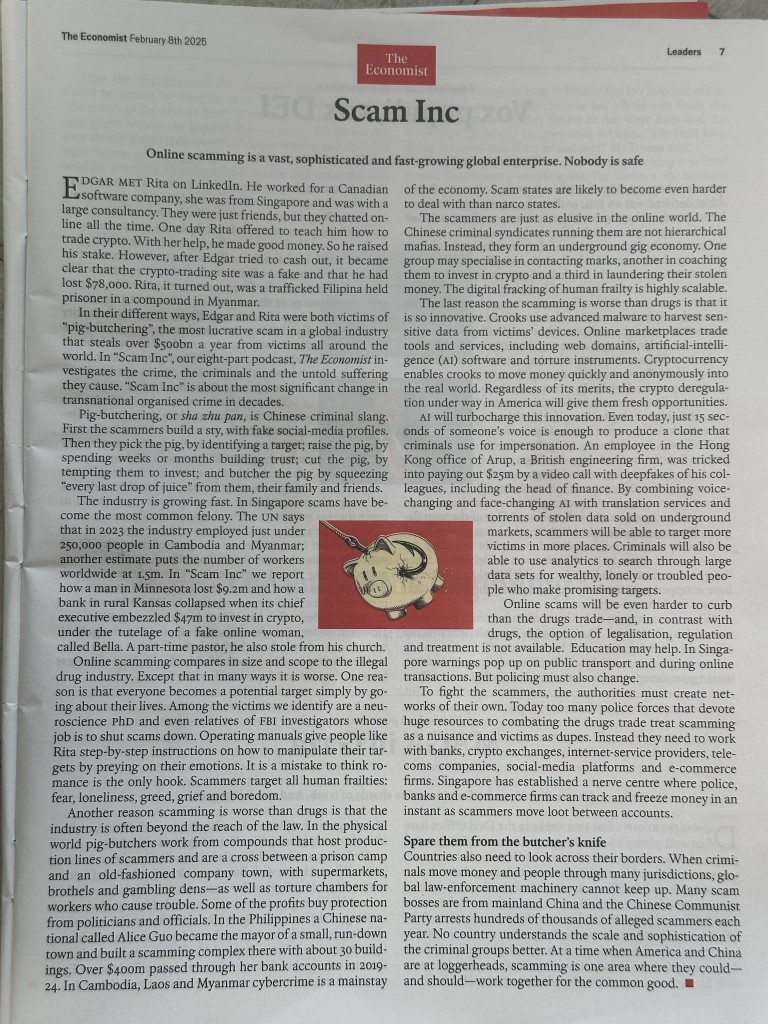
But we will look at how an image taken with your phone, or tablet, can be attached to a chatbot and get a summary of what it’s saying …
This (when sent to ChatGPT) with the one word message – “Summarise”, returned this …
Online scamming is a global industry – It is vast, sophisticated, and growing rapidly, with criminal networks operating across borders.
“Pig butchering” is a major scam method – Scammers build fake relationships with victims, emotionally manipulate them, and then convince them to invest in fraudulent schemes.
Scamming is more dangerous than the drug trade – It operates beyond the reach of law enforcement, lacks regulation, and is highly scalable.
Criminal compounds run large-scale scam operations – Many scams originate from compounds in Southeast Asia, where trafficked workers are forced into scamming.
Advanced technology enables fraud – AI-generated voices, deepfake videos, and cryptocurrency help scammers operate anonymously and make their schemes more convincing.
Scammers exploit human emotions – Victims fall prey to scams due to loneliness, fear, greed, and trust in online relationships.
The economic impact is massive – Billions of dollars are stolen annually, affecting individuals, businesses, and economies.
Law enforcement struggles to keep up – Scammers move money and people across jurisdictions faster than authorities can track them.
International cooperation is needed – Countries must collaborate, working with banks, tech companies, and social media platforms to combat online fraud.
Public awareness and education are crucial – Governments should implement stronger warnings and educational campaigns to prevent people from falling victim.
… but what is “pig butchering”, ask ChatGPT and you get this …
Pig butchering (shā zhū pán, 杀猪盘) is a sophisticated online scam that combines financial fraud with emotional manipulation. The term comes from the idea of “fattening up” a victim (the pig) before eventually “butchering” them for financial gain.
How It Works: 1. Initial Contact: Scammers approach victims through dating apps, social media, or even random text messages pretending to be a wrong number. They gradually build a friendly or romantic relationship. 2. Emotional Manipulation: Over weeks or months, scammers gain the victim’s trust, often pretending to be wealthy and successful. They encourage casual financial discussions, showing off their supposed investment profits. 3. Fake Investment Opportunity: Once trust is established, scammers introduce the victim to a “lucrative” investment, usually involving cryptocurrency or forex trading. They direct the victim to a fake but professional-looking website or app where they initially see small returns. 4. Encouraging Bigger Investments: As the victim gains confidence, they invest more money, sometimes even taking out loans or draining savings. The scammer keeps reinforcing the illusion of profits. 5. The Exit (Butchering Phase): Eventually, when the victim tries to withdraw funds, they encounter delays, extra fees, or are locked out entirely. The scammer then disappears, leaving the victim financially devastated. 6. Trafficking Connection: Many pig-butchering scams are operated from compounds in Southeast Asia, where trafficked workers are forced to run scams under threat of violence.
Why It’s Effective: • Long-term manipulation: Unlike quick scams, it relies on slowly building trust. • Emotional exploitation: Victims often feel emotionally invested, making them less skeptical. • Convincing fake platforms: Sophisticated websites mimic real investment sites, making the scam seem legitimate. • Cryptocurrency anonymity: Crypto transactions make it difficult to trace stolen money.
This type of fraud is one of the fastest-growing online crimes, with billions of dollars stolen worldwide each year.
That’s phenomenally powerful and time-saving!
So we’re going to look at installing some Chatbot apps, and doing some comparative enquiries, and end-up having some fun – I hope.
Le Chat helps me write this … “Provide a list of the most popular AI Chatbots, whether they’re open source and who they’re funded by?”
Here is a list of some of the most popular AI chatbots, their open-source status, and their funding sources:
ChatGPT: Developed by OpenAI, ChatGPT is one of the most widely used AI chatbots. It is not open-source and is funded by Microsoft and other investors.
Claude: Created by Anthropic, Claude is known for its conversational abilities and is considered one of the best overall AI chatbots. It is not open-source and has received significant funding from various investors.
Google Gemini: Formerly known as Bard, Gemini is Google’s AI chatbot integrated with Google services. It is not open-source and is funded by Google.
Microsoft Copilot: This AI chatbot is developed by Microsoft in collaboration with OpenAI. It is not open-source and is funded by Microsoft.
Llama 3 by Meta: An open-source AI chatbot released by Meta AI. It is designed to be freely available for anyone to use and build upon. It is funded by Meta.
Perplexity AI: Known for its ability to search the internet and provide relevant data, Perplexity AI is not open-source and is funded by various investors.
Jasper AI: This AI chatbot is tailored for content creation and marketing. It is not open-source and is funded by various investors.
Poe: Created by Quora, Poe allows users to access multiple AI models in one tool. It is not open-source and is funded by Quora.
Rasa: A popular open-source framework for building conversational AI assistants. It is funded by various investors and is widely used in the developer community.
DeepPavlov: An open-source conversational AI framework designed for developing production-ready chatbots. It is funded by various research grants and investments.
These AI chatbots represent a mix of open-source and proprietary solutions, each with its own strengths and funding sources.
Of these I do like Claude, Perplexity and Le Chat in particular, but Le Chat wasn’t in this list, why? I followed up my initial query with – “Why isn’t Le Chat in this list?”
Le Chat is an AI chatbot developed by Mistral AI, a French startup. It is designed to be a fast and efficient conversational assistant, capable of processing up to 1,000 words per second, making it one of the fastest AI models available. Le Chat is available as a native app for iOS and offers a range of features, including image analysis, content generation, and real-time internet searches. It is positioned as a European alternative to other AI chatbots like ChatGPT and Google Gemini.
Mistral AI has attracted significant investment from various sources, including American tech giants like Nvidia and IBM, as well as funding from the French government and other European investors. The company has also received support from France’s defense ministry and other European entities, highlighting its strategic importance in the region’s AI landscape.
Le Chat is part of Europe’s broader push for AI independence and is seen as a key player in the continent’s efforts to compete with major AI developers in the US and China. The chatbot is designed to offer strong privacy protections and aligns with European values regarding data security.
That’s why I like Le Chat – an element of independence from the US, but I suspect there will be a UK killer-chatbot in the wings!!!
I thought I’d do a comparative query across the different AI Chatbots I use – but in their web format so that I could do screenshots for this post [the responses would be the same on the phone/tablet – just easier for doing screenshots]. The query was fed to me by my daughter, and I followed the responses with some supplementaries (which I’m not including), but you’ll get the idea …
The enquiry … “In the UK, what I should plant in a western-facing partly shady coastal front garden with clayish soil?”
So to see how Gemini (in a browser looks), go to https/gemini.google.com register (or use your Google account) and type in the enquiry. From the Gemini app it looks something like this …
In the UK, what I should plant in a western-facing partly shady coastal front garden with clayish soil? 🤗

It's great you're planning your coastal garden! Coastal gardens in the UK present some unique challenges, but also opportunities. Here's a breakdown of considerations and plant suggestions, taking into account your western-facing, partly shady, clayish soil conditions:
Key Challenges:
 * Coastal Conditions:
   * Salt spray: Plants need to tolerate salty air.
   * Strong winds: Choose robust, wind-resistant plants.
   * Potential for sandy, but in your case clayish soil.
 * Western-Facing, Partly Shady:
   * Western exposure means afternoon sun, which can be intense.
   * "Partly shady" requires plants that can handle some shade but also appreciate some sun.
 * Clayish Soil:
   * Clay soil can be waterlogged in winter and dry and cracked in summer.
   * It's essential to select plants that tolerate these conditions or amend the soil.
Plant Recommendations:
Here's a selection of plants that generally thrive in these conditions:
 * Shrubs:
   * Escallonia: Very tolerant of coastal conditions and wind.
   * Photinia: Provides vibrant foliage and tolerates clay soil.
   * Hebe: Many varieties are well-suited to coastal gardens.
   * Lonicera nitida (shrubby honeysuckle): Good for hedging, tolerant of various conditions.
 * Perennials:
   * Hostas: Thrive in partial shade and tolerate clay.
   * Ferns: Many ferns enjoy shady, moist conditions (clay can hold moisture).
   * Pulmonaria (lungwort): Tolerates shade and clay soil.
   * Geraniums (hardy): Many varieties are adaptable to various conditions.
   * Sea thrift (Armeria maritima): Excellent for coastal areas.
 * Grasses:
   * Carex varieties: Many sedges tolerate clay soil and partial shade.
   * Festuca glauca (blue fescue): Can add textural interest.
Tips for Clay Soil:
 * Improve drainage: Incorporate organic matter like compost or well-rotted manure to improve soil structure.
 * Mulching: Apply a mulch to help retain moisture in summer and protect roots in winter.
 * Raised beds: Consider raised beds if drainage is a significant issue.
Where to Get More Information:
 * Royal Horticultural Society (RHS): The RHS website (rhs.org.uk) is an excellent resource for plant information and gardening advice.
 * Local Garden Centres: Local garden centres can provide tailored advice for your specific area.
When choosing plants, always check their specific requirements and consider your garden's microclimate.
In the UK, what I should plant in a western-facing partly shady coastal front garden with clayish soil? 🤗

Ah, a coastal garden in Wales with clayish soil—sounds like a wonderful challenge! For a western-facing garden with partial shade and a seaside breeze, you'll want plants that can handle salt spray, thrive in heavy soil, and enjoy a mix of sun and shade.

Here are some suggestions:

### Perennials and Shrubs:
1. **Eryngium (Sea Holly)** - Perfect for coastal gardens with its striking, spiky flowers and tolerance for salty air.
2. **Hydrangea macrophylla** - Thrives in clay soil and gives fabulous blooms, especially in partial shade.
3. **Hebe** - Compact, hardy, and salt-tolerant, making it ideal for coastal fronts.
4. **Skimmia japonica** - Great for partial shade, and its colorful berries add winter interest.
5. **Rosa rugosa (Beach Rose)** - Tolerates tough coastal conditions and produces lovely fragrant flowers.

### Grasses:
1. **Carex (Sedges)** - Many varieties thrive in clay soil and are low-maintenance.
2. **Festuca glauca (Blue Fescue)** - Adds texture and color, and it’s very hardy.
3. **Miscanthus sinensis** - Works well in heavier soils and creates a striking backdrop.

### Flowering Plants:
1. **Alchemilla mollis (Lady's Mantle)** - Thrives in partial shade and tolerates clay, with charming frothy flowers.
2. **Astrantia** - Adds a touch of elegance with its intricate blooms and loves partial shade.
3. **Primula vulgaris (Primrose)** - Ideal for dappled shade, and they bring an early splash of color.

### Ground Covers:
1. **Ajuga reptans (Bugleweed)** - Tolerates clay and partial shade while offering glossy foliage and purple flowers.
2. **Vinca minor (Lesser Periwinkle)** - A hardy ground cover that thrives in shady spots.

It’s also worth working organic matter like well-rotted compost into the clay soil to improve drainage and structure over time. Coastal gardens can be unique, so experimenting with a mix of hardy and native plants might lead to delightful surprises. 😊

What do you think about these options? Let me know if you'd like specific care tips or alternatives!
I hope that’s of interest; I encourage you to do your own comparative enquiries, bearing in mind that they don’t all have access to up-to-date information.
The world is changing rapidly, and my son has already demonstrated that he can build the code for the front-end of a website using a chatbot which he incorporated into his DuckDuckGo browser …
Screenshot
… with the following instructions …
“I asked my new AI app writing tool to build me a private social networking tool inspired by Google+ features.
Just done the front end design, but I can add a database and I can get it to setup federation with Google login.
It’s mobile responsive as well.”
… now that’s truly amazing, but I digress.
Creating a sitcom
First prompt.
Can you come up with some sitcom names that would cover two elderly people, one who loves technology and loves setting up systems, and the other who has no idea?
then i got names … i responded -> I like wired and retired.
Second prompt
Can you write the premise of the show. The grandad gets very frustrated cause he sets up all these amazing systems and is energised by tech but his wife (grandma) is airy fairy and likes more human pursuits and poetry and gardening and is shocking at planning and execution. Both are lovely.
This was the response.
Show Title: Wired and Retired
Premise: In the quiet suburbs, a lively retired couple navigates the collision of their wildly different passions. Frank, a tech-obsessed granddad, thrives on systems, automation, and the latest gadgets. His garage is a command center, his home a hub of interconnected brilliance—at least in his mind. Meanwhile, Betty, his whimsical wife, prefers the analog world. She spends her days writing poetry, tending to her unruly garden, and losing herself in daydreams.
Their love is undeniable, but their worlds often clash in hilarious ways. Frank’s perfectly calibrated smart irrigation system gets overrun by Betty’s impulsive planting sprees. His meticulous meal-planning app gets sidelined when Betty decides dinner should be a spontaneous pic… Read more
then he just kept asking questions
until he got to …
Updated Premise: Retired life for Frank and Betty is far from quiet. Frank, a tech-obsessed granddad, keeps busy in his upstairs office, perfecting his gadgets, cheering for West Ham, and sneaking out for his favorite snack, ‘Nice and Spicy’ Nik Naks. Betty, his free-spirited wife, thrives on poetry, gardening, and unplanned adventures that constantly disrupt Frank’s meticulously planned systems.
Their quirky family dynamic adds another layer of hilarity. Their 40-something son, who lives nearby, frequently steps in as mediator and problem solver, though his visible hair loss suggests he’s barely holding it together. Their older son, who lives in Australia, adds to the chaos during his visits, gleefully stirring up trouble and playing both parents off each other.
Balancing out the chaos is their serious older daughter, a psychologist, who watches the family dynamics with professional concern. She often finds herself frustrated with her brothers’ antics and their impact on her parents, though her attempts to intervene usually go unnoticed.
Adding warmth to the mix is their youngest daughter, who lives close by with her young family. Betty adores spending time with her grandchildren, but her tendency to lose track of time often leaves Frank exasperated when she abandons his carefully laid plans for yet another spontaneous outing.
Through all the love, laughter, and occasional family drama, Frank and Betty prove that life is always better with a little humor—and a lot of heart.
Supporting Characters: • Millie: The tech-savvy granddaughter who enjoys Frank’s high-tech world but often teams up with Betty during family adventures. • George: Frank’s West Ham-loving best mate and snack-run partner, who adds to the laughs. • Dorothy: Betty’s poetic and gardening partner, who fuels her creative chaos. • Alan: The middle son, a local, stressed-out mediator whose receding hairline marks his thankless efforts to keep the peace. • David: The mischievous older son from Australia, who stirs up trouble whenever he visits. • Clara: The serious older daughter, a psychologist, who’s always concerned about the family’s dynamics, especially her brothers’ antics. • Lucy: The youngest daughter, whose young family brings joy and chaos into Betty’s life, often making her forget time (and Frank’s plans).
Tone: A heartwarming sitcom full of humor and relatable family moments, Wired and Retired celebrates the beauty of intergenerational dynamics, proving that even in retirement, life is a delightful blend of love, laughter, and just enough chaos to keep things interesting.
… and then we got Episodes of the sitcom …
Episode Titles: 1. “Password Protected” Frank’s new smart home security system locks Betty out after she forgets the password during a gardening spree. Alan is called in to mediate, only for the system to malfunction spectacularly during a surprise visit from David. 2. “Nik Nak Sneak Attack” Frank’s secret snack stash is discovered by Betty, who replaces his ‘Nice and Spivey’ Nik Naks with healthy alternatives. Desperate to retrieve his beloved snack, Frank ropes Millie into a covert snack run that goes hilariously wrong. 3. “The Poetry of Football” Frank prepares for a big West Ham match, but Betty accidentally double-books the living room for her poetry club meeting. Clara arrives to mediate, but her psychological insights only make matters worse. 4. “Down the Rabbit Hole” Betty gets caught up babysitting Lucy’s kids and loses track of time, leaving Frank stranded at a gadget expo. When Lucy apologizes, Frank realizes he enjoys the quiet chaos of his grandkids—until they discover his gadgets. 5. “Springsteen & Shenanigans” David’s visit from Australia throws the household into disarray as he tries to convince Frank to join a local Springsteen tribute band while secretly encouraging Betty to paint her garden shed bright pink. Alan is left to clean up the mess. 6. “Psychologist vs. Chaos” Clara decides to hold a family therapy session to address everyone’s dynamics. But when old grudges resurface and Frank’s gadgets interrupt the session, Clara questions if anyone can truly retire from family drama.
and a 30-Minute Episode Outline:
Episode: “Password Protected”
Cold Open (2-3 minutes) Betty struggles with Frank’s new voice-activated front door lock after forgetting the password. She tries random phrases (“Bruce Springsteen rules!”) but is locked out. Frank smugly explains the system’s brilliance—until it locks him out too.
Setup (5-6 minutes) Frank works on fixing the system while Betty heads to the garden, only to accidentally trigger the motion sensors. Chaos ensues as Frank’s phone floods with alerts. Alan shows up after receiving a frantic call from Betty.
Rising Action (6-8 minutes) Alan tries to mediate, but the system glitches and locks everyone—including Millie, who came to help—inside the house. Betty starts reciting poetry to keep calm, which Frank finds infuriating. Meanwhile, David calls from Australia, adding comic commentary.
Climax (7-8 minutes) Alan manages to bypass the system just as Betty’s gardening friends arrive for tea, unwittingly triggering the alarms again. Frank declares the system a failure and blames Betty, who points out she only wanted a simple lock and key.
Resolution (3-4 minutes) Frank reluctantly agrees to simplify the system but secretly tinkers with it that evening. Betty catches him sneaking a Nik Nak, teasing him that even his snacks need a password.
Tag Scene (1 minute) The system malfunctions during the night, locking the entire family in the bedroom. Betty smirks, “At least we’re safe from burglars.” Frank sighs, “Or freedom.”
Each episode mixes laugh-out-loud situations with heartfelt moments, showing that even retirement is full of surprises!
Now it’s your turn!!!! This was all generated using ChatGPT, but the other AI chatbots could probably do the same.
Are there any subscription services that we use which we really rate – eg Amazon Prime, or blogs (Medium, Substack), news, music, film and software eg apps, OpenSource etc. we use; and have people given up subscriptions to print media?
Iain writes …
“One topic which you may discuss is digital subscriptions. I think that it’s interesting to compare the cost of digital and non-digital. I have a family Apple One subscription which costs about £40 a month and feels very expensive. However my wife and I like to enjoy reading real newspapers with a cup of real coffee in the morning. The South Wales Echo subscription is £50 per month and The Guardian is £70. This makes Apple look good value (for once !)”
I advocate subscription services, as an alternative to advert-funded services, or services where you can avoid adverts by paying a subscription eg itvX (but not YouTube as I use Magic Lasso to get round there adverts)
I pay for services that provide value and essential added services eg Apple One with Family sharing and iCloud+ (but not Apple News+ at the moment), NordVPN, WonderWatt (to control Battery Charging using Octopus Agile)
I pay for services that provide extra facilities, eg Pocket, Feedly, Google Drive, Amazon Prime Video (but annoyed that you now have to pay more to get adverts removed)
I pay for open-source services that I rely on eg Signal
I pay for services where there is no other option eg Adobe Photography Plan, Vimeo, Ancestry, NowTV (for access to Sky Sports as well), IFTTT
Useful devices, presents – things we’ve got, or would like to have
Apple AirPods Pro Gen 2 as hearing- aids
How long should we expect our “devices” to last? Is there a best before date, or do not use after date?
Do you have to take the latest update – even when your device could take the upgrade?
Presentation meeting in March – How much Privacy do you need/want? Invite others from u3a??
What subscription services do you use and do you value them (Iain)? It could be services (eg Amazon Prime), blogs (Medium, Substack), news, music, film and software eg apps, OpenSource etc. And have people given up subscriptions to print media etc
Ideas for future meetings (Stella)
Since it’s the season for gifts, we could ask members to recommend any devices or gadgets they have purchased this year.
I believe we have several keen photographers in the group, and members might be interested in learning about the latest digital cameras and how much they have evolved since the Kodak era.
We could also discuss the features that members find helpful or frustrating on their devices.
We might consider a talk on the latest technology in musical instruments. Phil is an expert on this topic and may enjoy sharing his knowledge with us. It could be a fun session!
Restrictions on use, legal impositions and “Best Before or Not After” for software/hardware
Digital terminology
Invite to join the Steering Group (Stella)
My bits and pieces
DM – Apple Pie
Apple’s anti-trust case with UK government over its Mobile platforms (iOS and iPadOS)
Bear in mind that a parallel enquiry has been launched into Google.
I think that this is what the Americans call an “anti-trust” investigation. It’s not uncommon in the tech world (eg the break-up of AT&T into regional companies) and in the economy generally e.g. railway and oil companies when they became dominant.
Economists tend to think that monopoly is bad by definition but I think that there’s an argument to be made that Microsoft, for example, has stimulated economic growth by creating a worldwide standard for personal computing and allowed companies to avoid unnecessary costs in transferring data between incompatible architectures.
Me
I agree. Whilst often saying derogatory things about Amazon and Google, I would defend the way they do business. They are not clandestine in their approach. Amazon make very little out of their online retail, but massive profits out of AWS (Amazon Web Services) and Google don’t attempt to hide that they are an advertising and marketing company (unlike Meta) and provide some very good tools (some chargeable) which you can construct your own privacy around – should you wish to.
I’d further add, just how do these anti-competitive folk think that innovation is funded, and isn’t it justifiable to protect some of your intellectual property rights?
The argument only holds true in relation to preventing new entrants to a market. I would argue that any person seeking to challenge Apple/Google (Android) would be wise to look at what happened to Nokia and Microsoft phones and seriously consider whether they can really compete.
Taking it one stage further. Even with the zillions of dollars that Google is prepared to hand out to make Google search the preferred search engine on Apple’s Safari browser, can one really say the general public is that interested – they just want to “Google it” – a masterstroke in marketing.
What is actually uncompetitive in this case is the reasoning for the “slush money” being given to Apple – it’s to stop them developing their own search engine!
Jonathan
I asked Google Gemini ” are apple and google anti competitive and, if so, is that a bad thing”. Here is the reply
Whether Apple and Google are anti-competitive is a complex question with no simple answer. There are arguments to be made on both sides.
Arguments for anti-competitiveness:
App Store dominance: Both Apple and Google operate dominant app stores on their respective mobile operating systems.
They have significant control over which apps are available to users and the terms under which they can be offered. Critics argue that this allows them to stifle competition and favor their own apps and services.
Default search engine agreements: Google pays Apple billions of dollars to be the default search engine on Safari. This gives Google a significant advantage in search, as many users stick with the default option. Critics argue that this harms competition and consumer choice.
Bundling of services: Both companies bundle their own apps and services with their operating systems, giving them a leg up over competitors. For example, Apple pre-installs its own browser, email app, and music service on iPhones.
Data collection and usage: Both companies collect vast amounts of user data, which they can use to their advantage in various markets. Critics argue that this gives them an unfair competitive advantage.
Arguments against anti-competitiveness:
Innovation and consumer benefit: Both companies have driven significant innovation in their respective markets, benefiting consumers with new and improved products and services.
Competition exists: Despite their dominance, both companies face competition in various areas. For example, there are alternative app stores and search engines available.
Focus on user experience: Both companies argue that their practices are aimed at providing the best possible user experience, even if that means limiting choices in some areas.
Is it a bad thing?
Whether anti-competitive behavior is a bad thing is also a complex question. Some argue that it stifles innovation and harms consumers by limiting choice and driving up prices. Others argue that it can lead to greater efficiency and innovation, ultimately benefiting consumers.
Ultimately, the question of whether Apple and Google are anti-competitive and whether that is a bad thing is a matter of debate. It is important to consider all sides of the issue and weigh the potential benefits and harms before drawing any conclusions.
A BBC response if ever I heard one.
Time machine
Restarting your MacBook
Update of devices for security issue
Invites app for iCloud+ users
Transcribing audio to text in Notes app
Switching-off Apple Intelligence
Using external drives on your Mac
DM – Hardware and Software
How to send large files
How to share files between Mac and Windows
Copilot invading Word docs
Extracting images from PDF files
Battery swelling
Recovering a deleted file
DM – Easy PC
Increase in subscription costs for Office 365
DM – Artificial Intelligence
The arrival of DeepSeek (from Iain)
“Author unknown.
Nevertheless, an interesting read.
Deep seek is on the news every where, for people like me who are not so well informed , I thought this message which I received from a friend, is very very useful. I am sharing it below for those who are interested :
Finally had a chance to dig into DeepSeek’s …
Let me break down why DeepSeek’s AI innovations are blowing people’s minds (and possibly threatening Nvidia’s $2T market cap) in simple terms…
First, some context: Right now, training top AI models is INSANELY expensive. OpenAI, Anthropic, etc. spend $100M+ just on compute. They need massive data centers with thousands of $40K GPUs. It’s like needing a whole power plant to run a factory.
DeepSeek just showed up and said “LOL what if we did this for $5M instead?” And they didn’t just talk – they actually DID it. Their models match or beat GPT-4 and Claude on many tasks. The AI world is (as my teenagers say) shook.
How? They rethought everything from the ground up. Traditional AI is like writing every number with 32 decimal places. DeepSeek was like “what if we just used 8? It’s still accurate enough!” Boom – 75% less memory needed.
Then there’s their “multi-token” system. Normal AI reads like a first-grader: “The… cat… sat…” DeepSeek reads in whole phrases at once. 2x faster, 90% as accurate. When you’re processing billions of words, this MATTERS.
But here’s the really clever bit: They built an “expert system.” Instead of one massive AI trying to know everything (like having one person be a doctor, lawyer, AND engineer), they have specialized experts that only wake up when needed.
Traditional models? All 1.8 trillion parameters active ALL THE TIME. DeepSeek? 671B total but only 37B active at once. It’s like having a huge team but only calling in the experts you actually need for each task.
The results are mind-blowing:
– Training cost: $100M → $5M
– GPUs needed: 100,000 → 2,000
– API costs: 95% cheaper
– Can run on gaming GPUs instead of data center hardware
“But wait,” you might say, “there must be a catch!” That’s the wild part – it’s all open source. Anyone can check their work. The code is public. The technical papers explain everything. It’s not magic, just incredibly clever engineering.
Why does this matter? Because it breaks the model of “only huge tech companies can play in AI.” You don’t need a billion-dollar data center anymore. A few good GPUs might do it.
For Nvidia, this is scary. Their entire business model is built on selling super expensive GPUs with 90% margins. If everyone can suddenly do AI with regular gaming GPUs… well, you see the problem.
And here’s the kicker: DeepSeek did this with a team of <200 people. Meanwhile, Meta has teams where the compensation alone exceeds DeepSeek’s entire training budget… and their models aren’t as good.
This is a classic disruption story: Incumbents optimize existing processes, while disruptors rethink the fundamental approach. DeepSeek asked “what if we just did this smarter instead of throwing more hardware at it?”
The implications are huge:
– AI development becomes more accessible
– Competition increases dramatically
– The “moats” of big tech companies look more like puddles
– Hardware requirements (and costs) plummet
Of course, giants like OpenAI and Anthropic won’t stand still. They’re probably already implementing these innovations. But the efficiency genie is out of the bottle – there’s no going back to the “just throw more GPUs at it” approach.
Final thought: This feels like one of those moments we’ll look back on as an inflection point. Like when PCs made mainframes less relevant, or when cloud computing changed everything.
AI is about to become a lot more accessible, and a lot less expensive. The question isn’t if this will disrupt the current players, but how fast? One of the reason of market fall across the globe”
AI to help in breast cancer diagnosis
Daisy – the granny AI spambot
Mistral ‘Le Chat’ French AI chatbot
ChatGPT as a summariser
Pete’s summary from Chat GPT …
1. Online scamming is a global industry – It is vast, sophisticated, and growing rapidly, with criminal networks operating across borders.
2. “Pig butchering” is a major scam method – Scammers build fake relationships with victims, emotionally manipulate them, and then convince them to invest in fraudulent schemes.
3. Scamming is more dangerous than the drug trade – It operates beyond the reach of law enforcement, lacks regulation, and is highly scalable.
4. Criminal compounds run large-scale scam operations – Many scams originate from compounds in Southeast Asia, where trafficked workers are forced into scamming.
5. Advanced technology enables fraud – AI-generated voices, deepfake videos, and cryptocurrency help scammers operate anonymously and make their schemes more convincing.
6. Scammers exploit human emotions – Victims fall prey to scams due to loneliness, fear, greed, and trust in online relationships.
7. The economic impact is massive – Billions of dollars are stolen annually, affecting individuals, businesses, and economies.
8. Law enforcement struggles to keep up – Scammers move money and people across jurisdictions faster than authorities can track them.
9. International cooperation is needed – Countries must collaborate, working with banks, tech companies, and social media platforms to combat online fraud.
10. Public awareness and education are crucial – Governments should implement stronger warnings and educational campaigns to prevent people from falling victim.
… followed up with …
Pig butchering (shā zhū pán, 杀猪盘) is a sophisticated online scam that combines financial fraud with emotional manipulation. The term comes from the idea of “fattening up” a victim (the pig) before eventually “butchering” them for financial gain.
How It Works:
1. Initial Contact: Scammers approach victims through dating apps, social media, or even random text messages pretending to be a wrong number. They gradually build a friendly or romantic relationship.
2. Emotional Manipulation: Over weeks or months, scammers gain the victim’s trust, often pretending to be wealthy and successful. They encourage casual financial discussions, showing off their supposed investment profits.
3. Fake Investment Opportunity: Once trust is established, scammers introduce the victim to a “lucrative” investment, usually involving cryptocurrency or forex trading. They direct the victim to a fake but professional-looking website or app where they initially see small returns.
4. Encouraging Bigger Investments: As the victim gains confidence, they invest more money, sometimes even taking out loans or draining savings. The scammer keeps reinforcing the illusion of profits.
5. The Exit (Butchering Phase): Eventually, when the victim tries to withdraw funds, they encounter delays, extra fees, or are locked out entirely. The scammer then disappears, leaving the victim financially devastated.
6. Trafficking Connection: Many pig-butchering scams are operated from compounds in Southeast Asia, where trafficked workers are forced to run scams under threat of violence.
Why It’s Effective:
• Long-term manipulation: Unlike quick scams, it relies on slowly building trust.
• Emotional exploitation: Victims often feel emotionally invested, making them less skeptical.
• Convincing fake platforms: Sophisticated websites mimic real investment sites, making the scam seem legitimate.
• Cryptocurrency anonymity: Crypto transactions make it difficult to trace stolen money.
This type of fraud is one of the fastest-growing online crimes, with billions of dollars stolen worldwide each year.
DM – News and Updates
Screen time doesn’t necessarily cause “brain rot”
UK government demands access to Apple’s end-to-end encrypted messages on iCloud
“I’m keeping my powder dry on this one. I’m not totally sure what my position is. On one side I’m a strong advocate for privacy, and therefore support for Apple’s stance. On the other, I feel the large techno. companies don’t do enough to control the nefarious use of theIr platforms. Apple by not having their own search engine, nor social network, nor indeed their totally owned operating system (being based on Unix) can quite justifiable hold their hands up in horror and say – “it’s not me guv” – but they do provide a platform in iCloud which is a safe haven for the material of “bad people”.
There must be a solution that satisfies both the individuals right to privacy, the states right to protect the greater good, and the corporations right to sell products that the individual wants/requires.
I don’t use the encrypted offering on iCloud+. Why do/should I need it? In many ways it gets in the way of usability.
Instead of blanket bans/prohibitions, why not a more nuanced approach, where the user is required to apply for the use of such a service on the basis of recognising (with their agreement on a case-by-case basis) that they agree to give-up total privacy upon lawful request.
This would prevent the possibility of fishing like intrusions, trawling through private encrypted data in the hope of finding something. As we all know, preventing one thing – in this case on iCloud would just shift the data somewhere else, and who would suffer? The honest user of course who had a valid reason for encryption.”
DM – Scams, privacy and security
“I’ve just come off the u3a Trust Zoom call on “Staying Safe Online”. Any one else watch it apart from Ian???
Some points I made notes of.
1) Seriously distrust QR Codes – the scams are much more than just parking meters, and can be quite sophisticated [I forget the example quoted]
2) I must buy a RFID Screening device for my “man bag”, and others should check whether their wallet/purse/handbag has one supplied in the bag. I was quite shocked at my ignorance on this one and how open I might be to scamming from a passing stranger.
3) Added to this, get a Faraday cage like device to put my passport in – much more sensitive info on that than I’d been aware of.
4) I like to think I wouldn’t fall for an ATM skimmer – a device on the front of an ATM cash dispenser, but I’ll be much more vigilant when using any device I don’t know.
5) The speaker, and now I, stress just how important it is to keep your email password secure. I’m going to reviewing mine again as a result, and just because one hasn’t been pwned doesn’t mean I shouldn’t change it. I’m using the Apple iCloud Keychain these days which generates passwords for me and holds them securely “in the cloud” in the same way as a password manager does. An incentive for me to double-check.
6) The risk of leaving your Facebook profile unprotected was highlighted. So, even though I don’t use Facebook/Instagram – I should either delete my account -not a bad idea, or go through the security/privacy settings with a fine-tooth comb. Same applies to Google. [This could be worth a blog post probably, when I’ve researched what the most appropriate settings should be.]
12:03
7) Lastly, and one I’ve never thought of doing, but now I will most certainly – switch off WiFi when I’m away from a known and safe network. These would be ones where you have to provide authentication to access the network, or behind your home router. It’s just too convenient to not switch-off WiFi, but as I reported last week … you don’t need a VPN when using your cell network – it’s secure; the cost of using mobile data is coming down – use that allowance and only connect to WiFi when you have to authenticate to an encrypted service.”
Ian …
“Overarching message:
Human beings are the point of weakness!
Action points-
1. Turn off WiFi on phone when leaving home. Unencrypted free WiFi that the phone will automatically connect to makes you vulnerable (even in hospital waiting areas).
4G/ 5G mobile data is encrypted, thus safe.
2. Your email password is your greatest vulnerability.
Emails are most frequently used as usernames on websites.
Once an email password is hacked they gain access to your entire contact list and work through using the ‘forgotten password’ facility to reset passwords and gain access.
Secure email accounts with very strong passwords (combination of at least three words + capitals, numbers and characters).
3. PW managers- a couple of things to consider. (a) may only work on one device, not multi-platform (b) protect master password.
4. Email scams-
Checking senders’ email address on desktop/ laptop is easy (hover).
Not so on phone (requires double tap to reveal; be careful).
5. QR codes can be intercepted + they are capable of altering settings on phones.
Be very cautious (esp with cafe menus and the like).
6. Websites
Links to actual websites may not appear at the top of Google searches.
Third parties often pay Google to get their website (intermediaries) to the top of the list. Looks like the real thing unless you read the fine print. Using them results in extra, unnecessary charges.
7. Never let your credit card leave your hand. Be very suspicious of card machines that “don’t work” or require a second swipe (skimmer’s ploy).
8. As David mentioned use RFID blocking cards in your wallet, use RFID blocking pouches to protect your passports (all your personal and government-held data is in your passport chip), and use Faraday cages to protect your keyless entry car keys.
And so we turn to passwords and online security. I’ve dealt with this at some length previously in a post entitled “Keeping safe online” which I last updated in May 2023, and although much of it is still relevant and most, if not all, of the links are still working, I thought to write something from scratch, rather than do another edit/revision.
I’m going to skip to the content at the end of the article referred to above and pick-up the theme of Passwords, Passkeys and Two-Factor Authentication (TFA).
First-of-all – you want a fright? Try typing your favourite password(s) – you do have more than one, don’t you? – into this website.
Secondly, check to see just how vulnerable your email address might be, using …
Screenshot
… go to haveibeenpwned? – and if you want to know what pwned means, and how to pronounce it, look here. If a service you use is in this list, you seriously should change your password!
Another approach is to use a tool that looks at your “digital footprint” to examine where you might be exposed. Such a tool is this one from Malwarebytes.
So that’s got your attention, right? You really need to deploy/use a Password Manager to hold your passwords – preferably one that is usable/consistent across all your devices. Two such products are 1Password and Dashlane. Both of which get very good reviews.
The alternative to using a Password Manager application is to use the password security offered by your browser. In Apple’s case this is iCloud Keychain – which stores the passwords – with its associated Passwords app; in Google’s case this is Google Password Manager. Both of these now offer support from one ecosystem to the other – so multi-platform users can choose one or the other. Microsoft also offer a Password Manager using the Edge browser, but its features are possibly not as well developed as those of Apple or Google, nor of dedicated password manager applications such as 1Password or Dashlane which score best with users who have a mixture of Microsoft, Apple and Google devices and applications.
And now we have Passkeys. When assessing whether you want to move to a Password Manager, you MUST check that the chosen one supports Passkeys as defined in the FIDO Alliance …
… and the key to its success and inter-operability is its integration with biometric signatures. So Passkeys are the platform for increased and improved internet security and should be welcomed with open arms – for Apple, for Google and for Microsoft.
If a Passkey can’t be employed on your favourite website, or even if they are, you may be asked to use 2FA (two-factor authentication). Using this means that when you’ve typed in your username and password you’ll be challenged to provide a code from a mobile phone, an authenticator app such as Google Authenticator, or go to another app (particularly if its a Google app), and do that extra second step (hence 2FA) to authenticate you are who you are.
We’re entering the passwordless world. It’s long overdue!
Finally, some other links to help you navigate the digital security world.
Best antivirus: Which? Best Buys and expert buying advice – a review for both PCs and Macs of anti-virus software – of course you could just be relying and using Windows Defender (for Windows) or nothing at all (if on a Mac), both of which are acceptable decisions, which then leads into …
So you’re an unhappy victim of a scam, apart from resolving the problem which was covered in the earlier post, what else should you do, and are there any other scams you should be aware of. Let’s look at the latter first.
Scams are not restricted to your computer, they can be “served” to you by phone or by text as well. [They can also be enacted face-to-face with vulnerable people.] The advice is constant and clear …
Don’t give your details to anyone you don’t know – if in doubt say you’ll ring them back
Don’t click on links in text messages (and emails of course) from people/organisations you can’t verify
Don’t immediately answer a call from an unknown number, or a number withheld, if it’s a genuine call the person at the other end will speak; if they don’t, the connection will be dropped.
Then there’s a UK website “Stop scams” – where you can report a scam by ringing the number 159. It works in exacgtly the same way as 101 (for the police) and 111 (for the NHS).
I would also suggest sharing details of the scam with Which? using their Scam Sharer Tool
By doing this – if you subscribe to their free newsletter – you will help others, and you, become aware of the scams that are current at that time. Here’s an example of what you’ll see delivered to your Inbox.
A couple of useful tools to check the veracity of a caller …
Who called me – a service that returns details of the likelihood, or otherwise, of the caller being a scammer …
It was indeed pleasing to be able to report that the member resolved the problem and it didn’t re-occur – as far as I know – but pop-up scams are a concern and this short post just gives some illustration of what the issue is, plus some advice on how to resolve the problem if you find your machine has been “taken over”.
I like this US video from the FTC (Federal Trade Commission) which explains the issue really well …
Perhaps the most common scam is the Tech Support Scam – which is what the Windows Defender one mentioned above was. The objective of the scammer is to get complete control of your computer by persuading the user they have a problem which can be resolved by you letting them “repair” the problem remotely – so please let them have your userid and password. Quite the opposite of course – the result will be either you’re locked out of your computer whilst the scammer harvests your personal details (bank accounts, etc), or they are going to implant malware so that they can record what you’re doing online, or use your computer as a relay (an intermediary) for other attacks on other services. Not a happy place to be then!
So read this article carefully. It describes in far greater depth and detail what these scams are and how you can remove pop-ups.
A more extensive article which explains how to reduce and remove malware from a Windows PC is provided here.
A single issue post to just alert folk to the murky world of credit reference agencies and their dual-role as data brokers – which I was (I’m ashamed to say) totally unaware of.
This came to my attention when I received an email from Experian – who I had an account with due to a data breach with my Pension provider which resulted in them giving members free 12-month access to their services – which advised that I had 19 “experienced” Soft Searches on my account with them. Now I’d not been seeking any credit recently, so this immediately sparked my interest and so I clicked on the link in the email (see above) and logged in to see what was happening. At which point I was greeted by this screen and the rather alarming sidebar, you can see here …
Screenshot
… just ponder this for a moment. I had always assumed that Experian was a credit reference agency which provided a service to organisations wishing to extend credit to consumers and businesses to give an assessment of credit worthiness. Indeed when I had an account with them, I could see my score, and you were able to challenge that if you didn’t think it looked right. But that’s all immaterial to what I was seeing on the screen. I was being asked to accept that it was perfectly OK for Experian to share personal information with their partners which included Facebook and Google. What!!!!!!!!!
This got me going, so I clicked on Settings …
Screenshot
Performance and analytics – OK, but the other two … no way! How could this be? I had to do some searching to find out that Experian (and a couple of other “credit reference agencies”) were also DATA BROKERS, and that they’d been hauled up about NOT declaring this part of their role in 2018. This appears to have been resolved now – because we are past the nine months they were given to clean-up their practices, but their other business purpose – sharing information with others would continue if you clicked on the Accept all button.
A real lesson learnt, with a secondary one being to engage brain before clicking on Accept all – the minimum requirement GDPR had imposed upon them and many others.
And what was the outcome of this. How had it come about, what is a “soft search”? The latter is explained on this page. How it had come about is more difficult to work out so this is just conjecture – our house insurance was about to come up for renewal and all 19 of the organisations who’d made an enquiry of our credit worthiness – or had been sent details of the upcoming renewal by Experian – were like these 9 …