I’ve been “playing around” with my email accounts. I’ve decided to use my Apple iCloud account more as it makes a lot of sense as I organise emails by moving messages from Inbox/Sent mail into Mailbox folders setup on my iCloud – shared between my Apple devices.
It’s not difficult to forward messages from my Gmail account, just go into Gmail on a desktop/laptop (you can’t do this from the Gmail app on your mobile device) select Settings (the Gear wheel) and then Select All Settings, and then Forwarding and POP/IMAP …
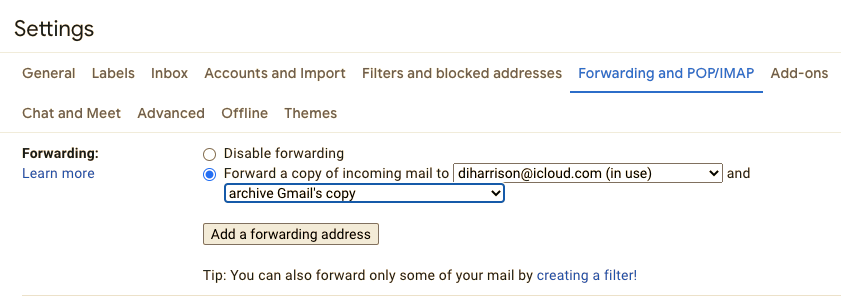
… you can then set up a rule such as the one above.
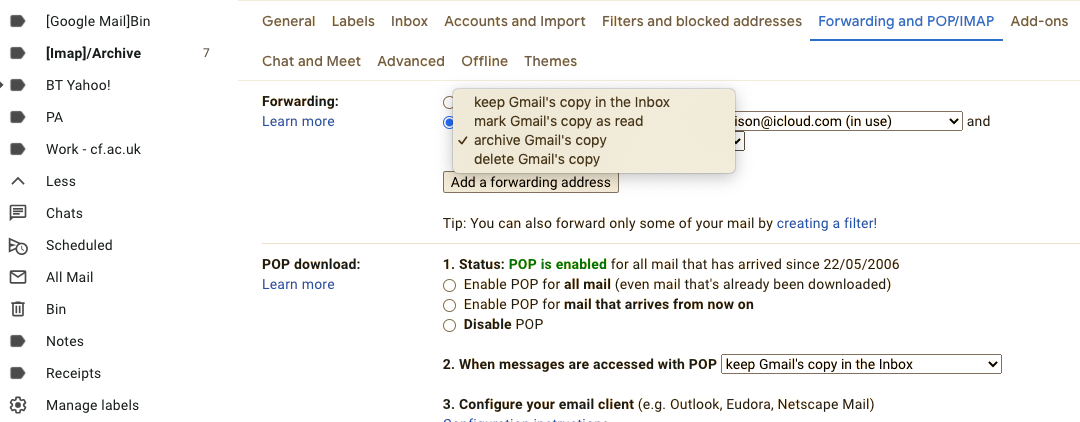
You have a number of options of what you can do with the copy in your Gmail Inbox – as you won’t now be reading it from that spot – and I’ve chosen to Archive the copy …
But where is the archive?
The answer is that you have to scroll down to More on the left-hand side of the screen and select All Mail – and that’s where all the mail you’ve ever received resides.
Simples!

.
