
Meeting 12th February 2026
Meeting 22nd January 2026
Meeting 12th January 2026
Meeting 11th December 2025
Meeting 27th November 2025
Meeting 13th November 2025
Next year with the Computer Group
I sent a long email to members after our last meeting of the session yesterday and thought it probably a good idea to post it on the website as well for reference, and for comment.
We’ve just finished our last meeting of the year – 17 of us met in our virtual state for a lively and very good natured (that means fun) session. Courtesy of Jim, I’m attaching a screenshot of those of us who took part.

We discussed next year, and how comfortable we felt about meeting in person again, and there was a general consensus that it was just too early to commit now to meeting as a group in September. That’s regretable, but completely understandable and a reasoning that I’m 100% in tune with. Until we can meet as a Group, in the same way as we used to meet, I won’t feel comfortable – especially in the small Meeting Room at URC.
There are other venues we could possibly meet in, and the Committee will be looking at possibilities for the re-start, and we will keep a “watching brief”, but as Phil Edwards said – the acid test will be when a crowd is possible at a Cardiff Blues match. Until then I think all of us have very understandable worries. Add the issue of Public Transport and mask-wearing and it really doesn’y make sense for us to take unnecessary risks when Zoom has been working so well for so many of us.
Over half the group has met at a meeting at some time since we started. The format of the meeting has been to go “round the screen” with attendees telling us what they’ve been up to, but more importantly the technology-related issues they’ve been facing. This has been very beneficial to all of us, so-much-so that I’ve rarely had to do much presentation. Being able to rely on the Group, or to “think on my feet” to provide solutions – it’s been great fun, and we’ve all learnt a lot I think. The Notes of the Zoom meetings have been written up and are on the Thought grazing website.
So … (and this is the point of this message) I wanted to let you all know that we’ve decided to continue with Zoom meetings for the time being. The first one of the new session being on Thursday 10th September at the usual time. They will then continue fortnightly (rather than 2nd and 4th Thursdays) like it used to be. I would like to encourage members who haven’t joined us on Zoom to consider giving it a go. If anyone would like me to help them setup Zoom ready for next session, please get in touch and we can arrange a one-to-one session to let you get some confidence on how it works. That’s how a few members in the attached screenshot joined Zoom and now they’re very active participants!!!
Zoom is always going to be a poor alternative to face-to-face meetings, but it has worked surprisingly well for those of us that have tried it out, and perhaps if you haven’t, then perhaps you might want consider giving it a go.
However, if you no longer want to receive these emails, and want to leave the Group, I would of course completely understand. Please let me know, or just leave the Group from the Beacon Members page. We would of course miss you and you could always rejoin once the “new normal” has been established! Your access to the Thought grazing website would in any case remain as long as you are a Cardiff U3A member.
Thanks for reading to the bottom of this long email.
Kindest regards. David.
Settings II (Google) – 9th May 2019
Boot-up
Any progress with websites??
Alternatives to Word on the Mac, but also see this choosing between Libre Office and Open Office, but also look at this article. I think the USP for me to adopt Libre Office is that it will read and write to .docx and .xlsx, not just read which is what Open Office does. The downside is that you can only download the complete office suite, not individual components which might be an inconvenience if you’ve only got limited hard disk space. Let’s do an install. And it installed using c.630Mb of disk storage. I’ve checked to see whether you can use Google docs, sheets and slides offline and you can! So that’s another alternative to using either Libre Office or Open Office and doesn’t require you to install a whole Office suite – just what you want to use as an app on your smartphone or tablet, or through using Google Chrome. Go here to find how to use an “offline” version of the Google apps with Google Drive.
John has offered to lead the session on 13th June.
Here’s another reminder about the format I’m suggesting for next year working with Digital Projects. What I’d like to do is have a Computer Group meeting on the fourth Thursday of the month (OK Christine?) and the Digital Projects on the second Thursday of the month. Generally the Computer Group will be much as it is at the moment catering for internet apps using a browser first and foremost, and then picking up iOS and Android issues as well as Windows and Mac items as well. The Digital Projects group will go into topics such as creating a website (which we’ve just done at a basic level), digital photography (re-visiting Lightroom for instance), digital audio and video editing, building a Linux computer, home media centres, integrating hifi with TV, etc etc. If anyone wants the Computer Group to continue fortnightly, then I need a volunteer to lead that session, I’d still attend if I can, and I will arrange the Digital Projects for another day/time.
Support for General Meeting 9th July, Chris Higley: Maps of Wales and Maps of War. Thanks for those who’ve offered to help; I’ll be sending a message round to those that weren’t present to sign-up, together with a guidance sheet that explains what’s involved.
Anything else, issues, problems.
News
Problems with Apple power adaptor plugs manufactured between 2003 and 2010.
| Affected | New |
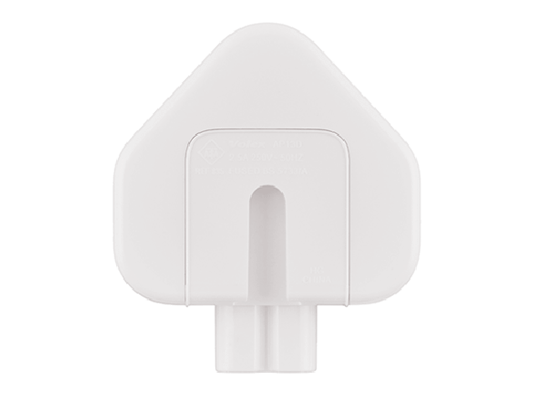 |
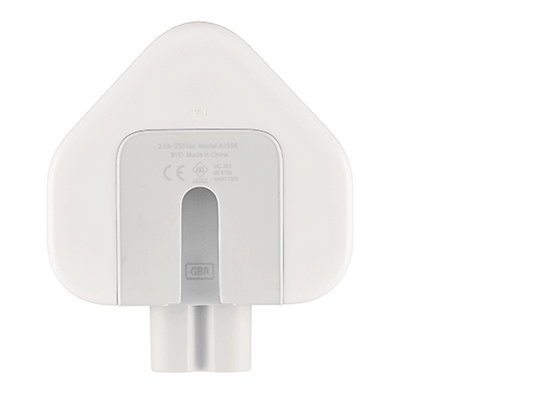 |
Anyone using (subscribed) to Apple Music? Anyone chosen the Family subscription? I need to check on saving a downloaded track to MP3 format.
How to uninstall programs on a Mac.
A guide on How to take photos with your iPhone.
Searching for a Copyright Free Image to use. What is Creative Commons?
Windows 7 support ends Jan 14th 2020 – what does this mean? What should you do? Your options – Cross-your fingers, Windows 8.1, Chromebook, Mac, Linux or Windows 10.
Experiences with Google Assistant? Paul has “volunteered” to look into this for next time.
You may be able to delete data held with Google automatically now.
Google and Windows 10 settings
Google Account settings (mainly referencing Android)
My Google Account – this is how you do it. I will look into using the native Gmail app with shared contacts.