
Boot-up
A couple of postings from Jim and me on Thought grazing, including Jim’s annoyance at having a Windows 10 upgrade foisted on him.
Google Photos and Google Drive
Jim posted on Thought grazing last month about the proposed changes to the way that Google Photos, Google Drive and Backup and Sync were going to work together. This is Google’s blogpost on the changes they are making and here is the help document explaining what will happen after July 10th, I suspect many of you will also have received this email …
| Simplifying how Google Photos & Google Drive work together | ||||||||
| You are getting this email because you sync items between Google Photos and Google Drive. | ||||||||
| Over the next few weeks, we are making some changes to help simplify how Google Photos and Google Drive work together. We are making these changes based on the feedback that we’ve heard that the connection between these services is hard to understand. | ||||||||
|
||||||||
| You can read our Help Centre article or learn more about these changes in our blog post. |
Add photos and videos from Google Drive to Google Photos
So … it’s really important to understand what Backup and Sync is doing, and this is determined from the Preferences screen.


Also from Backup and Sync you have links to your local Google Drive, your Google Drive on the web and Google Photos on the web …

… the interface is slightly different on Windows, but the first button will bring up something like this …

… the second button (from the web) will bring up something like this …

… and the third button (again from the web) will reveal something like this …

Now I wanted to test the Upload from Google Drive (which you should be able to do from the Upload button on the top-right of the screen), but it’s not yet operational – and it’s the 11th July! However, I see now that I can drag and drop images which is new, although the imported image is not easy to find unless you add it to an album at the time of import!
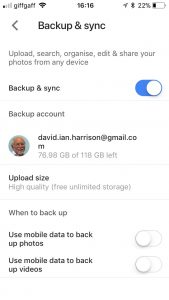
On my iPhone, the Google Photos app settings look like this …

… and then the Settings screen looks like this …

… with everything I’m uploading (Backup and Sync) NOT counting towards my storage limit as I’ve chosen the “High Quality” (15Mp) option. Then on my Google Drive app, the open screen looks like this …

… and if I open the Google Photos folder that I had at one time been syncing with Google Drive, it looks like this …

… with the warning that they are no longer connected. If I then look at Google Drive settings …

… the Photos setting being like this …

… and the Backup settings being like this …

… you can see the Backups are clearly defined. As it happens I don’t Backup from my iPhone as I sync everything to my Desktop and that’s where my Backups of Google Drive, Contacts, Calendar are done.
So I think the separation of automatic sync’ing between the two could be a distinct advantage. You just need to make sure you set up your Backup and Sync options, or preferences the way you want it to work for each of Google Drive and Google Photos.
PS: How to do screen shots from an iPhone – hold the Power button down and press the Home button and then release the Power button. The image will transfer to your Photos Library, and if you’ve got Google Photos linked to your Photos Library, it will appear there as well, and then be Sync’d up to your Google Photos on the web, from where you can Download them to your desktop to insert them in a document – like this one!
Anything else, issues, problems.
Next and last meeting: Sound
News
Google Maps may be getting public transport information.
New warning over automated phone call scams.
BT to offer Free Telephone Number to Report Nuisance Calls – 0800 150 150 – it’s a scam!!!
Reasons to Install a Password Manager
How to find out if your Facebook account has been hacked.
George Felton has passed away.
The Apps I can’t do without
Working smarter?
eMail – use a client and link it to the service; that way you can archive mail and contacts locally rather than leave it on a server which is useful if you change provider; you can also read your mail offline. I also recommend using Google (Gmail) – they have no restrictions on the number of accounts you have. Each one you open – you get 15Mb of cloud storage on Google Drive too.
Calendar – I’d be lost without my Google Calendar. Everything goes into it and it’s held in an account which my wife and I share. So everything that either of us puts in, appears in the others Calendar and we then use the Calendar client on our devices. I’m also beginning to use Reminders on my iPhone as I quite like the nagging it does on the lock screen, so that I don’t forget to do something!
Contacts – we do the same with Contacts; the same Google Account holds all our contacts. We don’t store number on our phones, we just sync them down to the client application on our devices.
Cloud storage
You name it, I’ve tried it and/or am using it. In practice my preferred method of working separates things I may wish to share – which I put on Google Drive, or Dropbox – and those things I want to access from more than one device – which I put on iCloud. I tried OneDrive, but it’s just too “windoesy”.
Browser?
I think I’ve tried them all and I change about a bit. Currently my preferred one is Safari because all my kit is Apple, but Brave is a really strong contender to replace Chrome (it’s the same “under the hood”). I’m now exclusively using DuckDuckGo as my search engine of choice on all but Chrome.
Text
I hate to admit it but I’ve got to like texting and also using WhatsApp – rumoured to be about to arrive on the iPad soon! The important thing about using communication tools is to use the most appropriate one in its correct context.
For example
- You require an answer to a question, or you want to make arrangements with someone – use eMail; it provides a better message trail and usually there is no urgency, so asynchronous communication is best.
- You want to let someone know what time you’re arriving – unless it’s urgent and you need to arrange a meeting in which case use a phone – use text.
- You want to discuss something but it’s not time critical – use WhatsApp.
- You want to discuss something and it is time critical – use the phone!
Note taking
I’ve mentioned it so many times before, it must be boring but Evernote is just great for recording almost everything and for saving/archiving almost anything.
Maps
I still prefer Google Maps, but Apple’s Maps are getting better and now that our cars have got Apple’s CarPlay, I may be tempted to move. [I can also use Google Maps through CarPlay, I believe.] I also have a subscription to OS Maps – as they’re the best [I’ve an annual subscription which allows me to print maps off as well].
Photography
I prefer Google Photos to Apple’s Photo app, because Google works better with Apple, than Apple works with Google. I also love the new Flickr and have taken out a Pro account to enable me to store more photos there.
Password Manager and Security
I truly don’t know how I could manage without LastPass. With so many online accounts it would be impossible to remember all the sign-on credentials, so it’s a life-saver! I’m also increasingly using two-factor authentication for a lot of sites, and Google’s Authenticator is a useful app that helps there as it means you don’t have to wait for a 6-digit number to be texted to you.
Newsreader
Apart from the subscription apps that I’ve got to read national newspapers, and the BBC app – which I’m not so impressed with these days – and Wales Online – which I dip into regularly; I use Feedly which aggregates new posts from all the websites I’m interested using a protocol called RSS (Really simple syndication) so that several times during the day I look to see what’s going on in the areas I’m interested in – Photography, Technology and West Ham!! It’s a great way of keeping in touch with things. I’m hoping to do more with this and linking them to my Flipboard magazines going forward.
The Weather
Ever since the Beeb ditched the Met Office I’ve preferred the Met Office app – you know where the data is coming from and it’s proved very accurate over the past couple of years, even when abroad as it links to the national meteorological services of counties around the world if it can!
Cardiff Bus and Cardiff Gov
Two apps that are invaluable – the latter also sends me reminders of what kind of bin collection I should expect.
And there’s of course many more, but I was trying to answer the question – “The apps I can’t do without”. What are yours?
 So how do I get my photos into Google Photos? From the iPhone/iPad (or any other smartphone that has the Google Photos app) it’s quite straightforward.