Notes from Zoom Meeting – 14th May 2020

Not much to report, but we had a good chat – eighteen members attended (according to Jim) – thanks for the photo.

I encouraged members to take a look at the Flipboard magazine where I’m trying harder than I had been to curate articles that I think might be of interest to you all. There’s a link on the Blog (Home) page of this website, but here’s a link as well. One of the links I mentioned was this one on an AR app which I invited members to investigate and feed back to me what they thought of it!

I raised the fact that Google Meet was now available and invited anyone who had a Gmail account to take part in a test with me. I haven’t followed that up yet! It’s a direct competitor to Zoom and has been brought out of the Business suite that Google has because of the success of Zoom’s free offering which gives 40mins of video-calling.

We also briefly discussed Google Lens which is certainly available on Android, but I wasn’t sure whether it worked on iOS/iPadOS – it is as part of Google Search and Google Photos, but not as a standalone app. It also works with the Google Assistant on Android as well. Shame! Google Assistant is available on iOS/iPadOS though.

I mentioned that I’d been asked about Jamkazam as an alternative to Zoom by the convenor of the Recorder Group. It’s probably very difficult to make sure the latency of all the participants are kept in sync, but it might be a bit of fun. I suspect some expensive equipment might be needed to make it work successfully. I also suggested that Phil (as a member of the Group) might offer his technical expertise!

I advertised the Which? Scam Service and encouraged members to have a look at it. I started a new Topic in the Computing and all things Digital which I’ll retitle Scams and keep an update on ones that I come across.

I gave a demonstration of my new personal family website which I’ve been working on through early May and explained some of the design issues in building a private members-only website which incorporated a social-media element for closed family chats incorporating threads (which WhatsApp doesn’t) and embedded images (which again WhatsApp has difficulties with).

Ted expressed his pleasure with his new Huawei Honor 8A smartphone and explained he now had to work-out linking Spotify to it, as well as transmitting to his Chromecast machine and integrating with his HiFi. Several members had suggestions and I think that’s a good idea for a topic in the Computing and all things digital forum.

Postscript: This website, and all the others I have hosted with TSOHost went down for approximately 4hours on Friday – that wasn’t the reason why I didn’t get round to writing-up the notes until this morning though! I’m a bit disappointed they haven’t published a reason why they had “network issues”. Yes, I know they happen, but when they do the educated user would like to know what happened, and moreover what they’re doing to mitigate the problem in the future. I don’t depend on my livelihood for income from my websites, but others do. They (we/I) deserve better.

This was our attendance the previous week …

… again – thanks to Jim.


Covid-19 Tracing app

What is Contact Tracing, and how does an app help?

This video from The Guardian is an excellent review of how Contact Tracing works in both a traditional and technology-enable world. You should watch it.

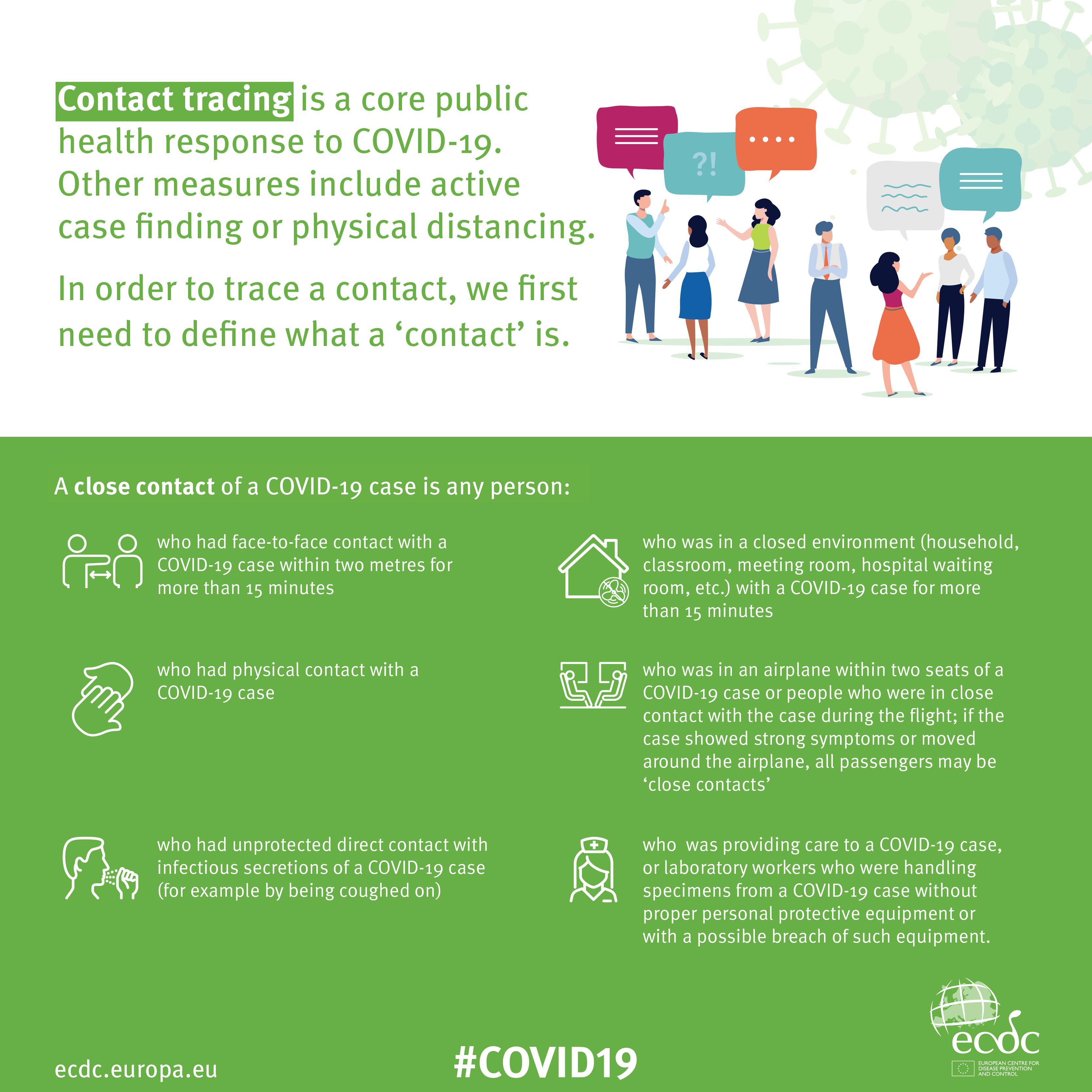
Contact Tracing Infographic

An Infographic that explains how Contact Tracing works

Approaches to creating a Contact Tracing app

Google and Apple have combined to work out a solution that works across iOS/Android devices. Here’s a document that explains how what they have done would work …


But there are Privacy concerns as this BBC article (with video) explains.  Regardless of those concerns the app is being trialled in the Isle of Wight. It’s useful to know the difference between the approach being used by the NHS and the Google-Apple approach, this article explains those differences.

However there are potentially difficulties …

France (how unexpected) have threatened Google-Apple over the fact they won’t work with France’s standalone approach (a similar approach to the UK); and it has been suggested that failure to adopt a common approach could threaten international travel – as “health passports” will be impossible to implement.

Then there are technical difficulties as iOS and Android devices work in different ways (not unsurprisingly) causing success of the Google-Apple approach to be dependent on a very high adoption amongst Android users.

The new NHS contact-tracing app could be used to send malicious alerts causing people to isolate unnecessarily, The Independent has been told. The app, which is being trialled in the Isle of Wight, tells users if someone they have been in close proximity with may be suffering from coronavirus, meaning they could be exposed. But because users can set off the warnings themselves by reporting symptoms – rather than positive Covid-19 test results – it could be used to send out false alerts. Dr Michael Veale, a lecturer in digital rights at University College London, said Britain’s tracing app had no measures in place to stop individuals “maliciously triggering notifications” using its normal functionality.

Then, on the technical front, some notes from Phil Edwards’ friend

On the Apple-Google Indirect approach

“Their approach seems pretty solid. I think they’re basically exposing some features that previously weren’t available to app developers. Both seem pretty determined to limit the potential for it to be exploited by governments; I think they announced yesterday/the day before that any apps using their system can’t also access location data.

Contact tracing is totally doable without central databases. I can see why a government might want to own data themselves, but there are big downsides (especially security when building in such a rush).”

On the NHSx Direct approach

“The implementation of this contact tracing app really hits that sweet spot between ‘Are they incompetent?’ and ‘Do they have ulterior motives?’ I’d advise against installing it but I doubt it’s going to work properly anyway in its current implementation because of various oddities around how Bluetooth LE works. This isn’t a great article but covers some of it.”

A better comment from Hacker News covers it clearer:

“‘Bluetooth LE has four main states: scanning, advertising, peripheral connection, and central connection. In order to exchange the data that the app needs it needs one device in the peripheral connection mode and the other in the central connection mode. This means one device must have previously been advertising and the other scanning. The two important states are advertising and scanning.Android devices can advertise in the background but they can’t scan reliably, they can do this for a short period of time enforced by the Android time limits on apps running in the background and possibly manufacturer specific power savings measures. These limits are not well documented and cause issues on any device using Bluetooth.iOS devices can’t advertise in the background, however they do advertise an Apple specific advertisement which can’t be controlled by the app but can still be connected to. iOS devices also can’t reliably scan in the background however they can scan more reliably for iBeacons (special adverts) [1]Combined this makes it difficult to work well in the background, Android devices can’t reliably connect to any device, iOS devices can’t connect to each other but iOS devices may be able to connect to Android devices.'”

Finally, a potential for Fraud

Plus fraudsters have not been slow to latch-on to the possibility of piggy-backing on the NHS app as this article in The Guardian show (thanks Phil for the link).

Other references:

The NHS Covid-19 website


Microsoft re-enters the browser war!

After Netscape Navigator was eclipsed by Microsoft’s  Internet Explorer as the browser of choice for many – mainly because it was hard-wired into Windows initially – the world of internet browsers has seen first the rise of Firefox from the Mozilla Foundation as an alternative open source option and then the succession to Google’s Chrome and it’s huge market presence.
I’ve written about Google’s dominance and the alternatives to Chrome before in “Just Google it …
Now Microsoft has stirred from its inactivity in the browser market place. It has ditched its proprietary Edge browser and replaced it with … Microsoft Edge. No confusion there then!
It is interesting because it will run on MacOS as well as Windows, something the old Edge didn’t do, and will use the same open source code base – Chromium – as Google’s Chrome and of course Brave (my browser of choice). This allows them to use Extensions written for that code base. I already use many extensions written for Chrome in my Brave browser.
What will this mean for Google especially as Microsoft Edge will effectively have a built-in ad-blocker? Who knows. It’s certain that as more users decide to use the Microsoft version of Chromium, so Google’s business model and revenue stream will come under attack. Will they retaliate in some way? Probably not. Interesting times.
Here’s an article that describes keyboard shortcuts that you can use with Microsoft Edge.

All things Google (and more) – 13th February 2020

Boot-up

Visit to Barclays Eagle Labs – now arranged for the next meeting – 27th February. Here’s some more detail about what they’re all about.

As part of Barclay’s community commitment,  we have also opened a new office in Cardiff designed to help businesses grow and start up in Cardiff. Great for budding Entrepreneurs (which statistics show can be high in the over 50s)  and inventors. Part of the Eagle Lab office hosts  a “Maker Space’ that houses laser cutting, vinyl printing, 3D printing, electronics equipment including soldering etc. It has a distinctly digital feel too with a really switched on Engineer running the lab. I will contact them to discuss what is actually available there and suggest things you might be interested in.

I have  13 confirmed attendees. I’ll contact Ashley Croome (the switched on Engineer) with details of who’s coming and discuss whether we need to split into two groups, or just stay at one. After the Science Group visit he advised me … “For group sizes, with the science group we had about 10-15 per group and that seemed to work really well as it wasn’t so overcrowded that people didn’t get a chance to ask questions, and try things like the VR we have set up here.”
The venue for the visit is:
Barclays Eagle Lab, 1st Floor Brunel House, 2 Fitzalan Road, Cardiff, CF24 0EB

Next meeting after Eagle Labs is on 12th March, then Paul will lead on 26th March and 23 April. I’m assuming there will not be a meeting on 9th April because of Easter. I’ll be back after that … for a while at least 🙂

Whats Up with WhatsApp – an interesting discussion about how you can “trick” an Android tablet into believing it’s a phone (without a SIM) between Margaret, Jim, Paul and myself. I’m not sure I’m completely the wiser, but it revolves around a solution for an Android tablet that Paul had already described (which works for him) and is also described in this post and on an iPad this post describes how to do it. If you want to see the WhatsApp log of the chatter and confusion, look here.
Undo Send function in Gmail (from desktop, not mobile) setup in Gmail Settings > General, selectable from 0 -30 secs, so not as long as I thought.
Clearing Off-Facebook Activity and a video to help you.
The death of Adobe Flash – Apple puts the boot in.
We had a question about Exporting email from Tiscali (TalkTalk) from Ann, who was concerned she might lose her old emails. It looks like the most useful way of doing it is to setup POP3 Forwarding of an Email account into Gmail – in Gmail > Settings (gear wheel) in the browser …

… get the correct settings for your server, as in …

and as long as you’ve selected Enable POP for all mail (even mail that’s been downloaded) and as long as your email provider supports POP3, your email should be downloaded from that server and into Gmail.

Gear Guide

Has anyone bought, or obtained anything recently they’d like to tell us about? It doesn’t have to be a computer, laptop, tablet or phone – just something that’s digital, ie used a computer processor in some way?
Here’s a provocative thought … what applications do you use that depend largely upon the use of a peripheral? Are you using the best application for that hardware? Perhaps you don’t have any choice, but if you do perhaps you should choose the most appropriate application for the hardware.
Jim updated us on his broadband upgrade using his new Router liked to a SIM-card (have I got that right, Jim?). He’s also purchased a dongle to watch live Freeview TV. This is not connected to the broadband, but it might cause his battery to lose power a bit more rapidly than it did before.

Apps Galore

That slot in the meeting where members are encouraged to share their experience (and possibly excitement) at a new app they’ve started using for their smartphone, tablet, laptop or desktop machine.
OpenStreetMap – creating maps for collaborators – a couple of examples – Canals and Railways, Land use and Buildings, but what about creating a shared Google Map ?

What’s IT all about?

That occasional slot in the meeting when we might do a bit of explanation of terms used in Computing, or in the use of digital devices.
Mesh Networks – which ones are members using:
Paul – BT solution
Don – Deco M4, with TP-Link AC1200
WiFi Reception – interesting fact … the range of the WiFi Router decreases as the signal frequency increases. However, the inverse also holds true, namely the closer you are to your WiFi router the greater the bandwidth you have as signal frequency increases. Therefore in a big house, maybe you need to employ 2.4Ghz; in a compact house it’s a good choice to use 5Ghz and maybe even employ a router that supports tri-band – which might give the best of both worlds!

The main topic

I use Google apps on my desktop and mobile devices – and I’m an Apple fanboy! However, it’s just come to my notice that a couple of Google developments have passed me by, which have caused me to think about whether I might be better to use more Google apps on my Apple mobile devices, rather than the native Apple apps
I rely on Gmail and Calendar. I have done for years. It’s a family joke – “if it’s not in the Google Calendar – it’s not happening”. I have been caught out  few times. I also use (and will continue to use) Google Maps extensively for mapping, the Apple version is not quite there yet, but it’s improving!
I have used Google Hangouts and Paul and I have tried to get that working – but it’s impractical to even try and demonstrate it at this location 🙁
We have looked at Google Assistant, as a way of interfacing with the virtual world, but I haven’t embraced it – probably because I still rely on the native Apple mobile apps and Siri is the way into these; but, it would have to be said, probably not as well as Google (or Amazon – Alexa).
But now I’ve become aware of Tasks, which you can access from Gmail, and  Calendar and if only it interfaced completely with Google Assistant – I think I’d be making the switch to using more Google apps on my Apple devices, but, and there’s always a but … why does Google makes things so difficult! Just remember there’s Google Keep (for notes) and Google Reminders (for reminders); and … you always have to remember Google have the nasty habit of dropping things just after you’ve got used to using them – Reader, Picasa and Google+ to name but three! Let’s have a look!



Google Photos – how I use it

As promised, and apologies for the delay – Christmas and illness got in the way – here are some notes on how I’ve got Google Photos to work for me. It concentrates mainly on how I’ve configured Backup and sync to do what I want it to do. I think the editing of photos is relatively straightforward, as is creating albums and slideshows. I may get round to doing something on the latter, as I might with sending photos for printing – that’s quite a good topic. I’ve used Snapfish and Yophoto for printing photos and books, both of which I can recommend. I now use Blurb, but that’s because it works so well with Lightroom – it’s more expensive than the other two.

Some more links, if you’re interested …

25 tricks to master Google Photos – https://www.pcmag.com/feature/345998/25-tricks-to-master-google-photos

How to master Google Photos – https://www.theverge.com/2017/6/9/15762170/google-photos-how-to-master

32 tips and tricks for Google Photos – https://www.computerworld.com/article/3148245/desktop-apps/32-tips-and-tricks-for-google-photos.html

https://thoughtgrazing.org/google-photos/

Difficulties/problems of running Google’s Backup and Sync as a Service

I shared with the Tuesday group some of my difficulties/problems of running Google’s Backup and Sync as a Service which runs at Start-Up. It appears that this is not a problem, but a design feature – no doubt created by Microsoft. You can do this on the Mac, but apparently not on a Windows 10 machine.

The article below explains how you can get round this difficulty. For myself, I’m just going to have to remember to right-click the Backup and Sync Icon and run the application as Administrator every time I login. Sometimes, the simple solutions are the easiest!!!!

https://www.coretechnologies.com/products/AlwaysUp/Apps/RunBackupAndSyncWindowsService.html

Windows 10 Backup and Restore

Having fumbled around for a couple of sessions, learning a lot more about Windows 10 Backup and Restore, and Recovery and Reset, facilities in the process, I’ve found this article that I think explains it all quite well.

In attempting to get Google’s Backup and Sync working on the U3A laptop this morning, I also, eventually decided to do a System Restore to before the Tuesday Group session … it’s just finished, having taken probably an hour for a relatively unchanged system. Be warned and prepared (I checked the web for info on why it was taking so long) … this could take a very long time and would probably be best done overnight!!!

https://www.howtogeek.com/220986/how-to-use-all-of-windows-10%E2%80%99s-backup-and-recovery-tools/