My first encounter with computers – notes from meeting

Ted told us he’d managed to avoid computers until he started work then it was a PC – a heavy laptop which he took home (possibly a Compaq) on which he used spreadsheets like Lotus 1-2-3.

Judith came across computers first when she started doing office work as a “temp” then later in the 60’s and 70’s she learnt how to use a word processor that led to her having an Amstrad PC at home eventually.

Phil told us his involvement with computers started in the mid-10980’s through the Micro-electronics Programme for Schools (MEP Cymru??). he went on courses; then got involved with using a BBC-B in school and we shared a laugh at the way it loaded programmes from Cassette tapes and how you could type-in programmes from magazines such as BeebUser. Two he remembered were Base Invaders and Flight Simulator.

Christine first encountered computers when she started working in a bank and saw a machine room; that persuaded her that this environment wasn’t for her and so she moved to a local authority computing and schools where, like Phil, she used a BBC-B.

Ann also used a BBC micro in the late 1980’s. She went on several courses, leant quite a few pieces of application software and then went on to learning more advanced computing topics such as Oracle Database, C++ programming and learning about computer security.

Marilyn didn’t use computers in work but did buy a Tiny PC fro a shop in town, She has been amazed at how much she has learnt from her use of computers including finding out that from a BBC website that there is a recording of Tennyson speaking his works online that was originally recorded to wax cylinder.

Stella attended a Beginner’s Course in Computing when she was living in London. She had an Amstrad PC 1512 and thinks she probably worked on an IBM machine as well at that time. She’s impressed (like Marilyn) in what she can find online and cited the Enigma Machine in the National Archives (at Kew) as being a great example of a resource.

Mike didn’t use the computer much in his work until it was necessary to complete MoT work (garage). His claim to fame is that he had three Sinclair ZXs and broke all three of them.

Thanks to you all, and of course the others who talked about what they’d written here …

Notes from Zoom Meeting – 11th June 2020

The meeting had a theme … “My first encounter with computers” and I’m really grateful to those members who applied fingers to keyboards and wrote something. You can see the list of submitted articles, and my notes from the contributions at the meeting here …

… but first we went round the screen finding out if there were any issues, or updates on issues from previous weeks.

David H. reported on his rather slow Broadband. There was general agreement that 13Mbps Download, 1Mbps Upload could be improved upon.

Paul (and Sianed as well) reported that the Windows Bluescreen that had been reported the week before had now spread to his machine which had necessitated a re-installation of his printer drivers. A general feeling that if you have the option to Click (to get round a warning message) this should be taken – several members had done that recently. Paul later reported that the problem had seemed to have “gone away”.

Renée asked for advice on Zoom as she was about to host a meeting. I pointed her to a webpage I’d written, and also sent her some screenshots which I also copied to Jim as he was going to do the same shortly for the Photographic Group.

Don was experiencing a Norton ant-virus Pop-up message in Gmail. It was felt that this was a scam, and should be ignored. Phil suggested this was a phishing scam and that we should all look at our browser extensions to see if there were any installed we didn’t ask for, or weren’t using. Good advice! I mentioned that it might also be a good idea to look at using another Browser such as Brave, or Firefox.

Margaret was having a struggle getting all her old WhatsApp chats onto her new Galaxy S Tablet. She’s used SmartSwitch to do most of the transfer but WhatsApp was not behaving in a friendly manner (probably due to it not being a Tablet application) and had needed many keys and tokens to do the transfer(s). However she’d found a way around the problem and hoped to have finished the transfer soon.

Ann was going to do a BIOS update on her Lenovo – my notes don’t tell me why and I’ve forgotten. We suggested finding a BIOS update program. Again my notes fail me but I seem to remember someone (Owen??) found a solution.

I must have been asleep. I’ve got a note that says Christine – mail/TV Cello – what does that mean?!!

Phil went through a number of things. He recommended that 4K was great for watching hi-res You-Tube videos, Paul remarked it’s only of value if you’ve got a large screen. He recommended a video to watch from Michael McIntyre – he later sent the link to the WhatsApp group. He’d setup a Netbook with a slideshow – why?? [My notes again let me down!] Also I’ve written Family Zoom and webpage??

Judith was getting an error on her Virgin Home Page and we recommended she should look at the Status page perhaps for some further information.

Ted talked about how you could get better quality audio for people with difficulties in hearing and there was a prolonged discussion about using AV Receivers; and also different modes on the TV set itself.

Apologies for incomplete notes. I’ll try and do better next time.


My first encounter with computers

For me it would be being introduced to an ICL 4130 (formerly an Elliot Computing 4130) mainframe and the use of punch card decks. I was instructed on how to program the computer using the computer language Algol-60 and I had to write the code on sheets that were then punched by punch card operators. Somewhere, I have a booklet which describes the machine … somewhere!

Anyway, by the time I’d got started on my computing life the 4130 was getting a bit long in the tooth and the form for Universities in those days (remember everything was centrally funded by the Universities Grant and Research Grant Committees of the Education Department then) was to get a visit from the Computer Board – a group of the wise and worldly (it must have been, I went on to serve on its successor body much later on – the Joint Information Systems Committee) who would adjudicate whether an institution needed a new computer or, if it was between its regular visits, whether the Computer Centre needed new peripherals such as disk drives, printers or plotters. As a research student (at UCW Aberystwyth) I, along with my other researchers were fully prepped to be able to say the right thing just in case one of these visiting folk asked a question. What fun! The preparation must have paid off because we got a new machine.

The ICL 4130 was replaced by an ICL 1900 series machine running George 3 – a proper operating system [I think a second machine was purchased later on and they were linked so that one could handle batch punch card jobs and the other handled teletype terminals and possibly output]. Of course this was the time when Computer Operators were needed and they ran jobs (including back-ups) overnight and had to be in attendance to change magnetic tapes, and handle printed output – a lot of which was created by me!

I was teaching myself multi-variate statistics, mainly based on linear and multiple regression models, but also principal components and factor analysis and using standard programs which I modified in part to my research subject because I needed mapped output, on a line-printer! The main program I worked with however was written (in Fortran IV) by David Wishart from St Andrews for Cluster Analysis, so I learnt to program in Fortran and this soon replaced Algol-60 as my preferred programming language. This program and its adaptation to spatial analysis (in which I followed the work of a fellow researcher called Stan Openshaw who was using the technique in human geography to group together similar grid cells from maps) was to take up a huge part of the next 10 years of my life as I worked hard to avoid actually going out to do any field work on my research topic “Contemporary Erosion in mid-Wales”. Most of my jobs were by now being run by remote job entry at the Manchester Regional Computing Centre as the size of my data set was too large to run in the UCW Aberystwyth Computer Centre.

It was an exciting time to be a geographer and books and monographs were being published on quantitative geography amongst which were ones in the Institute of British Geographers CATMOG series, still in my possession, by a certain John Silk. A lovely coincidence that brings John and myself together and allows us to reminisce on the early 1970’s and “the quantitative revolution” as it was called by some!

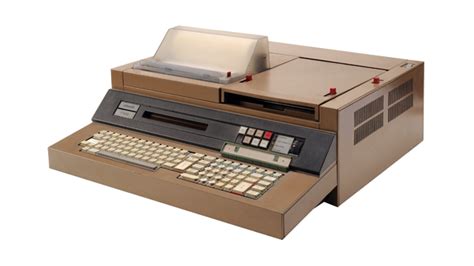
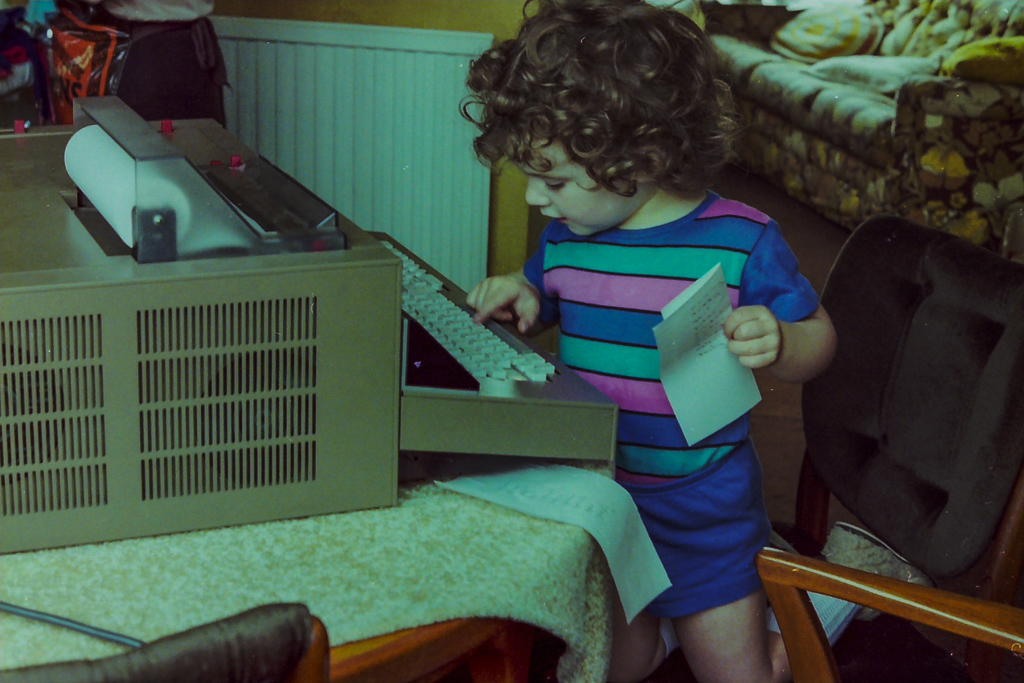
Through the 1970’s I returned every summer holiday to Aber, and camped at the top of Penglais Hill to get time on the mainframe. In between these visits I would sit at a teletype at Doncaster College of Education, where I was now a Lecturer in Physical Geography, and submit jobs to the IBM 360 mainframe at what was then Sheffield Polytechnic. It had to be said that by 1978-9 my main interest (apart from the family that was now arriving on the scene) was in computing, not geography, and so when a friend asked me to put my knowledge to work in programming some engineering design problems, I accepted the challenge, set up my own consultancy (with my HoD’s approval) and started programming an Olivetti P6060 desktop computer using Basic. Having it at home to do the work allowed my eldest daughter (44 yesterday) to have a go at programming …

So now the link to geography had begun to be broken. This was severed by Shirley Williams decision in 1978 to close the Teacher Training part of the College where I worked. I bravely, one of my colleagues thought foolishly given that we had by now three young children, decided to opt for voluntary redundancy on the basis of being given a year’s fully-paid retraining. I went to Bradford University and did a one-year MSc in Computer Science giving me letters after my name to go with my 10+ years programming experience. Here I was introduced to the DEC PDP-11/60 mini-computer – a lovely machine running Unix, which was a lovely operating system which I continue to use in it’s Linux incarnation, to this day. I wrote my thesis on building a disk operating system (Modus) for a PDP-8 using a high-level structured programming language (Wirth’s Modula) on the PDP-11. I could now program in Algol-60, Basic, Fortran iV, Fortran 66, Cobol, PDP Assembler, Pascal and Modula.

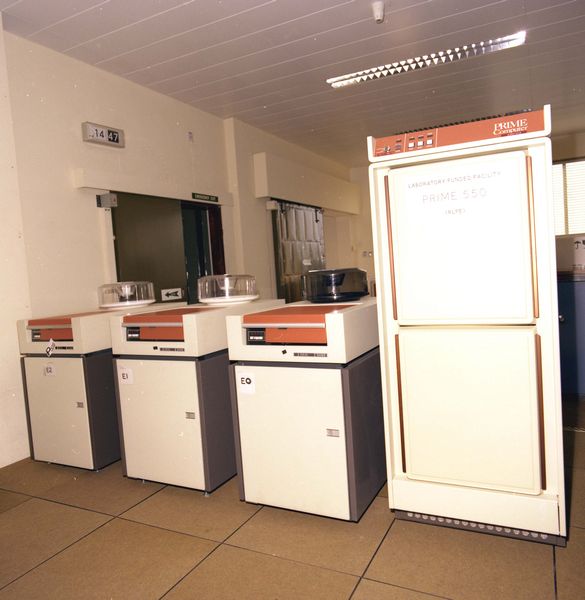
It was the latter language (the first concurrent programming language and the precursor of first Modula-2 and then Ada) that enabled me to get a job as a Systems Programmer / Computer Lecturer at South Glamorgan Institute of HE at Llandaff. I was returning to Cardiff and HE. Not a very bold move and “only for 4 years max” (which is what I said to Jenny). That was not to be! At SGIHE/CIHE/UWIC I oversaw the introduction of a mini-computer service based initially on a Prime 550, then Prime 750 and so on, initially writing the systems programs for its operating system – Primos in Fortran, PL/P and SP/L, and then becoming Head of the Computer Centre where I dabbled in producing the first website for the institute, which has since been a continuing interest for me.

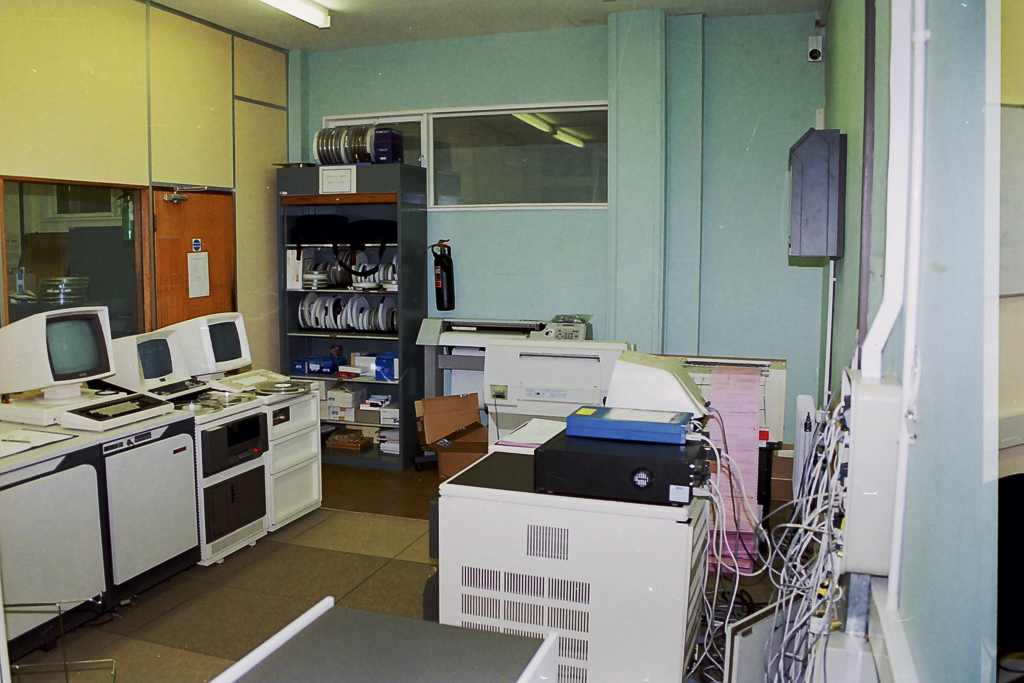
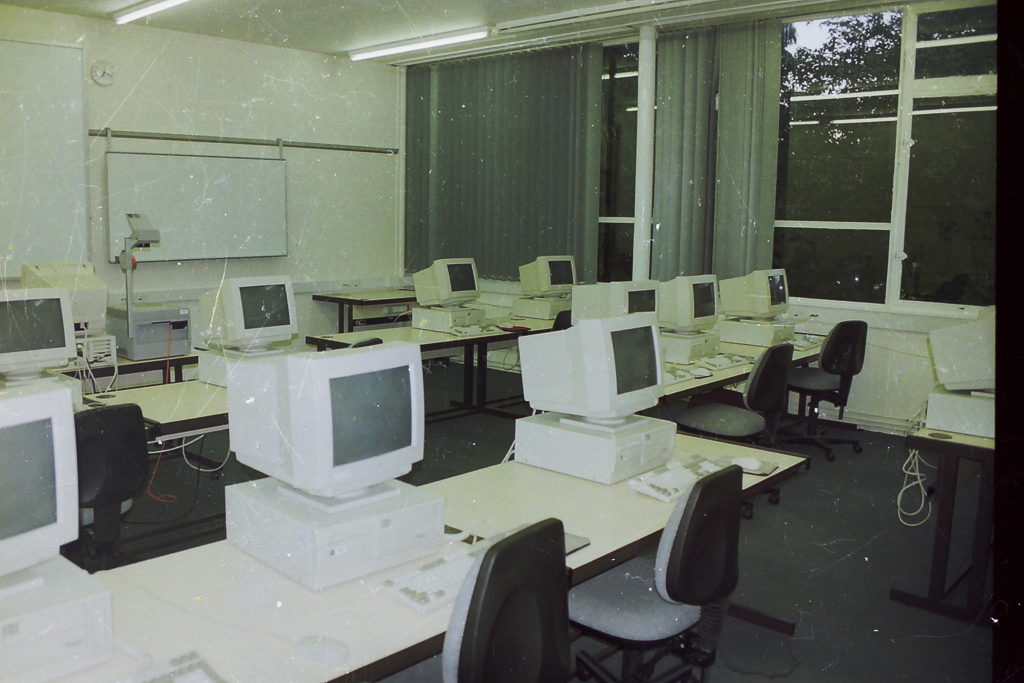
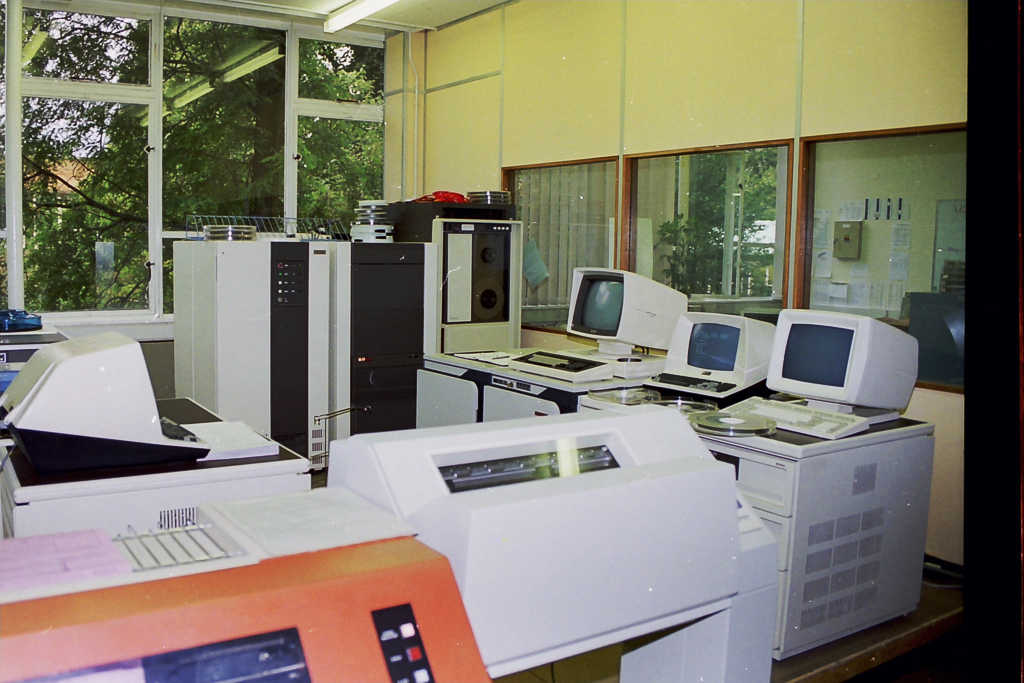
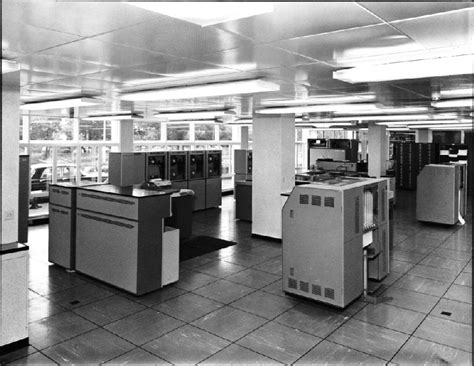
Here are a few pictures of the Computer Centre at UWIC taken before I left for UWCM at UHW (The Heath) …

The Operator’s Consoles for each system are on the left, the tape rack for the day’s tape back-ups are in the background, a terminal room with micro-computers was alongside the Computer Centre …

The original Line printer (orange) was till in service, the Prime 750 is in the background …

I’d become a manager, and the rest is another story, which I’ll record another day!

At home we’d purchased one of the first BBC-B Computers – the first of a long series of domestic computers which again is another story, which I’ll record another day!

David Harrison, June 2020


Notes from Zoom Meeting – 4th June 2020

Sit still, adjust your hair, mute your microphone …

As well as a once round the participants opportunity for members to say what they’d been “up to” in a computing sense the past week, I asked them in the light of Margaret and Lizbeth’s moving posts on WhatsApp (see below) today to give examples of “a good use of technology”.

Mike chipped in immediately to say – Zoom Meetings; so I had to admit that yes, it was a very good use of technology and it has the unforeseen benefit in getting more members participating in the meeting. So much so that I’m wondering whether ALL meetings of the Group should now be held using Zoom. [Don’t worry, I’m not!]

John then added that Zoom as a one-to-one instructional assistant had proved to be very useful to him as he and I worked out a problem he was having with some software. This is indeed true and I can see that once the Covid-19 crisis is over we can all examine whether we can help solve each others problems with one-to-one Zoom calls.

Sianed told us about virtual tours of properties up for sale, and Mike told us his last home was sold solely through a virtual tour, no home visit was undertaken by the purchaser. I thought this remarkable!

I can’t remember who it was who said Wildlife Cameras (it might have been Jim) and yes, for us the purchase of such a camera has been very interesting, to say the least.

Don came-up with an idea for a device to alert a household to the fact that a gas ring had been left on. In our house that would have saved a couple of saucepans over the years, especially those boiling eggs!

Marilyn told us she’d been looking at triptychs and using the software Photoscape – another project for a rainy day, me thinks!

Renee told us about meeting-up through Facebook/Messenger with an old school friend she’d not seen since she was 15 and what joy that now communicating with WhatsApp had brought to them. I related how I’d used Fb to track down a friend for a re-unuion that all my friends had lost contact with using Fb. Yes, Facebook is good for some things!

Stella was interested in finding out whether she could connect her Bluetooth headphones to her TV and to her laptop. We pointed her to the work that Jim had done for Marilyn in setting that up for her TV. This then morphed into a discussion on whether using a 4G router in a house (as Jim has done) was a good alternative to a wired broadband connection. I think this needs more research, but it could be a horses for courses thing as much as a cost issue.

David raised the problem of transferring large files that couldn’t be sent by email. Two solutions were offered (or three if you count sending the file on a small USB-stick by post). One was to use cloud storage as an intermediary, sharing a link to the file with the recipient in an email. This would work with Google Drive, One Drive, and Dropbox et al. The second option was to use a file-transferring service such as WeTransfer. For both situations, perhaps you also should consider zipping (compressing) the file as well. This can often be done by right-clicking on the file and saving the compressed (zip, or other format) file to send.

Then we had a comfort break, and when that was over a large number had excused themselves as they had limited interest in video-editing which I went through using the post I’d written, ending with another one of my knee-shaking live demos which this time, I even recorded!

This left the remaining 5 members with a lot of questions which I attempted to answer, one of which (from Don) was about using non-copyright music in videos. Ann answered this question with a reference to this website – Freeplay Music.

Next time it’s “My first encounter with computing“. Even if you don’t want to join the Zoom Meeting, I’d love for as many of you as can to record their memories, either in a post, or in the Topic I’ve just created, or by sending me an email.


Margaret & Lizbeth’s WhatsApp thread. Margaret wrote …

I have had a different computer experience this afternoon although am not sure I would recommend it. But I report it for “technical interest”, if you can call it that.

By invitation we attended a funeral transmitted from Cardiff to geographically distant family who are not allowed to travel here at this time and any friends such as ourselves who cared to ‘tune in’. It was done by webcam by a company doing this with entry to the service at a given time with ID and password that the family or its contact gives you.

It was good that someones full life did not just drift away when more meaningful methods are not permitted but it was so sad to see just the next of kin and his household, outnumbered by the necessary staff. The tribute, music, homily and commital were all as one might expect but experienced virtually in a physically empty situation.

In this case the deceased was elderly, in poor health for some time and like so many had succumbed to covidn19 in a home. I am sure that in his long and productive life he could never have dreamt of a televised end!

Lizbeth replied …

I was the celebrant at a similar ceremony a while ago. Very difficult for all concerned. But there will be another ceremony in the autumn when we can properly celebrate that life.

This is certainly a time when technology serves us well.

I replied …

A lovely couple of messages. I’m sure you’re right. Your friend would not have expected such a ceremony, but it’s good that you’ll all meet to celebrate their lives when life gets back to “normal”. We had a different experience recently which was rather lovely in a strange sort of way. The husband of my son’s next-door neighbours, who we’ve got to know quite well, passed away from cancer and though it was a sudden ending to his life, his neighbours and friends lined the streets of the route to the crematorium and clapped the passing of his hearse. His son said his father would have been tickled pink to think he’d been treated as royalty.

We also had the opportunity of attending our late dear uncle’s ceremony whilst we were on the other side of the world. Not the same, but we were pleased to be able to hear my sister deliver my words of tribute to him. Then again, whilst Jenny actually flew to Australia to be with our son when he became an Australian citizen, I was able to watch the proceedings from Cardiff and actually talk to the mayor who was the officiate.

Yes technology can be a wonderful aid to life as we know it, and as we hope it will be.

It was this conversation that gave me the idea of asking members “What’s a good use of Technology?”



Video-editing for Dummies

… and I am talking about myself here!

If I wanted to do video-editing and wasn’t doing “this U3A stuff”, I’d use Apple’s iMovie which is a “really nice and easy lemon squeezy” way of producing videos, but I can’t because for the Group it has to be cross-platform, and it has to be FREE!

I have suggested using YouTube for simple editing and indeed with the new YouTube Studio that may be your best solution – especially if you’re intending to share the video on YouTube through your Google Account; Google provides some Help & Assistance on how to do some basic video-editing and provides a useful help page with a short video on how to do video-editing using YouTube Studio, and there’s a load of other YouTube videos on the subject as you might expect.

However, not all of you have Google/YouTube accounts, and not all of you would want to “edit in the cloud”, so we need to find another solution that ticks all the boxes.

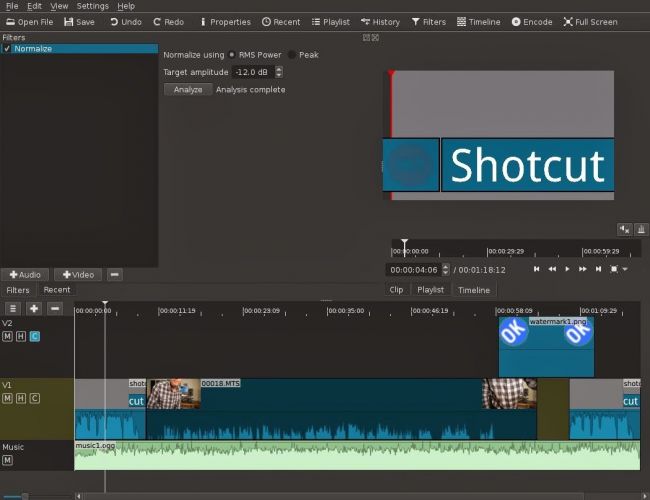
The one I found that does just that, and which also has a substantial amount of Help and Support documentation and video tutorials is Shotcut.

It’s a bit daunting when you first start it up; so many controls, icons, sliders, windows, options – but don’t let that put you off. Just try the basics to get started and then go back to learn more as you need it.

Here’s a link to a “Getting started …” video, and here’s one to a “manual” which tells you more about video-editing and using Shotcut. If you want to print something out to have beside you as you learn how to navigate the interface, you might find this short (3-page) guide useful.

Having created your video masterpiece you’ll want to save it in a format that is playable on most online services and applications – choose MPEG4 from the Export option – and then decide what you want to do with it. You can of course upload it to Google Photos – there’s no size limitation on videos you upload apart from the 15Gb per week that you get against your free storage limit – which is 15Gb!!!! You could use YouTube of course (see above) – but the quality of the video may be downgraded as you upload it; but I’d recommend you also look at Vimeo as it’s a more privacy-orientated platform for sharing videos and has a better-quality of video playback too. You can do quite a bit with a free subscription, but if you’re into video-production in  big way it might be worthwhile paying  £72 for an annual subscription. Alternatively, you could decide to host your own videos, on your own website – but that’s for another day!

… and that’s about it – except for the dreaded live-demo!

Recorded from Zoom, my first attempt. Not all the panes were showing, so I’m afraid the Timeline pane is not to be seen – it’s at the bottom of the screen. I’ll need to see if I can record the whole screen – not just the Window.

[PS: I’ve now found out how to share the Desktop, rather than just a Window, so there’s no stopping me now. Next time, next time …]


Cleaning-up your PC or Mac???

Try dupeGuru – it’s very good at finding direct matches of files on your machine even when they have different names. It also provides a matching score so that if it’s not exactly sure that it’s found a match it will score it and you can then make a decision after inspection. Otherwise you can delete or move it to an archive folder – just in case!

Upgrading the RAM on your Laptop PC

This is all you need

The only tool you need is a Posidrive #0 screwdriver for this laptop, I bought a set of six small screwdrivers made by Black & Decker some time ago; if you’re going to do more of this sort of thing, you might need to buy a more sophisticated toolset. I also attached an earth strap – just to show you how to the job properly – but to be perfectly honest I don’t usually bother.

But I’m jumping ahead. You first have to find out what upgrades you can do to your PC. I recommend using Crucial as the supplier of both RAM and hard disk upgrades. When you land on the site, you will see a screen something like this – it will change as new products are introduced …

… you click on Select Computer (you can download a tool to scan your computer, but that shouldn’t be necessary as all the information you need is usually on the bottom of the laptop) and supply the information required about your computer …

… and the following information should come up.

I’ve selected the Upgrade I want, but I’m also offered different DRAM memory choices, as well as SDD hard disk upgrades …

… from this I get the Part No. and then see if I can purchase it cheaper on Amazon – for old memory I usually can …

… so that’s saved £10. Now we turn to the removal of the old 1Gb DRAM module and the insertion of the new 2Gb module. Turn the laptop so that it’s back is facing upwards …

… take your screwdriver and unscrew the screws which are holding the back panel in place.

On this model the screws don’t totally come away from the panel which is great as there’s less likelihood of losing any of them. Unscrew them all, and slide the panel off …

… the DRAM is right in front of you on the left-hand side of this picture. All laptops have different layouts, but the DRAM modules are very easy to pick out! Next comes the first tricky bit (not really). You need to prise the two clips holding the module in place on either side of it. Here’s me prising one clip away …

… you have to do them together of course, but as I don’t have three hands … the module will pop out and swing upwards so that you can easily remove it, which you should do and place it on an electrically inert surface – just in case you have to put it back! You then get your new module and slip it into the space vacated by the old one at an angle. [My apologies – I should have taken a picture of this.] Most problems occur at this point as it can be tricky to insert the new module in firmly enough. You then gently push it down so that the clips re-engage with the module.

Nearly finished now. The new DRAM module is in place and you just have to replace the back panel, tighten the screws and hope that the new memory will be recognised when you boot-up the computer. You may be advised that the Memory Configuration has changed when you re-boot, just ignore this the first time you attempt to re-boot your computer. Check the memory has been recognised from the Windows System Panel …

… and you’re good to go. Any problems, first try and check the module has been inserted firmly and far enough into the slot, and then if necessary run the System Configurator when asked to when you boot up. I’ve never had to do the latter, I have had to unscrew the panel and re-insert the memory module though.

And that’s it. It took me about 10mins, but I have done it before. Still 30mins tops will see you with more memory in your old laptop and hopefully improved performance.

Notes from Zoom Meeting – 14th May 2020

Not much to report, but we had a good chat – eighteen members attended (according to Jim) – thanks for the photo.

I encouraged members to take a look at the Flipboard magazine where I’m trying harder than I had been to curate articles that I think might be of interest to you all. There’s a link on the Blog (Home) page of this website, but here’s a link as well. One of the links I mentioned was this one on an AR app which I invited members to investigate and feed back to me what they thought of it!

I raised the fact that Google Meet was now available and invited anyone who had a Gmail account to take part in a test with me. I haven’t followed that up yet! It’s a direct competitor to Zoom and has been brought out of the Business suite that Google has because of the success of Zoom’s free offering which gives 40mins of video-calling.

We also briefly discussed Google Lens which is certainly available on Android, but I wasn’t sure whether it worked on iOS/iPadOS – it is as part of Google Search and Google Photos, but not as a standalone app. It also works with the Google Assistant on Android as well. Shame! Google Assistant is available on iOS/iPadOS though.

I mentioned that I’d been asked about Jamkazam as an alternative to Zoom by the convenor of the Recorder Group. It’s probably very difficult to make sure the latency of all the participants are kept in sync, but it might be a bit of fun. I suspect some expensive equipment might be needed to make it work successfully. I also suggested that Phil (as a member of the Group) might offer his technical expertise!

I advertised the Which? Scam Service and encouraged members to have a look at it. I started a new Topic in the Computing and all things Digital which I’ll retitle Scams and keep an update on ones that I come across.

I gave a demonstration of my new personal family website which I’ve been working on through early May and explained some of the design issues in building a private members-only website which incorporated a social-media element for closed family chats incorporating threads (which WhatsApp doesn’t) and embedded images (which again WhatsApp has difficulties with).

Ted expressed his pleasure with his new Huawei Honor 8A smartphone and explained he now had to work-out linking Spotify to it, as well as transmitting to his Chromecast machine and integrating with his HiFi. Several members had suggestions and I think that’s a good idea for a topic in the Computing and all things digital forum.

Postscript: This website, and all the others I have hosted with TSOHost went down for approximately 4hours on Friday – that wasn’t the reason why I didn’t get round to writing-up the notes until this morning though! I’m a bit disappointed they haven’t published a reason why they had “network issues”. Yes, I know they happen, but when they do the educated user would like to know what happened, and moreover what they’re doing to mitigate the problem in the future. I don’t depend on my livelihood for income from my websites, but others do. They (we/I) deserve better.

This was our attendance the previous week …

… again – thanks to Jim.


Scams

You might want to consider signing up for the Which! Scam Service, I have …

There are necessary steps we can all make to protect ourselves from fraud. But as they become more sophisticated, it can be difficult to know what’s genuine. We’re here to act as a source of trusted advice for those times when you’re just not sure.

From email scams and copycat websites to nuisance calls and tax rebate scams, our guides help you to spot a scam or get money back.

— Forum Responses —

Here’s a nasty one, which on the surface looks OK – just remember that if you’re using Facebook Messenger, you shouldn’t need to login to Facebook again, and vice versa.

Passwords harvested by fraudster (from Which? Scam Watch)

remember also my advise, if you do use Fb, or FB Messenger please Logout – I know it’s a pain but there’s a distinct chance that if you don’t Fb will record all your internet comings and goings and you’ll get loads on unsolicited emails, etc.

David Harrison May 29, 2020 6:26 pm

Covid-19 Tracing app

What is Contact Tracing, and how does an app help?

This video from The Guardian is an excellent review of how Contact Tracing works in both a traditional and technology-enable world. You should watch it.

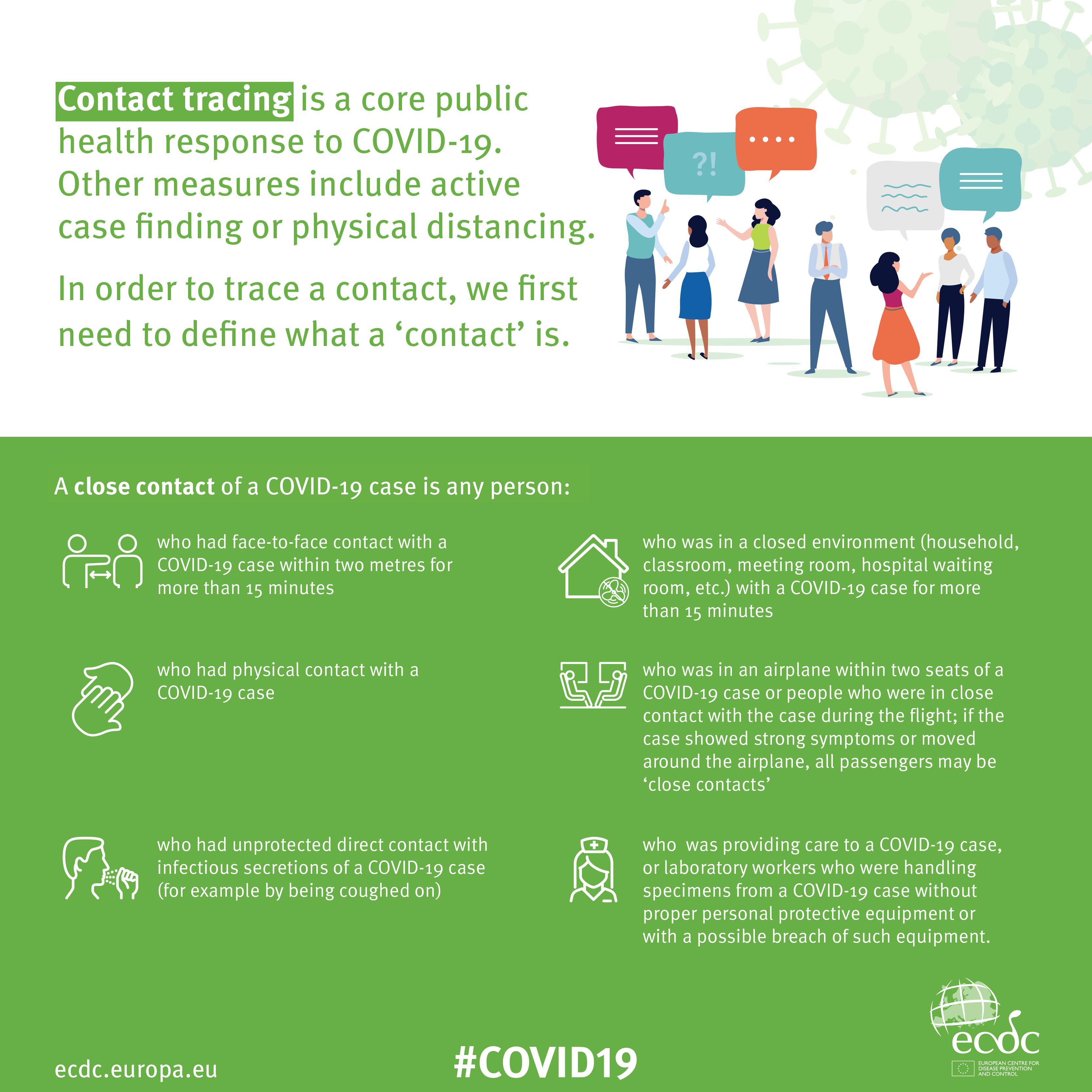
Contact Tracing Infographic

An Infographic that explains how Contact Tracing works

Approaches to creating a Contact Tracing app

Google and Apple have combined to work out a solution that works across iOS/Android devices. Here’s a document that explains how what they have done would work …


But there are Privacy concerns as this BBC article (with video) explains.  Regardless of those concerns the app is being trialled in the Isle of Wight. It’s useful to know the difference between the approach being used by the NHS and the Google-Apple approach, this article explains those differences.

However there are potentially difficulties …

France (how unexpected) have threatened Google-Apple over the fact they won’t work with France’s standalone approach (a similar approach to the UK); and it has been suggested that failure to adopt a common approach could threaten international travel – as “health passports” will be impossible to implement.

Then there are technical difficulties as iOS and Android devices work in different ways (not unsurprisingly) causing success of the Google-Apple approach to be dependent on a very high adoption amongst Android users.

The new NHS contact-tracing app could be used to send malicious alerts causing people to isolate unnecessarily, The Independent has been told. The app, which is being trialled in the Isle of Wight, tells users if someone they have been in close proximity with may be suffering from coronavirus, meaning they could be exposed. But because users can set off the warnings themselves by reporting symptoms – rather than positive Covid-19 test results – it could be used to send out false alerts. Dr Michael Veale, a lecturer in digital rights at University College London, said Britain’s tracing app had no measures in place to stop individuals “maliciously triggering notifications” using its normal functionality.

Then, on the technical front, some notes from Phil Edwards’ friend

On the Apple-Google Indirect approach

“Their approach seems pretty solid. I think they’re basically exposing some features that previously weren’t available to app developers. Both seem pretty determined to limit the potential for it to be exploited by governments; I think they announced yesterday/the day before that any apps using their system can’t also access location data.

Contact tracing is totally doable without central databases. I can see why a government might want to own data themselves, but there are big downsides (especially security when building in such a rush).”

On the NHSx Direct approach

“The implementation of this contact tracing app really hits that sweet spot between ‘Are they incompetent?’ and ‘Do they have ulterior motives?’ I’d advise against installing it but I doubt it’s going to work properly anyway in its current implementation because of various oddities around how Bluetooth LE works. This isn’t a great article but covers some of it.”

A better comment from Hacker News covers it clearer:

“‘Bluetooth LE has four main states: scanning, advertising, peripheral connection, and central connection. In order to exchange the data that the app needs it needs one device in the peripheral connection mode and the other in the central connection mode. This means one device must have previously been advertising and the other scanning. The two important states are advertising and scanning.Android devices can advertise in the background but they can’t scan reliably, they can do this for a short period of time enforced by the Android time limits on apps running in the background and possibly manufacturer specific power savings measures. These limits are not well documented and cause issues on any device using Bluetooth.iOS devices can’t advertise in the background, however they do advertise an Apple specific advertisement which can’t be controlled by the app but can still be connected to. iOS devices also can’t reliably scan in the background however they can scan more reliably for iBeacons (special adverts) [1]Combined this makes it difficult to work well in the background, Android devices can’t reliably connect to any device, iOS devices can’t connect to each other but iOS devices may be able to connect to Android devices.'”

Finally, a potential for Fraud

Plus fraudsters have not been slow to latch-on to the possibility of piggy-backing on the NHS app as this article in The Guardian show (thanks Phil for the link).

Other references:

The NHS Covid-19 website