
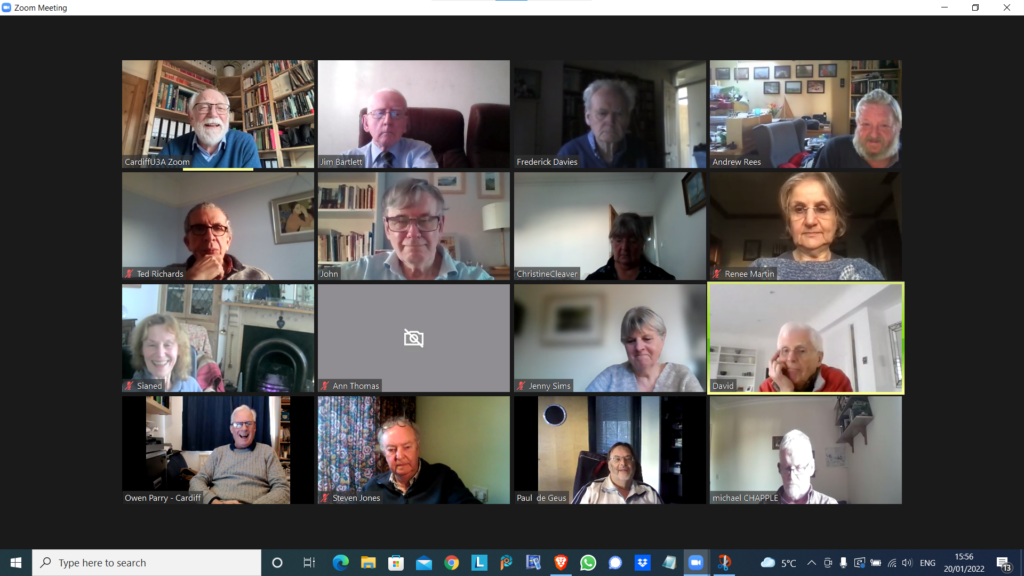
Notes from Zoom meeting – 20th January 2022

We received apologies from Ann, Margaret, Jenny ( who arrived later) and Don.

I asked if anyone would be willing to share their favourite app with the group bu way of a demonstration. Steve offered to do something with Trello – a work organisation application, and I asked Ted whether he’d be willing to do something on Ancestry. Steve also asked me whether I’d do something on LastPass – so I said that I’d do that as a return favour for his offer which we agreed he’d do at the next meeting.

I then did a demonstration of flickr and will write an article up on what I’ve found out in doing the preparation for it! This will be on my Just thoughts blog in due course!

Owen reported that he’d been working on ways to move the Cardiff u3a website over to WordPress, in conjunction with some other local groups which were doing the same, and away from the SiteBuilder software he’d been using to date. They all needed to find a way to get it to work with the Beacon membership system, but there was a problem that there was no api (application programming interface) for Beacon that would allow easy import/export of information between the two systems. As a first step a read-only access api would be valuable and would allow the two to be linked together. Owen was now learning how to use WordPress, and I offered to provide help if required.

Mike has discovered the the iPlayer app on his desktop which he is very happy with. Steve suggested he looks into the Sounds app as well. I queried whether people listened to Podcasts much – quite a few members did.

David Hughes recommended the Sounds app and podcasts and said he’d just recently been listening to one from a family memberJon Ronson – I for one, will try and catch-up on this!. We then started a discussion on David’s IT-phobic friend who lived in the Marina and somehow was receiving more than one incoming call on two handsets – that’s different calls!. It appears his son had purchased broadband and OpenTReach had installed a landline and a router. His landline is now digital (see Jenny’s article) and it appears he can use two handsets off the broadband landline for incoming calls. Renee reported problems with interceptions, and conversations being repeated on her landline. VirginMedia engineers had replaced the the handset to a broadband connected router. Maybe (she suggested) David’s friend had a legacy connected analog line? Owen offered the information that you could buy two-line cordless phones, but they did have separate numbers. [In later conversations on Signal it was mooted whether it was possible to put n answer machine on one of the lines, or not.] I can see us returning to this one.

Sianed advised us of a scam asking a user by TEXT to update their PayPal account. Watch out for that one.

Paul reported that Amazon and Visa had come to an arrangement so that Visa Credit cards could be used with Amazon. Good news. He also recommended All 4 as another possibility for streamed TV. I mentioned BritBox as another source of good binging boxset TV.

Steve had started using LastPass and wondered whether I could do something on using it, and was also looking at Flickr. He reported that he wouldn’t have problems with Chrome updates as the renewal date was 1st March. [I think this note needs reviewing.]

Ted was off to Rwanda. I won’t say more, just read his wonderful blog post on this site, and go look at his website for more information. He had us all in stitches describing his challenges with getting Banana Beer and doubts as to whether his payment using PayPal had been a scam because of links to a sister company offering him handbags and selling chilli paste. The mind boggles, or at least mine did!

Jim was transferring information from photos that went back to the early 2000’s into a Comment field in the EXIF data held on the photos. He also reported the problems that American airlines were having with 5G and their altimeters s they approached airports. The switch-on had been delayed until problems were resolved. Apparently 5G in the US is on a higher frequency than in the UK and transmits more power. Whether the problem is in the airports, or the planes is uncertain.

John reported that Flickr was working well. He’d uploaded lots of p[hotos of clouds and created a few albums of them too!

Christine was now a happy Real Bridge user. All her difficulties had been resolved [insert solution here as note not clear] She, like others, had been finding the process for getting a digital Covid Pass from the NHS website, more than challenging and was now printing off a paper version.

Renee had solved the problem with her landline; she said she was receiving emails from Royal Mail re. tracking deliveries that she was uncertain about. We suggested that they be best ignored.

Ann had updated her Zoom software. She had looked at her Firewall settings and chose to view blocking and now video not showing in Zoom. It was suggested that she look at her firewall settings and review Allow/Deny options. Jim suggested looking at the choices with Zoom itself that might be causing the problem. Owen suggested looking at another app that uses the camera to see if the problem was replicated.

Jenny (having managed to make the meeting after an earlier appointment) wondered whether she should get a replacement battery for her laptop – depends on whether she thinks £100-£140 is a good investment and whether she can do the replacement herself – perhaps get a view from Neil (our helpful IT fixit man!) and also said tht her external monitor was not working as well as she’d hoped.

Zoom with a view!

Our last meeting on January 6th 2022

It was suggested that members might be interested in finding out how one group – the Computer Group – has handled and coped with the Covid pandemic by using Zoom. We haven’t actually met in person since the beginning of the 2020 session in September. We were quick out of the blocks however even before that and we held our first Zoom meeting on the 23rd April even before the Committee had taken out a subscription to Zoom I believe. Since then, almost without a break, we’ve met virtually every fortnight.

Supporting us in our meetings we’ve kept Notes and added them to our website – “Thought grazing” at https://thoughtgrazing.org – which any Cardiff u3a member is welcome to view by just sending an email message to computer@cardiffu3a.org.uk.

We’ve had an attendance of between 12 and 24 at our meetings with 16 being an average number, so that means probably 50% of the group have been able to participate at any meeting, but of course it’s not always the same 16!!! We’ve adopted a new way of organising the meetings to match with the virtual world, focussing on getting members to share issues and problems, matters of interest and general chitchat about matters digital. It’s become a much more social group with everyone encouraged and requested to participate – when it’s their turn at the very minimum. This has led to reduced time for presentations and facilitator-led talks. Some might say this is a good thing … I couldn’t possibly comment!

The pluses …

  • We’ve enjoyed each others company and supported each other through these difficult times.
  • The technology has really helped, since we’ve found screen-sharing to be an excellent way of showing and telling what we’re discussing. [Not having to rely on the venue WiFi has also been a real boon!]
  • The technology, I think, has actually made us much more inclusive as every member has a chance to make a contribution – far more so than when we met face-to-face.

... and the minuses.

  • Nothing can make up for meeting people face-to-face, the chance for casual chatter, the chance to add a cup of coffee or share lunch before (or after) the meeting.
  • Perhaps the number of informational presentations has dropped, but this doesn’t seem to have been a factor in attendance.
  • As a technology group we would hope that our members would find using Zoom relatively straightforward. Hopefully, we can still encourage some “lapsed” members to try this way of meeting, but we do accept that some memberts are perhaps “over-Zoomed” as well.

Could we manage so-called hybrid-meetings?

The occasional one-off event with some members remote on Zoom and some face-to-face might work but it would have to be a presentation-style meeting.

We have concluded that we might try an alternate meeting style when we are able to return to face-to-face, with Zoom meetings still being scheduled.

Would we miss meeting over Zoom?

In the end, probably not, because the benefits of face-to-face would outweigh any benefit from the new form of interaction, much as we like it. However, I think we’d want to take some of what we’ve learnt from our Zoom meetings into the way we organised our in-person meetings in the future. Roll on that day when Zoom doesn’t have that view!

Notes from Zoom meeting – 24th September 2020

Thanks Jim for the visual reminder of who was Zooming

We had apologies from Sianed and Owen.

I decided I ought to sit down immediately after the meeting to write up some notes this time. The first part of the meeting focussed on the NHS Covid-19 App which is the subject of a separate post. I’ll keep that updated as the days and weeks roll by, but please also make comments in the Covid-19 Forum, I’ve created a Topic for the app there as well.

As well as showing Forums and Topics (which I hope you will grow in time to use more than WhatsApp) I showed the Flipboard magazine for Thought grazing in which I’ll post articles for the fortnight prior to a meeting as the recent Computing/IT/Digital News. There’s a link to it on the Home page of the site too. I also enquired who used twitter as I had created a @thoughtgrazing account some time ago. Only four of you used twitter (and only occasionally at that), so I decided not to put any more effort for the moment into promoting, or using, that social media platform. It was noted that at times of crisis that twitter was probably the best means of finding out what was going on.

I took the opportunity of leading-off with what I’ve been up to since the last meeting, highlighting a really useful piece of software to scan for duplicate photos – PhotoSweeper (which cost me £9.99 form the Apple Store). I thought it was available for Windows PCs as well, but apparently not. The other piece of software I found when I came to wanting to share an old blog post with someone and found that the link to an embedded map no longer worked, was an upgrade to the OS OpenSpace Maps Plugin for WordPress websites which is now even better. This new Plugin (and the output from it) is called OS DataHub Maps and links to it are included in the first of the above relevant links.

So we moved to participants.

David was unconsolable that his phone didn’t appear to be able to take the NHS app and wanted advice on where to buy a no-contract smartphone. From the advice that was given – Carphone Warehouse, Argos, Amazon (used), Tesco – it was generally felt that Tesco (Western Avenue) would be a good starting point as they had a specialist desk to help people buying phones. He also praised the response he’d had from Public Health Wales on an enquiry about Covid and Indoor Bowls, and also the Vale of Glamorgan on the help and documents they’d provided on the subject of Public Space Protection Orders which he was progressing due to anti-social behaviour on The Esplanade at Penarth.

Mike was interested in the Covid app, which his wife installed whilst I was talking about it; Stella had a bad throat and couldn’t talk, and Marilyn had nothing to mention apart from reminding me about Tripod advice – which I’ve now given her!

Christine reported that she now had a fully-functional Cello TV connected to the Internet so she could partner her husband playing online bridge. Success. Paul reported he’d just purchased a similar TV for his garage – and Android TV – which was seemingly very easy to set up and connect to his other devices. She had to buy a wireless mouse (Bluetooth) to make it work as a computer though.

Fred was very concerned about the way that Zoom was not being used in Care Homes to bring residents and families closer together during these difficult time. He was going to pursue the matter through his policy connections, and I suggested that perhaps we ought to raise it with Owen as an issue U3A might like to raise nationally, or make a representation to a suitable body. Phil recommended the Amazon Echo Show device as an inexpensive device that would suit this purpose well. Don related that Liverpool FC had purchased iPads for all the Care Homes in their area (presumably not the Blue part of Liverpool).

Jim had been having troubles with his mobile broadband router and it looked now that being on the edge of a wireless zone (for Three) and maintenance work going on currently together might be the reason for the drop in bandwidth. The purchase of an antennae had don nothing to help, and keeping his window open was not going to be an all-the-year solution!

Margaret related her experience of online retail which had resulted in her being unable to route the gift that she’d wanted to send to her daughter but which she discovered too late (more than 30mins) she’d directed to her home house. Paul felt that District Selling Act should allow you to return any goods within 7 days – I’m not able to comment upon whether this does apply in this case, or not, as the mistake was being made by the purchaser, not the retailer and presumably the 30mins is the time from order to dispatch.

Don had experienced a recent PayPal scam, and had subscribed to the Which? Scam Alert Service. He was also considering how the images from his garden wildlife camera could be viewed on a computer. I offered to help if he was experiencing any problems which might involve AVI to MPEG conversion – perhaps using Handbrake, and also capturing a JPEG image from a movie.

Renee had been experiencing outages from VirginMedia; she’d had a reasonable response from the Support desk when she complained about the increase of £20 in her bill. The Retentions department gave her a re-worked cost £1 less than she was paying now. It pays to complain.

John enquired how to reverse the Gmail forwarding he’d implemented for his and his wife’s Gmail accounts – I pointed him towards the Settings > Forwarding options where he should be able to disable the feature.

Phil told about his discovery of Musescore which will enable him to read the music he needs to be able to play his newly found “love” his bassoon that much better as it can print scores larger. He also commended the use of Google Docs as a suite of applications which you can use to store and edit documents on any device, in the cloud.

Next year with the Computer Group

I sent a long email to members after our last meeting of the session yesterday and thought it probably a good idea to post it on the website as well for reference, and for comment.


We’ve just finished our last meeting of the year – 17 of us met in our virtual state for a lively and very good natured (that means fun) session. Courtesy of Jim, I’m attaching a screenshot of those of us who took part.

We discussed next year, and how comfortable we felt about meeting in person again, and there was a general consensus that it was just too early to commit now to meeting as a group in September. That’s regretable, but completely understandable and a reasoning that I’m 100% in tune with. Until we can meet as a Group, in the same way as we used to meet, I won’t feel comfortable – especially in the small Meeting Room at URC.

There are other venues we could possibly meet in, and the Committee will be looking at possibilities for the re-start, and we will keep a “watching brief”, but as Phil Edwards said – the acid test will be when a crowd is possible at a Cardiff Blues match. Until then I think all of us have very understandable worries. Add the issue of Public Transport and mask-wearing and  it really doesn’y make sense for us to take unnecessary risks when Zoom has been working so well for so many of us.

Over half the group has met at a meeting at some time since we started. The format of the meeting has been to go “round the screen” with attendees telling us what they’ve been up to, but more importantly the technology-related issues they’ve been facing. This has been very beneficial to all of us, so-much-so that I’ve rarely had to do much presentation. Being able to rely on the Group, or to “think on my feet” to provide solutions – it’s been great fun, and we’ve all learnt a lot I think. The Notes of the Zoom meetings have been written up and are on the Thought grazing website.

So … (and this is the point of this message) I wanted to let you all know that we’ve decided to continue with Zoom meetings for the time being. The first one of the new session being on Thursday 10th September at the usual time. They will then continue fortnightly (rather than 2nd and 4th Thursdays) like it used to be. I would like to encourage members who haven’t joined us on Zoom to consider giving it a go. If anyone would like me to help them setup Zoom ready for next session, please get in touch and we can arrange a one-to-one session to let you get some confidence on how it works. That’s how a few members in the attached screenshot joined Zoom and now they’re very active participants!!!

Zoom is always going to be a poor alternative to face-to-face meetings, but it has worked surprisingly well for those of us that have tried it out, and perhaps if you haven’t, then perhaps you might want consider giving it a go.

However, if you no longer want to receive these emails, and want to leave the Group, I would of course completely understand. Please let me know, or just leave the Group from the Beacon Members page. We would of course miss you and you could always rejoin once the “new normal” has been established! Your access to the Thought grazing website would in any case remain as long as you are a Cardiff U3A member.

Thanks for reading to the bottom of this long email.

Kindest regards. David.

Notes from Zoom Meeting – 4th June 2020

Sit still, adjust your hair, mute your microphone …

As well as a once round the participants opportunity for members to say what they’d been “up to” in a computing sense the past week, I asked them in the light of Margaret and Lizbeth’s moving posts on WhatsApp (see below) today to give examples of “a good use of technology”.

Mike chipped in immediately to say – Zoom Meetings; so I had to admit that yes, it was a very good use of technology and it has the unforeseen benefit in getting more members participating in the meeting. So much so that I’m wondering whether ALL meetings of the Group should now be held using Zoom. [Don’t worry, I’m not!]

John then added that Zoom as a one-to-one instructional assistant had proved to be very useful to him as he and I worked out a problem he was having with some software. This is indeed true and I can see that once the Covid-19 crisis is over we can all examine whether we can help solve each others problems with one-to-one Zoom calls.

Sianed told us about virtual tours of properties up for sale, and Mike told us his last home was sold solely through a virtual tour, no home visit was undertaken by the purchaser. I thought this remarkable!

I can’t remember who it was who said Wildlife Cameras (it might have been Jim) and yes, for us the purchase of such a camera has been very interesting, to say the least.

Don came-up with an idea for a device to alert a household to the fact that a gas ring had been left on. In our house that would have saved a couple of saucepans over the years, especially those boiling eggs!

Marilyn told us she’d been looking at triptychs and using the software Photoscape – another project for a rainy day, me thinks!

Renee told us about meeting-up through Facebook/Messenger with an old school friend she’d not seen since she was 15 and what joy that now communicating with WhatsApp had brought to them. I related how I’d used Fb to track down a friend for a re-unuion that all my friends had lost contact with using Fb. Yes, Facebook is good for some things!

Stella was interested in finding out whether she could connect her Bluetooth headphones to her TV and to her laptop. We pointed her to the work that Jim had done for Marilyn in setting that up for her TV. This then morphed into a discussion on whether using a 4G router in a house (as Jim has done) was a good alternative to a wired broadband connection. I think this needs more research, but it could be a horses for courses thing as much as a cost issue.

David raised the problem of transferring large files that couldn’t be sent by email. Two solutions were offered (or three if you count sending the file on a small USB-stick by post). One was to use cloud storage as an intermediary, sharing a link to the file with the recipient in an email. This would work with Google Drive, One Drive, and Dropbox et al. The second option was to use a file-transferring service such as WeTransfer. For both situations, perhaps you also should consider zipping (compressing) the file as well. This can often be done by right-clicking on the file and saving the compressed (zip, or other format) file to send.

Then we had a comfort break, and when that was over a large number had excused themselves as they had limited interest in video-editing which I went through using the post I’d written, ending with another one of my knee-shaking live demos which this time, I even recorded!

This left the remaining 5 members with a lot of questions which I attempted to answer, one of which (from Don) was about using non-copyright music in videos. Ann answered this question with a reference to this website – Freeplay Music.

Next time it’s “My first encounter with computing“. Even if you don’t want to join the Zoom Meeting, I’d love for as many of you as can to record their memories, either in a post, or in the Topic I’ve just created, or by sending me an email.


Margaret & Lizbeth’s WhatsApp thread. Margaret wrote …

I have had a different computer experience this afternoon although am not sure I would recommend it. But I report it for “technical interest”, if you can call it that.

By invitation we attended a funeral transmitted from Cardiff to geographically distant family who are not allowed to travel here at this time and any friends such as ourselves who cared to ‘tune in’. It was done by webcam by a company doing this with entry to the service at a given time with ID and password that the family or its contact gives you.

It was good that someones full life did not just drift away when more meaningful methods are not permitted but it was so sad to see just the next of kin and his household, outnumbered by the necessary staff. The tribute, music, homily and commital were all as one might expect but experienced virtually in a physically empty situation.

In this case the deceased was elderly, in poor health for some time and like so many had succumbed to covidn19 in a home. I am sure that in his long and productive life he could never have dreamt of a televised end!

Lizbeth replied …

I was the celebrant at a similar ceremony a while ago. Very difficult for all concerned. But there will be another ceremony in the autumn when we can properly celebrate that life.

This is certainly a time when technology serves us well.

I replied …

A lovely couple of messages. I’m sure you’re right. Your friend would not have expected such a ceremony, but it’s good that you’ll all meet to celebrate their lives when life gets back to “normal”. We had a different experience recently which was rather lovely in a strange sort of way. The husband of my son’s next-door neighbours, who we’ve got to know quite well, passed away from cancer and though it was a sudden ending to his life, his neighbours and friends lined the streets of the route to the crematorium and clapped the passing of his hearse. His son said his father would have been tickled pink to think he’d been treated as royalty.

We also had the opportunity of attending our late dear uncle’s ceremony whilst we were on the other side of the world. Not the same, but we were pleased to be able to hear my sister deliver my words of tribute to him. Then again, whilst Jenny actually flew to Australia to be with our son when he became an Australian citizen, I was able to watch the proceedings from Cardiff and actually talk to the mayor who was the officiate.

Yes technology can be a wonderful aid to life as we know it, and as we hope it will be.

It was this conversation that gave me the idea of asking members “What’s a good use of Technology?”


Using Zoom safely

Updated 13th May

Since this article was originally written back on March 31st, some other U3A have started using Zoom, and I thought it sensible to Review this article and see if I should change anything in it. Any changes will be marked in red. However, before I start, a couple of things.

Zoom have recognised that there were defficiencies in their security model and have moved in their new client (version 5) to implement end-to-end encryption – that’s what you get from WhatsApp. After May 30th, all users will be using version 5 because a forced upgrade will occur on any person attempting to join a Zoom meeting after that date. However, you are recommended to upgrade before that day and you can do that from this link.

A member has also sent me this really useful Infographic on implementing Zoom which I would recommend reading carefully …

Secure_Zoom_2020_03


I could stop here, but there’s a few things I differ from the advice in that infographic which will be highlighted below and which I’ve also discussed in another article here.

You might also like to take a look at this article with video that explains the new features on Zoom v.5.

So here’s the original article, as I said published on March 31st …

Since writing this article, just over a week ago – gosh it seems longer than that – more groups have started using Zoom, and it’s also clear that it’s being used very widely by friends, families, communities, etc. It’s also clear that Zoom has responded to some of the criticisms that have been levelled against it and disabled some of the “unintended” consequences of allowing people to Login using their Facebook credentials. That is all good news, so my concerns have been diluted, but I think it’s still wise to “proceed with caution” and to this end I’ve collected together some guidelines which I hope will be of use. First of all – you need to get started by signing-up and installing some software on your device.

Installing Zoom on your Desktop, Tablet or Phone.

Zoom is a multi-platform piece of software – that puts it in a great place to serve the maximum number of people who are all using different equipment. This puts it in the same category as Skype and Google Hangouts.
It’s important to remember that the software was intended for business users, and so some of the language might be slanted in that direction. No matter, what you do need to do, is sign-up to get an account. I would not recommend using your Facebook credentials; I might be tempted to link my Google account to Zoom and use it to Login; but overall, it’s probably better to setup an account directly. I have given advice before to use a “throwaway” email account – one you’ve created which is separate from your main email account for this sort of thing. You can have many Google (gmail) accounts – I probably have 6 or 7!
Once you’ve provided an email address – you’ll be asked to confirm it from an email that will have arrived in your Inbox. Then you’ll be asked to provide normal identity stuff – your name, and then provide a password for your account-you’ll  get a screen which provides you with this information. This is what you can do with your account – you don’t need to press Upgrade Now.

It might be a good idea to allow your self the time before your first meeting to look at the three videos which are in your welcome email – they will give you a flavour of what Zoom is all about and how to take part in a video call.
If you’re going to use a Windows PC or an Apple Mac, now would be a good time to have a look at this page and install the app on your desktop or laptop – but if you’re really careful with your privacy, see the cautionary note below about using a desktop or laptop. [I don’t have this fear now, so I would disregard my cautionary note.]

If you’re using a smartphone, or tablet, it would be a good idea to check this page and install the app on your device.

If you’ve done all that and have an idea how it’s going to work – you’re ready to start. I’d suggest having a go with a friend or family member first, to practice and test your understanding. If you’ve got a problem with anything add a comment to this post and someone will try and get back to you with an answer/solution.

So now we come to making things safer for you. As I said before there have been concerns about Zoom’s Privacy policies or procedures, so although they have tightened up these there are a couple of things you should do. [I’ll add some screenshots from my iPad shortly. I didn’t and I won’t be doing this.]

First of all some tips on which device to use and how to use it …

  • I’ve said this already, but I’ll repeat it. Don’t sign into Zoom with Facebook. This stops Zoom from collecting your Facebook profile info. Although, if you’re already giving all your private info to Facebook, maybe it doesn’t matter.
  • Use a separate device if you need to do anything during the call, if possible, in that way you stop Zoom from tracking any other activity on the device.
  • If you’re an Apple user, use an iPad or iPhone instead of your Mac. Zoom’s iOS app is subject to Apple’s App Store rules, which gives an extra degree of security. The Mac version is a direct download from Zoom, so you have no idea what’s inside. The same is probably true for Windows – but I haven’t checked. So it’s generally safer to use a Mobile device rather than a desktop/laptop. [I don’t consider this a problem now. Zoom have increased their security and it’s MUCH MORE convenient to use a laptop/desktop as you can more easily see everyone on the call in a Gallery view – rather than having to scroll across images of people on a smaller screen device.]

Hints and tips on staying safe …

If you do decide to use Zoom, the company offers a few good tips on its blog for staying safe. First, don’t share a meeting link on social media or any public forum, because then anyone who sees it can join. This can lead to “Zoom bombing,” where bad actors crash the party, and drop off a payload of porn and/or other disruptions, before leaving. Something you definitely want to avoid!

Next, if you’re hosting the event, do not use your Personal Meeting ID (PMI) to do it. “Your PMI is basically one continuous meeting,” says Zoom, “and you don’t want randos crashing your personal virtual space after the party’s over.”

I use Scheduled Meetings even for Recurring Meetings, I can then send a Meeting Invite round in Beacon, that users just click on to join. This is much easier than sending out invites to every meeting.

Also, consider making use of the Zoom “Waiting Room,” which is a way to control who can get into your meeting. [This is now the default setting for a meeting.]You can then decide who you want to admit to the call. [This may not be relevant to your calls, but it’s worth bearing in mind if someone you don’t know somehow appears on the call. Next time they won’t because you’ll have implemented the Waiting Room.]

For more information on staying safe, read Zoom’s blog post, as mentioned above.

Zoom changed a couple of their Default settings from today – 5th April. Now when you join a meeting the default setting from the host is to ENABLE a Waiting Room, from which the Host can invite people in.

The second change is to set a Password on Personal Meeting IDs (PMI). It’s not recommended anyway to use PMI as it’s like a permanently open meeting; far better (if you’re the host), as I’ve described above and elsewhere, to create a specific meeting ID which sets a password anyway. Here’s a link that better explains these changes.

Notes from Zoom Meeting – 23rd April 2020

I thought it might be a good idea (correct me if I’m wrong) if in addition to any posts that might be generated from the meeting – which I was delighted to see 14 members attended – that I wrote a couple of notes about it.

Covid-19: The main topic of conversation was the difficulty in getting deliveries arranged for shielded people. David H related how his wife had only just (after 6 weeks) received a letter to tell her that she should be considered to be vulnerable and thus shielded – we have other members who are also in that category. Anyway, the problem is getting in touch with a Supermarket to get you on the list for priority deliveries. In Wales that’s compounded by the fact that the letter does not contain a NHS number (as I understand it) and yet the supermarkets require that information. Duh!

It would appear in England that those in the vulnerable category are getting free drops of food – even if they don’t want, or need them and it’s impossible to opt out easily. [We have a friend that’s arranged to take them to the local food bank.] It also appears that the supermarkets are responding off the peg so-to-speak and are approaching customers to offer deliveries even if they’re not regular customers and they would prefer their regular supermarket to reach out to them. Again duh!

This is an unfortunate set of circumstances. On the positive side the number of click’n’collect slots from our local Sainsbury’s seem to have increased – even if the alternatives picked off the shelves for us, are not what we would have wanted – how do you interpret a request for an oatcake into a ginger biscuit????

I’ll put this into the Covid-19 Topic – so please comment there and update my understanding – if I’ve got it wrong!

[Update eConsult]: I forgot this when I wrote up the notes at first. Just a quick note for you to see if your GP Surgery’s website has a link to eConsult on it – as well as My Health Online which you can sign-up for to get repeat prescriptions and book appointments … sometimes! Anyway eConsult gets you to fill-in a form that explains your symptoms as best you can, and asks if you have a preferred doctor from the practice who you’d like to ring you back. My experience was that I got a call back within a couple of hours. Really much better for non-serious consultations that you think can be handled without a face-to-face session. I can see that things will never be the same again. I can see that I’ll be asking my doctor to “zoom” me after I’ve first filled in an eConsult referral. Interesting times!

Screen capture on Windows: Apparently there is piece of software called Snipping Tool in Windows that does the trick, here’s an article that shows a number of ways of solving that issue. On the Mac, you can use a combination of key strokes to Copy screens, or sections of screens to the Clipboard, from which you can Paste the contents to a program. Here’s an article that shows you how to do this on a Mac. On an iPhone you can capture your screen and take a picture that goes to your Camera Roll in this way, and can create a screen recording like this, on Android you take a screen shot this way.

Digital HDS Antenna: Well, it appears Christine that the Dragons Den might well have been taken in by this product sometimes called TV Fix, but also DigitalHDS and TV Brite. The reviews are not good. Let’s pass on …

Sharing Notes between iPhones: Yes you can do that Don, and yes it might be useful for creating shared shopping lists – always useful at a time like this – but my recommendation would be to use Evernote which means you’re not restricted to just a Mac, you can use it on a Windows and also from the web, and share notes that way as work on them collaboratively. Evernote has replaced a word processor for most of my notes taking and writing. Gets 5* from me, and I pay for it too now!!

Have I been pwned?: Another use case for this very handy website that tells you whether your email address has been hacked is a check on your password – just click on this link and supply your “favourite” password to see if it’s out in the wild!

Problems with Nest and Google accounts: An issue we couldn’t really provide an answer to. In fact, I had difficulty understanding (not Margaret’s fault, I’m just not familiar with the product). Paul suggested that maybe trying to use a different email account with the device might allow you to get admin rights back. I really don’t understand this, so I suggest that Margaret might put it up as a Topic in our Forum – perhaps someone outside the Group might be able to help?

[Update We will fix your PC]: Forgot this in the first write-up of the notes. I’ve put a “plug” for Neil in the Computer etc. Forum.

Creating a Zoom meeting: I promised to produce a quick video showing how you can Schedule a meeting as a host, rather than just be on the receiving end. Here’s the video.

New website: I demonstrated the features of the new website using the Screen Sharing facility in Zoom. In feedback to this it was suggested that perhaps there ought to be a facility to add a Photograph to a Profile – I promised to look into this. If you have a WordPress account, this gets picked up automatically, but it should be possible to optionally add a Profile picture. I also pointed at the way of creating a Movie using Quicktime Player (goto Method 2) on the Mac. I’m sorry, but I can’t find an equivalent, easy way of doing it on Windows – it must exist!

Finally, by way of light relief, here’s a video I had thought of showing with you at the end of the call. The Project Manager’s nightmare. Enjoy …


Video calling – Covid-19 and beyond [Updated]

The current crisis is forcing us all to consider how we can maintain face-to-face social contact at a time when that simply is not desirable, or even permissible. To this end we might look to video-calling  as a possible solution. Let’s look at the options – this list will undoubtedly be updated, so please check back and also add your thoughts and experiences in the Comments area below.
WhatsApp is the simplest means of keeping in contact face-to-face and works well for a one-to-one call; you can also use it for audio calls and of course chat – but you can use it for calling up to four others. Here’s how you do it. It’s available for iPhone (iOS) and Android phones and you can use it from a webapp that runs on Windows or MacOS. It’s encrypted which means that your conversations should be secure, but it is owned by Facebook so one can never tell what might happen to it, or your data, in the future. You can also use Facebook Messenger to connect to up to 50 people – but I wouldn’t go there!
If you are a Mac/iPhone/iPad user wanting to call someone who also has Apple equipment you should really just use Facetime and look no further. Here’s how to use it from mobile devices, and here from your laptop or desktop. If you want to do a Group video-call then you can – up to 32 people can be on the same call! Here’s a User Guide which is applicable if you’re using the latest versions of Apple’s MacOS – Catalina (or Mojave), and here’s one for the mobile users. You cannot use Facetime however to chat with someone who doesn’t have Apple equipment.

So we turn to Google Hangouts which has the benefit of working cross-platform (that is Apple, Windows, Linux and Android users can all use it) and can also support Group video-calling as well of up to 25 people. This is the application that on the surface of things is well suited to most group video-chat situations, and is the one I’ll be focussing on using most over the next few weeks. It has the real advantage that whilst there are dedicated apps for mobile devices, it just requires a browser and a web-address on desktop/laptops. Here’s how to get started with Google Hangouts.
There’s a Microsoft offering as well – perhaps the oldest and best known piece of video-calling software, so much so it’s been adopted as the generic term for video-calling – Skype. It’s the most obvious competitor to Hangouts as again it’s cross-platform and indeed it’s hugely scaleable as you can have up to 50 devices on a single call (how do you manage that?!) but I’m afraid I find the way of calling, the potential for charging (why and when), the connection with your phone number and account, and general way to go about using Skype just a little bit too complicated for me. One day, maybe I’ll find the time to research it more, but for the moment …
Finally, in this first pass of applications you can use for video-calls, there’s Zoom. We’ve used it and set it up for a call from a Mac to an iPad. It is cross-platform – so that’s good. It has a good reputation for person-to-person calls where it’s free but a little fiddly to setup, but I believe it won’t scale well for Group chat – as it’s principal focus is Business. I believe you’ll have to pay for that facility, so for the moment, I’m discounting it.
[Update]
Since writing this I’ve been pleased to here that several U3A members have been using Zoom – I’ll be trying it out myself shortly. However there are a few things you should take notice of which are described in this article and this one. I’d suggest you take the time to read both of them and don’t think they’re not relevant because they’re from a Mac user website.
There are a couple of other articles I’ve come across just recently on setting up Zoom, and using Zoom for online meetings, and again I’d suggest that you might read them. One hint/tip that seems quite sensible – get someone else to setup the meeting/server – don’t host it yourself. Selfish but safe!
Please add comments on your use of Zoom, or any other video-calling software in the Comments below.