Notes from Zoom Meeting – 4th June 2020

Sit still, adjust your hair, mute your microphone …

As well as a once round the participants opportunity for members to say what they’d been “up to” in a computing sense the past week, I asked them in the light of Margaret and Lizbeth’s moving posts on WhatsApp (see below) today to give examples of “a good use of technology”.

Mike chipped in immediately to say – Zoom Meetings; so I had to admit that yes, it was a very good use of technology and it has the unforeseen benefit in getting more members participating in the meeting. So much so that I’m wondering whether ALL meetings of the Group should now be held using Zoom. [Don’t worry, I’m not!]

John then added that Zoom as a one-to-one instructional assistant had proved to be very useful to him as he and I worked out a problem he was having with some software. This is indeed true and I can see that once the Covid-19 crisis is over we can all examine whether we can help solve each others problems with one-to-one Zoom calls.

Sianed told us about virtual tours of properties up for sale, and Mike told us his last home was sold solely through a virtual tour, no home visit was undertaken by the purchaser. I thought this remarkable!

I can’t remember who it was who said Wildlife Cameras (it might have been Jim) and yes, for us the purchase of such a camera has been very interesting, to say the least.

Don came-up with an idea for a device to alert a household to the fact that a gas ring had been left on. In our house that would have saved a couple of saucepans over the years, especially those boiling eggs!

Marilyn told us she’d been looking at triptychs and using the software Photoscape – another project for a rainy day, me thinks!

Renee told us about meeting-up through Facebook/Messenger with an old school friend she’d not seen since she was 15 and what joy that now communicating with WhatsApp had brought to them. I related how I’d used Fb to track down a friend for a re-unuion that all my friends had lost contact with using Fb. Yes, Facebook is good for some things!

Stella was interested in finding out whether she could connect her Bluetooth headphones to her TV and to her laptop. We pointed her to the work that Jim had done for Marilyn in setting that up for her TV. This then morphed into a discussion on whether using a 4G router in a house (as Jim has done) was a good alternative to a wired broadband connection. I think this needs more research, but it could be a horses for courses thing as much as a cost issue.

David raised the problem of transferring large files that couldn’t be sent by email. Two solutions were offered (or three if you count sending the file on a small USB-stick by post). One was to use cloud storage as an intermediary, sharing a link to the file with the recipient in an email. This would work with Google Drive, One Drive, and Dropbox et al. The second option was to use a file-transferring service such as WeTransfer. For both situations, perhaps you also should consider zipping (compressing) the file as well. This can often be done by right-clicking on the file and saving the compressed (zip, or other format) file to send.

Then we had a comfort break, and when that was over a large number had excused themselves as they had limited interest in video-editing which I went through using the post I’d written, ending with another one of my knee-shaking live demos which this time, I even recorded!

This left the remaining 5 members with a lot of questions which I attempted to answer, one of which (from Don) was about using non-copyright music in videos. Ann answered this question with a reference to this website – Freeplay Music.

Next time it’s “My first encounter with computing“. Even if you don’t want to join the Zoom Meeting, I’d love for as many of you as can to record their memories, either in a post, or in the Topic I’ve just created, or by sending me an email.


Margaret & Lizbeth’s WhatsApp thread. Margaret wrote …

I have had a different computer experience this afternoon although am not sure I would recommend it. But I report it for “technical interest”, if you can call it that.

By invitation we attended a funeral transmitted from Cardiff to geographically distant family who are not allowed to travel here at this time and any friends such as ourselves who cared to ‘tune in’. It was done by webcam by a company doing this with entry to the service at a given time with ID and password that the family or its contact gives you.

It was good that someones full life did not just drift away when more meaningful methods are not permitted but it was so sad to see just the next of kin and his household, outnumbered by the necessary staff. The tribute, music, homily and commital were all as one might expect but experienced virtually in a physically empty situation.

In this case the deceased was elderly, in poor health for some time and like so many had succumbed to covidn19 in a home. I am sure that in his long and productive life he could never have dreamt of a televised end!

Lizbeth replied …

I was the celebrant at a similar ceremony a while ago. Very difficult for all concerned. But there will be another ceremony in the autumn when we can properly celebrate that life.

This is certainly a time when technology serves us well.

I replied …

A lovely couple of messages. I’m sure you’re right. Your friend would not have expected such a ceremony, but it’s good that you’ll all meet to celebrate their lives when life gets back to “normal”. We had a different experience recently which was rather lovely in a strange sort of way. The husband of my son’s next-door neighbours, who we’ve got to know quite well, passed away from cancer and though it was a sudden ending to his life, his neighbours and friends lined the streets of the route to the crematorium and clapped the passing of his hearse. His son said his father would have been tickled pink to think he’d been treated as royalty.

We also had the opportunity of attending our late dear uncle’s ceremony whilst we were on the other side of the world. Not the same, but we were pleased to be able to hear my sister deliver my words of tribute to him. Then again, whilst Jenny actually flew to Australia to be with our son when he became an Australian citizen, I was able to watch the proceedings from Cardiff and actually talk to the mayor who was the officiate.

Yes technology can be a wonderful aid to life as we know it, and as we hope it will be.

It was this conversation that gave me the idea of asking members “What’s a good use of Technology?”
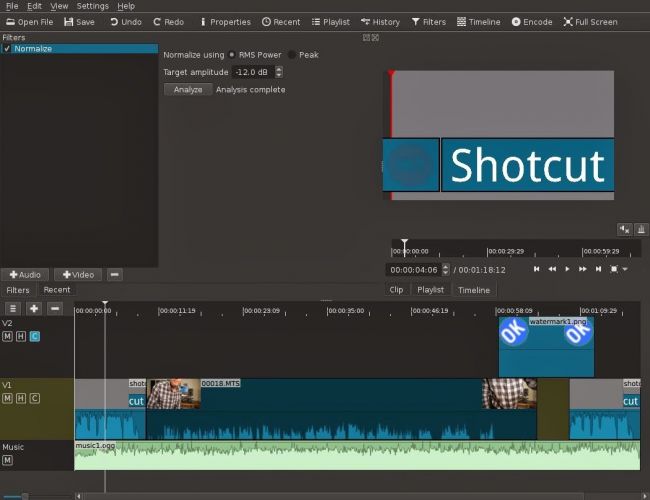



Video-editing for Dummies

… and I am talking about myself here!

If I wanted to do video-editing and wasn’t doing “this U3A stuff”, I’d use Apple’s iMovie which is a “really nice and easy lemon squeezy” way of producing videos, but I can’t because for the Group it has to be cross-platform, and it has to be FREE!

I have suggested using YouTube for simple editing and indeed with the new YouTube Studio that may be your best solution – especially if you’re intending to share the video on YouTube through your Google Account; Google provides some Help & Assistance on how to do some basic video-editing and provides a useful help page with a short video on how to do video-editing using YouTube Studio, and there’s a load of other YouTube videos on the subject as you might expect.

However, not all of you have Google/YouTube accounts, and not all of you would want to “edit in the cloud”, so we need to find another solution that ticks all the boxes.

The one I found that does just that, and which also has a substantial amount of Help and Support documentation and video tutorials is Shotcut.

It’s a bit daunting when you first start it up; so many controls, icons, sliders, windows, options – but don’t let that put you off. Just try the basics to get started and then go back to learn more as you need it.

Here’s a link to a “Getting started …” video, and here’s one to a “manual” which tells you more about video-editing and using Shotcut. If you want to print something out to have beside you as you learn how to navigate the interface, you might find this short (3-page) guide useful.

Having created your video masterpiece you’ll want to save it in a format that is playable on most online services and applications – choose MPEG4 from the Export option – and then decide what you want to do with it. You can of course upload it to Google Photos – there’s no size limitation on videos you upload apart from the 15Gb per week that you get against your free storage limit – which is 15Gb!!!! You could use YouTube of course (see above) – but the quality of the video may be downgraded as you upload it; but I’d recommend you also look at Vimeo as it’s a more privacy-orientated platform for sharing videos and has a better-quality of video playback too. You can do quite a bit with a free subscription, but if you’re into video-production in  big way it might be worthwhile paying  £72 for an annual subscription. Alternatively, you could decide to host your own videos, on your own website – but that’s for another day!

… and that’s about it – except for the dreaded live-demo!

Recorded from Zoom, my first attempt. Not all the panes were showing, so I’m afraid the Timeline pane is not to be seen – it’s at the bottom of the screen. I’ll need to see if I can record the whole screen – not just the Window.

[PS: I’ve now found out how to share the Desktop, rather than just a Window, so there’s no stopping me now. Next time, next time …]


Notes from Zoom Meeting – 30th April 2020

Apologies for the slight delay; if you look on the Notice Board and the Guides Menu bar, you can see I haven’t been idle. All the guides are offered unread; I can’t recommend them as I haven’t looked at them yet, but I have used BDM publications on a few occasions in the past and they produce the “manuals” that you often see in WH Smith & Sons, and in their Motorway Service outlets. Pictorial and easy to read is how I’d describe them.

A good attendance again, up to 15 at one time – I was willing two more people to join to force the Gallery view to extend on to a fifth line; maybe next time.

A Review of items from the last meeting:

David H was happy to report that his issue with shielding and deliveries from Supermarkets was now resolved and that Tesco had offered to provide the service to them without the paperwork (as I understand it). Paul on the other hand described the trials and tribulations in getting Asda to amend their online order.

I reported back that I’d been unable to help Ann with her Nest problem, we’d given some suggestions to Margaret on WhatsApp about her router/printer problem, and to Christine (in the last notes) about her Digital TV antenna query. Jenny was going to follow-up her hardware issues with Neil next week.

Today’s issues:

Owen gave us the good news that U3A had purchased a subscription for Zoom and that he was maintaining a diary for any group wanting to use it. I requested that our weekly meetings be put in the diary.

Renee had received her new iPhone SE (review from The Guardian here) but was having problems with her internet connection – someone will have to help me, I’ve forgotten what the problem was!! Duh!

John was experiencing a number of problems with his MacBook Air  with files being greyed out (presumably in Finder). He was going to do more research of the problem and get back to us. Perhaps Creating a Topic in the Computing Forum might be a good idea John? He was also disturbed that in setting up email for his wife on the computer that her email was now in the same system as his, whereas before it wasn’t. I suggested that this was almost certainly due to the necessity of them both needing to have separate Login IDs and accounts on the machine.

David H asked a question of Paul about the Honor phones, to which Paul replied it was wise to investigate whether they had the Google suite of programs available to them as Trump had barred the US from installing them – same for Huawei phones as well. If you bought an 8A (?) this would not be a problem as this model pre-dated the ban. These phones are available from Argos and Carphone Warehouse.

Jim showed us his new external DVD/CD Drive to replace one that had failed in his Laptop. [I forgot to write the model down – can you remind me] He also enquired whether anyone could help him preview photos on his Windows Laptop (outside his photo-editing software). The order in which the pictures occurred seemed to appear in different orders and so it was difficult to review to delete duplicates etc. Owen suggested that he might look at Irfanview. Someone else suggested that there were specific programs to sort out duplicates – indeed we dealt with that in an earlier meeting – dupeguru was used.

Marilyn asked whether it was safe now to upgrade to Catalina on her Mac. I agreed to check and for her, and did, and as she had no Legacy Software installed, it was now perfectly safe to upgrade.

Jenny gave an account of her work for the National Pensioners Convention (?) and asked members whether any of us had experience of providing training for older people. Some of us shared our rather jaundiced experience. We wish her good luck!

Christine alerted us to the fact that Ancestry was now available online through the Cardiff Library Service – but you had to have a current Library account, with a PIN to access it. I received an email alerting me to the fact that Kew was making a lot of its digital records available online during the Covid-19 lockdown – here’s a link to that. You need to have registered with them. Could be an opportunity for genealogy work?

Don gave a very positive account of his experience in using a TP-Link mesh network device to extend his WiFi network in his house. He also alerted us to a service available for Which? to sign-up for a Scams Newsletter. I told the group that I’d purchased another Trendnet WiFi extender device for outdoor use.

Ann thanked us for our advice to clean her Home button on her iPad with an alcohol-based solution to improve the performance of the button. She also enquired on whether anyone had experience of using any video-editing software. I thought I had some notes somewhere on the subject – maybe done for a Digital Group session, but I can’t find them currently. I did find however that I installed (and used) Shotcut and had also (but not purchased) Wondershare Filmora – these are cross-platform programs which work n both PC & Mac. I also mentioned that I thought you could do some basic editing in YouTube, and then download the finished work back to the home machine and delete the uploaded video(s). This feature of Windows 10 might be of use too. I can see that it might be an interesting idea to try a special Zoom meeting on video-editing – especially since I have to do some myself at the current time.

My notes:

Google (and Microsoft in recent adverts) is responding to the rise in the use of Zoom to extend the use of Google Meet (formerly just for business use) to everyone who has a gmail address. The problem with both of these is that you need to have a Google (or Microsoft) account to make use of the service. Zoom is service and platform independent as it’s web/cloud based.

Zoom has responded to security concerns and this article and video might be worth looking at. Those of us in the Apple camp might find this article interesting for group calls.

Google and Apple combine to provide indirect method of doing contact tracing, but UK government decides to go alone with another NHS IT project. [Watch this site for details if and when it appears – there are also pages on other NHSx Covid IT services.]

I mentioned that I’d found an app to help me tune my guitar (Fender Tune), and that I’d also purchased (£4.99) an app called SongShift to copy Playlists from Spotify to Apple Music (and many other services as well) and back again. It works very well!

Finally, we looked at Phil’s experiences of plumbing in a new dish washer, but more interesting than that was his work in installing Ubuntu Linux on an old laptop. Here’s an article that explains the key differences between Windows and Linux. Something that I’d been meaning to do for some time now and had always intended as a Digital Project. Quite a few members were interested in this as the subject of a Zoom Digital Project and Phil and I will be putting our heads together to try and set this up. Watch this space.