
Welcome
Introductions
What do you want / expect from the Group?
Please tick your attendance, pay £1.50 and agree that you want to join the “Thought grazing” website I run where the notes of the meeting are posted, and that you are interested in joining a WhatsApp Group.
For those who’ve expressed an interest in “Thought grazing” and establishing a WhatsApp Group, I’ll send out an email following the meeting with UserIds and Initial Passwords for new members. [You can change your password if you want to – I’ll write a post that explains how you can do that.] The Password for Password Protected pages on the website is the same as everyone’s initial UserId Password, namely – Ca3rdyddU3A
Do we all know the difference between Google and an Internet Browser? – Don’t be shy. This is perhaps the most important thing to be sure about before we go any further. Two links to look at – Just google it … and the notes from the first meeting last year.
What’s happening to Digital Projects?
Helping others in Cardiff U3A with Computing/IT issues …
- a WhatsApp Help & Advice Group? We agreed to do this and I’ll write to the Committee for them to consider.
- opening-up Thought grazing to non-Group members? We agreed not to do this
Visits. We agreed visits to the Barclays ‘Maker Space’ which Mario will arrange for us, see details below …
In addition, as part of our community commitment, we have also opened a new office in Cardiff designed to help businesses grow and start up in Cardiff. Great for budding Entrepreneurs (which statistics show can be high in the over 50s) and inventors. Part of the Eagle Lab office hosts a “Maker Space” that houses laser cutting, vinyl printing, 3D printing, electronics equipment including soldering etc. It has a distinctly digital feel too with a really switched on Engineer running the lab. We can host groups there and would be happy to chat with your Digital Projects group and your Science groups coordinators, to discuss with them what is available there and whether they would like to bring members along to take a look at the facilities, or host a meeting there. Please feel free to ask them to contact me and I can discuss what they need, what we have, what we can do to support your members.
… in the approach to Easter, and also a visit to the new BBC Centre after Easter. I’ll approach Cardiff Uni about the possibility of a visit maybe before Christmas, and Fred suggested a visit to Brains new brewery site as an alternative.
Boot-up
There will be no News section this year – I’m moving it to Flipboard, unless there’s a really big news story when we’ll take it as part of Boot-up.
Only “really” big news (tongue-in-cheek) is of course the Apple Autumn event streamed across the world last Tuesday afternoon. Available on YouTube and from Special Apple Events (if you’ve got an Apple TV).
Update your Bus Pass – Transport for Wales have taken over the issuing of concessionary bus passes for all of Wales from the Local Authorities. Your current bus pass will not be valid after December 31st 2019.
Gear Guide
Members are encouraged to talk about a new piece of computing/digital technology, or software that they’ve purchased or recently started using.
Paul’s gear experience this summer …
- Emails
- Google Photos
- Banking
- Bit of Surfing
- Some Games
Marilyn approached me for advice on which Mac to buy. She had a Windows laptop which was slowly dying. I advised her the most important thing when buying new gear was to write down very clearly what it was that you wanted to do with the gear, and where you wanted to do it. The upshot of that debate with herself was that she got an iMac desktop instead with faster internal Solid State Hard disk, an external hard disk for her photographs, and a bigger (and better screen) to watch YouTube photography videos on … and a re-organised flat!!!!
Apps Galore
That slot in the meeting where members are encouraged to share their experience (and possibly excitement) at a new app they’ve started using for their smartphone, tablet, laptop or desktop machine.
What’s IT all about?
An opportunity to occasionally go into a little more detail about how something works – eg how the internet works, how does a website work, how does email work, etc etc
Thought grazing, Flipboard and WhatsApp
Demonstration of using Thought grazing – there is a Guide, but I know you’d all like a demonstration.
Using Flipboard – for the best experience, register, follow Thought grazing and install it on your smartphone or tablet. You can add content yourself as well.
Creating a WhatsApp Group … for the Group. If you’ve ticked-the box on the sheet I’ve circulated, I’ll send you an invite to join the Group. You’ll need a mobile phone number to participate (I believe), and have installed the App on your phone. You can then also use if from your laptop/desktop (if your phone is to hand). Currently, it’s not available on a tablet (I believe).
[Update: Paul has written a post detailing how you can add WhatsApp to a Tablet.]


 WhatsApp
 internet) enters your house. If you’re lucky you will have a fibre-optic connection which would give you the fastest speed and performance but the fibre only runs from the Exchange to a Street cabinet. From the cabinet to your house the connection will be by copper. You can
 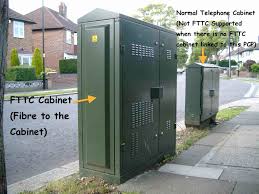 recognise whether you have fibre in your area by looking at the BT street cabinets. If they’re like the one on the left – you have. If they’re smaller like the one on the right of this picture and don’t have vents in them (necessary for cooling) – then you won’t … yet! Inside the cabinet it is still likely that there will be a tidy arrangement



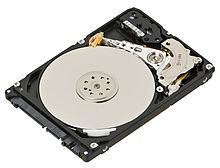 This need for additional storage meant first the introduction of
 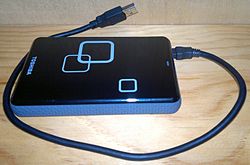 connected usually to a USB port on your computer and then
 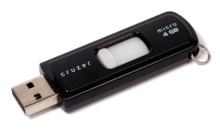 with you and then connect to a USB port on your computer.
 There are a number of Cloud Storage options you can use for free as long as you keep your storage below a certain limit. You can use as many as you want to and you might consider using different providers for different purposes. For instance I use Google Drive mainly for Photo Storage, Apple’s iCloud for documents, and Dropbox for sharing stuff. [I’ll maybe explain why I do this in another post.] The other main provider is Microsoft with their OneDrive (formerly SkyDrive) offering, I don’t tend to use this much, but the principles for using it are much the same as the others.