… I also pointed at the Network Forum where members might wish to raise home networking issues.
I showed a couple of videos from the first post, explaining the difference between Extenders and Powerline networking, and explained the difference between modems, routers and hubs; what the difference between 2.4Ghz and 5Ghz networks is, and when to use each of them, and when you might consider using a Mesh network.
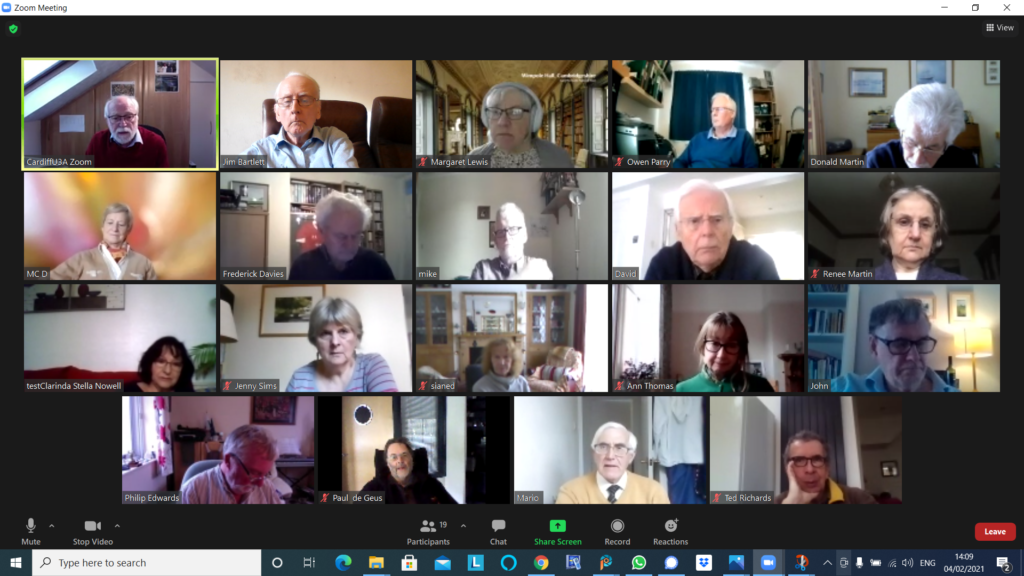
A large attendance yesterday, touching nineteen as shown above. We started with this – The Blue Ball – it’s mesmerising; the digital equivalent of those steel balls that swung on a cradle on execs desks in the seventies, remember them?
I mentioned the emojipedia which I referenced in the last notes and offered to help anyone who wanted to get onto Signal at the end of the meeting. Then it was “round the screen” to find out what members had been up to, or were having difficulties, or issues, with.
Margaret reported on two scams, one from Lloyds Bank (spelt Lloyd) and an “internet interruption” call/text which on traceback (which David H had done having received the same one) appeared to come from Caerphilly! On a more productive note she had been able to transfer a lot of treasured photos from her old laptop – which she’d been unable to upgrade to Windows 10 unfortunately (for a number of reasons, lapsed time, lack of memory) – to their desktop. I mentioned that Linux was still a possibility to revive the old laptop, we could look at that agin when we were all together in person. She also told us about a very pleasant experience attending virtually the Destinations Travel event, and informed us about the Stanfords Travel Writer Festival and the videos from the event which finished yesterday will be online from that site.
Owen reported that following the last meeting, he’d replaced his Powerline Adaptors with new ones and was now getting much improved wired connection speed for his study.
Don had been decorating for the past three weeks, that is when he wasn’t standing in the garden at a safe distance from the lead gas pipe he’d fractured in a wall, thinking it was redundant!
Jim had got himself into “trouble” with Flickr for displaying a photo of some aubergines – this caused much mirth. He reported to me today that Flickr had apologised for slapping an “unsafe” rating on the picture, and it was now visible to everyone. He had also upgraded (on his new laptop) his copies of Audacity (audio editing) and PaintShop Pro (photo editing).
Marie-Christine reported she was having a problem with her version of Lightroom and Windows. I offered to raise the matter on the Lightroom Queen Forum if she told me hat version of Lightroom, and the precise version of Windows she was having problems with.
Fred reported that a switch to Signal was not getting any traction with his friends, and that he’d had an instance of PayPal phishing to contend with.
David H added to Margaret’s description of the “internet will crash” scam. Someone asked where you should report such scams. The preferred method would appear to your ISP, in this case Sky, but Marie-Christine reminded us of Action Fraud (0300 123 2040) – is it a scam in itself? No it’s run by the police. Other tricks are to type the phone number of a caller into a browser and you’ll get an indication from Who Called Me? or Should I answer? Of course for an email you should look carefully at the email header address and type the domain into a browser to see if it’s genuine. David also asked whether it was possible to use WiFi for making telephone calls as the O2 signal in his apartment was so bad. The answer appears to be to activate WiFi calling for Android or iOS. David also reported that he was still not having any joy with his Times subscription on his iPad although it was working on his wife’s machine. I suggested that perhaps the subscription was limited to a fixed number of devices, and that perhaps deleting it from both machines and then re-installing it in order of preferences might solves the problem. Just a thought. Finally, he mentioned the possibility of adding people to a Netflix account and that his daughter had added them to her account and he was paying her £3 a month in gratitude – this being the cost of the extended subscription. It was pointed out that there was a similar option for Spotify, and the launch of Apple One scheme just recently was very similar. [NB The Spotify Family requires address verification; I’m not sure how this works but all members have to have “the same address” – work that one out yourself.]
Mike had nothing to report.
Renee reported some alarm issues ; problems with her satellite TV which required a factory reset eventually as the Italian channels had changed polarity (??) and just re-tuning didn’t solve the problem.
Stella had nothing to report.
John told us about the problems that have dogged them since he lost a bank card and the issues of not knowing whether a request to change details for a direct debit (because it use the former 16-digit number) was a scam or not. Just a nuisance. He wondered whether there were more scams at large currently because of Covid. Not sure. He reported with some delight success in transferring a SIM from an old phone to a new iPhone XR. There were some problems initially (with O2) but these were now resolved and he was getting the service he wanted at the reduced price of the service on the old phone. My standard advice is never to buy a phone on a plan, but to always save up for “the next one” when you purchase outright a new one. Also look at the plans that are available for SIM-only, or Pay as you Go. Measure up what you can get against the ones offered by GiffGaff (running on the O2 network and owned by them), which is my personal recommendation.
Paul had nothing to report, having been too sore to think of anything else but finding a comfortable place to sit since his accidental encounter with his loft.
Phil told us about a Facebook page – Strange things found in walls, including a safe and a gothic arch. He also told us about his experience (relating to Jim’s Flickr episode) of the poor performance of content-filtering for schools internet when he was working.
Ted told us about Just Watch – a really useful website that tells you which streaming service you should look on to find films, etc. He also mentioned how useful he was finding the Snipping Tool in Windows to cut-out an element from an image. I was able to say that the Screenshot Utility in MacOS did the same thing, but there were also short-key sequences for the Mac that did the same thing.
Sianed relayed the sad story of the Smart TV that had lost its smart functionality. For many of us that’s a cause for celebration as the smart functionality decreases with the age of a set as manufacturers don’t keep their apps up-to-date. So now she is in the happy position of using possibly an Amazon Firestick, a Google Chromecast (although Paul doesn’t rate it as there appears to a lot of US-content), a Now TV dongle, a Roku device or an Apple TV. Here’s a recent review of all of the ones available in the UK.
Finally Jenny described the National Pensioners Convention (Wales) event that she was participating in on Tuesday (9th February). You are encouraged to sign-up and take part in the webinar – I’ve circulated details by email earlier. She particularly noted the work of the Good Things Foundation and the Carnegie Trust in supporting digital inclusion activity and projects. She recommended looking at the former’s website.
I concluded the meeting with a gallop through home networking and router configuration which is all written up in this article which builds upon earlier ones.
I’ve written and talked about this subject on a number of occasions. I’ll bring these together in one place, before delving into the specifics of router configuration which prompted the subject for the meeting on Feb 4th, 2021.
For many of us home networking means WiFi, and the first article I wrote was on the subject of “Flaky WiFi” on October 11th, 2016. Members of the group had commented on their WiFi connection appearing to drop and in this article I tried to explain how all the bits and pieces hung together and how you could test your network to see it was working the way your Internet Service Provider (ISP) was proclaiming it should be!
I described “How the Internet works” in this post on June 29th, 2017, with links to a few videos and policy documents which hopefully explain the topic better than I could. Not much has changed since then; IPv6 is still to appear in the domestic market, so we still use IPv4 for internet addressing.
If you’re using an integrated modem/router – often called a hub, typing in the IP address 192.168.1.1 will bring up a screen something similar to this …
… mine is different because I’ve disabled the router functionality so that I can use my own router – a Netgear Orbi Mesh Network – so to just access the modem part of MY hub I use the IP address 192.168.100.1. You can see from the above that only the Modem is active.
So for most users with an integrated modem/router, the first thing you need to be able to do is to access your Router’s Admin Dashboard. This article explains how to do it using the cmd prompt in Windows, but it is probable that your hub/router has an application you can start to do this, or that you can access it from a browser window. For most you would just enter the IP address 192.168.1.1 and supply the UserID admin and the password that I’ve created – the default is quite commonly ‘password’, so you ought to change that!!!
The above screen is for my mesh network, but non-mesh would be similar. Clicking on Internet will give you the ability to change some of the settings for your connection.
Of these the most useful to change is the Domain Name Server (DNS) – these are the servers that translate a URL (eg thoughtgrazing.org) into an IP address. I’ve chosen to replace the default DNS supplied for my VirginMedia (ie 194.168.4.100) Hub (I’ve disabled the router functionality on the SuperHub so that it only acts as a modem) for two servers run by Google (1.1.1.1 and 8.8.4.4). The reason I’ve done this is that these servers are replicated around the internet and will almost certainly be closer to my router than VirginMedia which I think the closest one is in Bristol.
All the other settings can probably be left as they are. The next option is where you configure the name of your network and the channels you’re going to use.
If you don’t like the name supplied to your network by your ISP, you can change the SSID. I did to make it a little more meaningful. You should then consider changing the 2.4Ghz Channel. If you can set the channel to Auto – you should do so because generally the router will then find the best channel for your network. If that’s not possible and you have found your WiFi to be “flaky” due to you and your neighbour using the same Channel(s), try setting the channel manually to one that’s not being used. The article I mentioned before describes how you can find the best Channels for a Mac, and this one identifies a Windows Tool that does the same thing – there’s a Download link at the bottom of that documentation. Here’s an article that describes all the possibilities.
Generally 2.4GHz has a wider range of signal but lesser bandwidth (throughput), and 5Ghz the opposite – shorter distance, but higher bandwidth. On my system my 2.4GHz channel gives me 400Mbps and the 5Ghz channel 866.7Mbps.
You’ll want to look at your Security Options and make sure that you choose the best for the devices that you’re going to connect to your router. Generally, for a home network, WPA2-PSK [AES] should be sufficient.
This article from the Apple website provides a very thorough and detailed examination of what settings you should deploy for your router, and why. Worth a read, even if you’re not an Apple Fanboy!
On your device …
Make sure the security settings match that you’ve just set on your router; remember the SSID and Password you’ve created, and re-connect to your network.