
The purpose of this note is mainly a thank you to David and everyone else in the Computer group for furthering my learning over the past couple of years. It has helped me pick up a lot of news and tips which have helped in day-to-day life.
One topic we discussed that I have found particularly useful and implemented in a number of places is Google maps and especially ‘my maps’ and ‘your places’. I have drawn up a number of maps and embedded them into a website etc.
The latest instance where I have used this is to breathe new life into a project U3A had with the Cardiff Story Museum to devise a Heritage Walking Route in the middle of town. A small group of us spent about three months carrying out the research, being sent on a training course and devising a route and editing the material. Unfortunately the end product never materialised. Whether the museum ran out of funding, personnel or enthusiasm we never found out. We were always told publication was imminent whenever we made enquiries and that was 18 months ago.
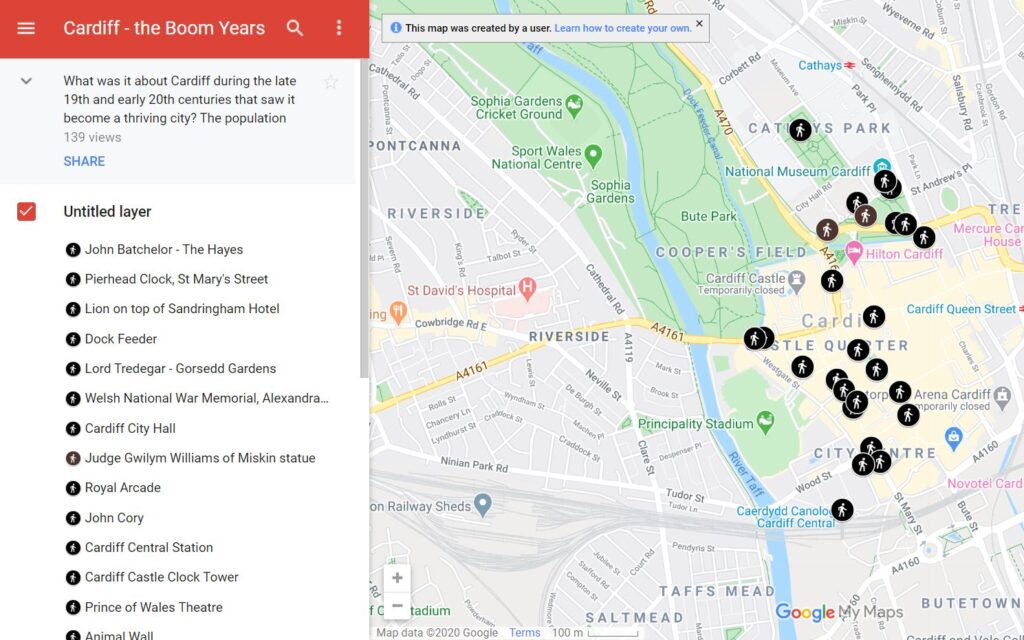
In order to salvage something from our efforts I have recently devised a Google map to include the material we researched and wrote. I have already shared the link with the U3A researchers and would now like to share it with members of this group. I would like to hear any comments you have on content or style etc so I can may be instigate improvements before making it available to all.
Here is the link: https://www.google.com/maps/d/edit?mid=1XZeLwbexn6Dq2Y_lntbB9UQqkb7C-et0&usp=sharing
The other place I have used a Google map extensively is on the Roath Local History website and in particular on the Roath Virtual War Memorial page. Again I would appreciate any comments you have. The page itself is beginning to get very long now and I need to start to thin somehow about putting the information on sub-pages. https://roathlocalhistorysociety.org/local-history/war-memorials/roath-virtual-war-memorial
Here’s just a reminder of how to devise your own map:
- Log into your Google account.
- Click on the nice dots next to your avatar in the top right.
- Click maps
- Click on the three lines on the top left of the screen
- Click Your Places
- Click maps
- Click create map