Covid-19 NHS Tracing App

I will add more detail later, but just wanted to create this for the meeting later today.

The long-awaited app is launched today (24th September).

It’s a really positive step forward I feel, even though there’s the inevitable doom and gloom merchants already slating it.

What is really a sad state of affairs (and here I stray into political waters – dangerous, I know) is that the Track and Trace (outside Wales, where we have tried to do things much more locally and involved local Public Health experts from an early stage much more) is that it does appear to be putting the cart before the horse. The app should have been in place before they allowed the pubs/hospitality outlets to be opened. It should have been made mandatory. You shouldn’t have been able to enter unless you scanned yourself in (or failing that supplied a verifiable name and address. Mini-rant over!

So it’s available on iOS devices from the iPhone 6s onwards, and Android devices from 2017 (Android 6) onwards. You download it from the appropriate app store.

This is how it works …

I’ll get back on to this following the meeting. Please post Comments, or ask Questions below, or raise a Topic in the Covid-19 Forum.

How does it work? This article from Wired UK provides a comprehensive explanation.

The BBC’s explanation of how it works (as an infographic).

Screenshots from installing the app on my iPhone 6s

The app is highlighted on the App store (at least for Apple) today …

… download and install, and start the app …

You will be asked a couple of questions, including an age enquiry …

… and then a Privacy section, which is actually very good and worth reading. The developers have done all they can to make you aware of what the app does, and how it protects your privacy.

So if you click on the Privacy link you will be taken to the UK Government website that gives you more information, after first informing you that it uses cookies …

You might like to click through to the Welsh pages to find out more about Local restrictions …

… then you need to supply the first part of your postcode. The developers have acknowledged there’s a weakness in the app currently in that if you move your location, you can’t change it in the app. They are working on a workaround/fix/upgrade. This would apply if you were to go on holiday somewhere else, or if you were a student moving away from your home.

Having done that you’re into the app, it starts scanning and you’re on your part of the Covid-19 Tracing community.

You can see that north Cardiff is at a Medium risk level (as I believe the whole of Cardiff is) …

… and then you have access to the other features of the app, as shown below …

A recent article about the NHS app which addresses possible Security and privacy concerns.

I wondered about creating a QR code for our house

This is how you can do it

… and this is what it looks like …
cb7af8f1-5a66-4b22-888c-71fbb4057e40_R8K6W825

Covid-19 Tracing app

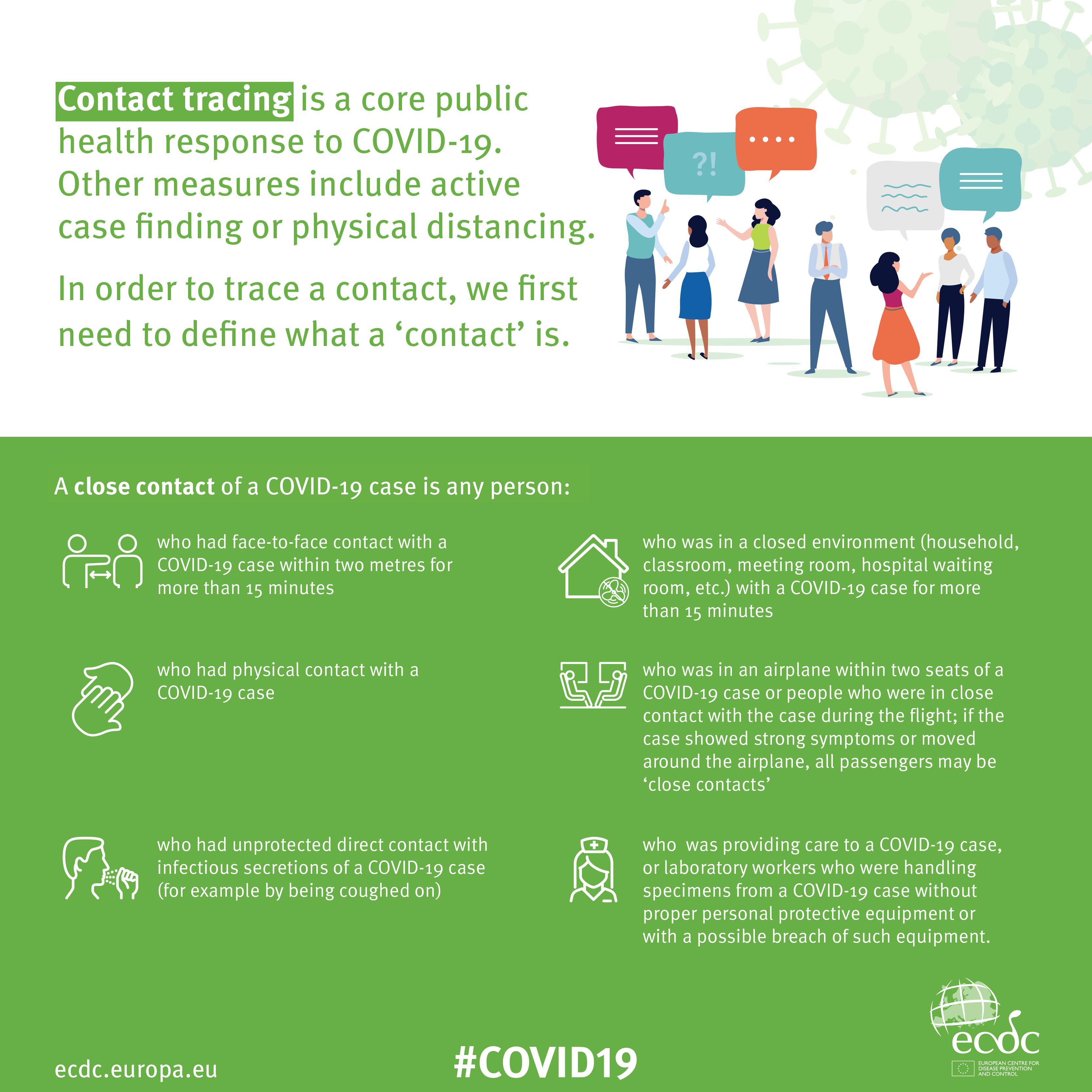
What is Contact Tracing, and how does an app help?

This video from The Guardian is an excellent review of how Contact Tracing works in both a traditional and technology-enable world. You should watch it.

Contact Tracing Infographic

An Infographic that explains how Contact Tracing works

Approaches to creating a Contact Tracing app

Google and Apple have combined to work out a solution that works across iOS/Android devices. Here’s a document that explains how what they have done would work …

Overview_of_COVID-19_Contact_Tracing_Using_BLE


But there are Privacy concerns as this BBC article (with video) explains.  Regardless of those concerns the app is being trialled in the Isle of Wight. It’s useful to know the difference between the approach being used by the NHS and the Google-Apple approach, this article explains those differences.

However there are potentially difficulties …

France (how unexpected) have threatened Google-Apple over the fact they won’t work with France’s standalone approach (a similar approach to the UK); and it has been suggested that failure to adopt a common approach could threaten international travel – as “health passports” will be impossible to implement.

Then there are technical difficulties as iOS and Android devices work in different ways (not unsurprisingly) causing success of the Google-Apple approach to be dependent on a very high adoption amongst Android users.

The new NHS contact-tracing app could be used to send malicious alerts causing people to isolate unnecessarily, The Independent has been told. The app, which is being trialled in the Isle of Wight, tells users if someone they have been in close proximity with may be suffering from coronavirus, meaning they could be exposed. But because users can set off the warnings themselves by reporting symptoms – rather than positive Covid-19 test results – it could be used to send out false alerts. Dr Michael Veale, a lecturer in digital rights at University College London, said Britain’s tracing app had no measures in place to stop individuals “maliciously triggering notifications” using its normal functionality.

Then, on the technical front, some notes from Phil Edwards’ friend

On the Apple-Google Indirect approach

“Their approach seems pretty solid. I think they’re basically exposing some features that previously weren’t available to app developers. Both seem pretty determined to limit the potential for it to be exploited by governments; I think they announced yesterday/the day before that any apps using their system can’t also access location data.

Contact tracing is totally doable without central databases. I can see why a government might want to own data themselves, but there are big downsides (especially security when building in such a rush).”

On the NHSx Direct approach

“The implementation of this contact tracing app really hits that sweet spot between ‘Are they incompetent?’ and ‘Do they have ulterior motives?’ I’d advise against installing it but I doubt it’s going to work properly anyway in its current implementation because of various oddities around how Bluetooth LE works. This isn’t a great article but covers some of it.”

A better comment from Hacker News covers it clearer:

“‘Bluetooth LE has four main states: scanning, advertising, peripheral connection, and central connection. In order to exchange the data that the app needs it needs one device in the peripheral connection mode and the other in the central connection mode. This means one device must have previously been advertising and the other scanning. The two important states are advertising and scanning.Android devices can advertise in the background but they can’t scan reliably, they can do this for a short period of time enforced by the Android time limits on apps running in the background and possibly manufacturer specific power savings measures. These limits are not well documented and cause issues on any device using Bluetooth.iOS devices can’t advertise in the background, however they do advertise an Apple specific advertisement which can’t be controlled by the app but can still be connected to. iOS devices also can’t reliably scan in the background however they can scan more reliably for iBeacons (special adverts) [1]Combined this makes it difficult to work well in the background, Android devices can’t reliably connect to any device, iOS devices can’t connect to each other but iOS devices may be able to connect to Android devices.'”

Finally, a potential for Fraud

Plus fraudsters have not been slow to latch-on to the possibility of piggy-backing on the NHS app as this article in The Guardian show (thanks Phil for the link).

Other references:

The NHS Covid-19 website


You’ve got to laugh!

These videos (amongst many) arrived in Family and U3A Group WhatsApp groups and are linked to our current self-isolation or shielded status. I hope to add others later.


… and I couldn’t resist adding these two, which might not be strictly created in the Covid-19 timeframe, but which both strike a chord – literally!


Notes from Zoom Meeting – 23rd April 2020

I thought it might be a good idea (correct me if I’m wrong) if in addition to any posts that might be generated from the meeting – which I was delighted to see 14 members attended – that I wrote a couple of notes about it.

Covid-19: The main topic of conversation was the difficulty in getting deliveries arranged for shielded people. David H related how his wife had only just (after 6 weeks) received a letter to tell her that she should be considered to be vulnerable and thus shielded – we have other members who are also in that category. Anyway, the problem is getting in touch with a Supermarket to get you on the list for priority deliveries. In Wales that’s compounded by the fact that the letter does not contain a NHS number (as I understand it) and yet the supermarkets require that information. Duh!

It would appear in England that those in the vulnerable category are getting free drops of food – even if they don’t want, or need them and it’s impossible to opt out easily. [We have a friend that’s arranged to take them to the local food bank.] It also appears that the supermarkets are responding off the peg so-to-speak and are approaching customers to offer deliveries even if they’re not regular customers and they would prefer their regular supermarket to reach out to them. Again duh!

This is an unfortunate set of circumstances. On the positive side the number of click’n’collect slots from our local Sainsbury’s seem to have increased – even if the alternatives picked off the shelves for us, are not what we would have wanted – how do you interpret a request for an oatcake into a ginger biscuit????

I’ll put this into the Covid-19 Topic – so please comment there and update my understanding – if I’ve got it wrong!

[Update eConsult]: I forgot this when I wrote up the notes at first. Just a quick note for you to see if your GP Surgery’s website has a link to eConsult on it – as well as My Health Online which you can sign-up for to get repeat prescriptions and book appointments … sometimes! Anyway eConsult gets you to fill-in a form that explains your symptoms as best you can, and asks if you have a preferred doctor from the practice who you’d like to ring you back. My experience was that I got a call back within a couple of hours. Really much better for non-serious consultations that you think can be handled without a face-to-face session. I can see that things will never be the same again. I can see that I’ll be asking my doctor to “zoom” me after I’ve first filled in an eConsult referral. Interesting times!

Screen capture on Windows: Apparently there is piece of software called Snipping Tool in Windows that does the trick, here’s an article that shows a number of ways of solving that issue. On the Mac, you can use a combination of key strokes to Copy screens, or sections of screens to the Clipboard, from which you can Paste the contents to a program. Here’s an article that shows you how to do this on a Mac. On an iPhone you can capture your screen and take a picture that goes to your Camera Roll in this way, and can create a screen recording like this, on Android you take a screen shot this way.

Digital HDS Antenna: Well, it appears Christine that the Dragons Den might well have been taken in by this product sometimes called TV Fix, but also DigitalHDS and TV Brite. The reviews are not good. Let’s pass on …

Sharing Notes between iPhones: Yes you can do that Don, and yes it might be useful for creating shared shopping lists – always useful at a time like this – but my recommendation would be to use Evernote which means you’re not restricted to just a Mac, you can use it on a Windows and also from the web, and share notes that way as work on them collaboratively. Evernote has replaced a word processor for most of my notes taking and writing. Gets 5* from me, and I pay for it too now!!

Have I been pwned?: Another use case for this very handy website that tells you whether your email address has been hacked is a check on your password – just click on this link and supply your “favourite” password to see if it’s out in the wild!

Problems with Nest and Google accounts: An issue we couldn’t really provide an answer to. In fact, I had difficulty understanding (not Margaret’s fault, I’m just not familiar with the product). Paul suggested that maybe trying to use a different email account with the device might allow you to get admin rights back. I really don’t understand this, so I suggest that Margaret might put it up as a Topic in our Forum – perhaps someone outside the Group might be able to help?

[Update We will fix your PC]: Forgot this in the first write-up of the notes. I’ve put a “plug” for Neil in the Computer etc. Forum.

Creating a Zoom meeting: I promised to produce a quick video showing how you can Schedule a meeting as a host, rather than just be on the receiving end. Here’s the video.

New website: I demonstrated the features of the new website using the Screen Sharing facility in Zoom. In feedback to this it was suggested that perhaps there ought to be a facility to add a Photograph to a Profile – I promised to look into this. If you have a WordPress account, this gets picked up automatically, but it should be possible to optionally add a Profile picture. I also pointed at the way of creating a Movie using Quicktime Player (goto Method 2) on the Mac. I’m sorry, but I can’t find an equivalent, easy way of doing it on Windows – it must exist!

Finally, by way of light relief, here’s a video I had thought of showing with you at the end of the call. The Project Manager’s nightmare. Enjoy …