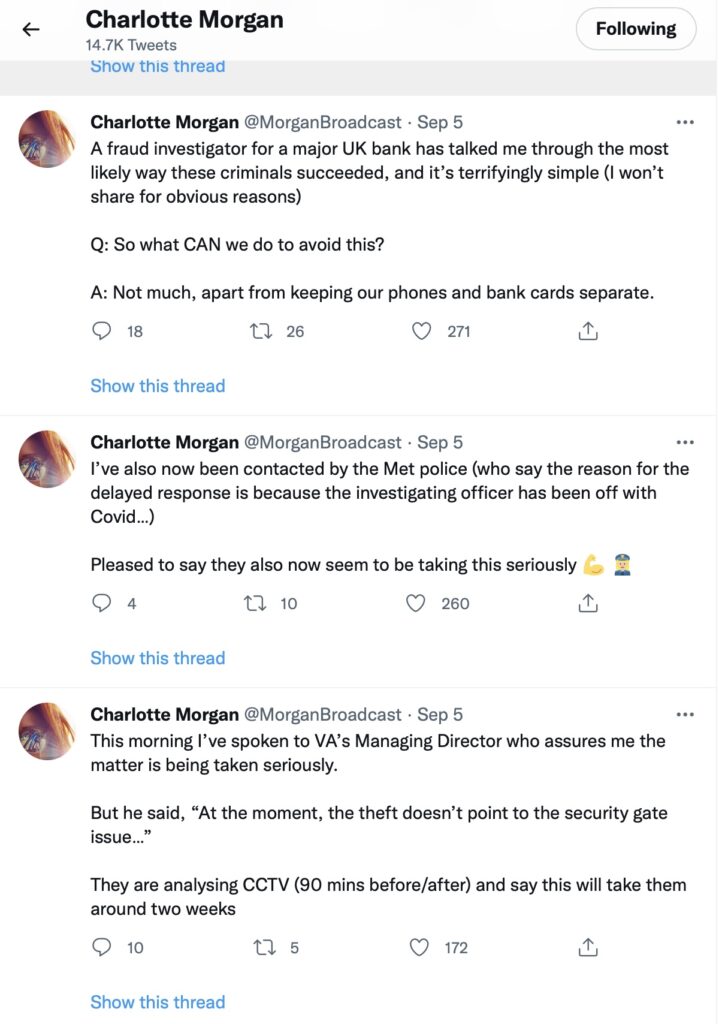
A rather disturbing incident involving a stolen phone and credit cards and the ability of a fraudster/thief being able to reset a user’s password/pass-number for a high-street bank occurred in September involving a journalist called Charlotte Morgan. She described what happened to her (and it transpired others) when her phone and credit cards were stolen from a locker in her local gym.
Charlotte chose to broadcast her experiences on twitter and got a range of helpful and supportive pieces of advice.
So we start with the first piece of advice – keep your phone and your credit cards separate. Don’t store/keep them in the same place. Maybe, if you follow the advice that follows later you should just keep the credit card details only on your phone and dispense with using plastic. For Apple that involves storing the card information in your Wallet.
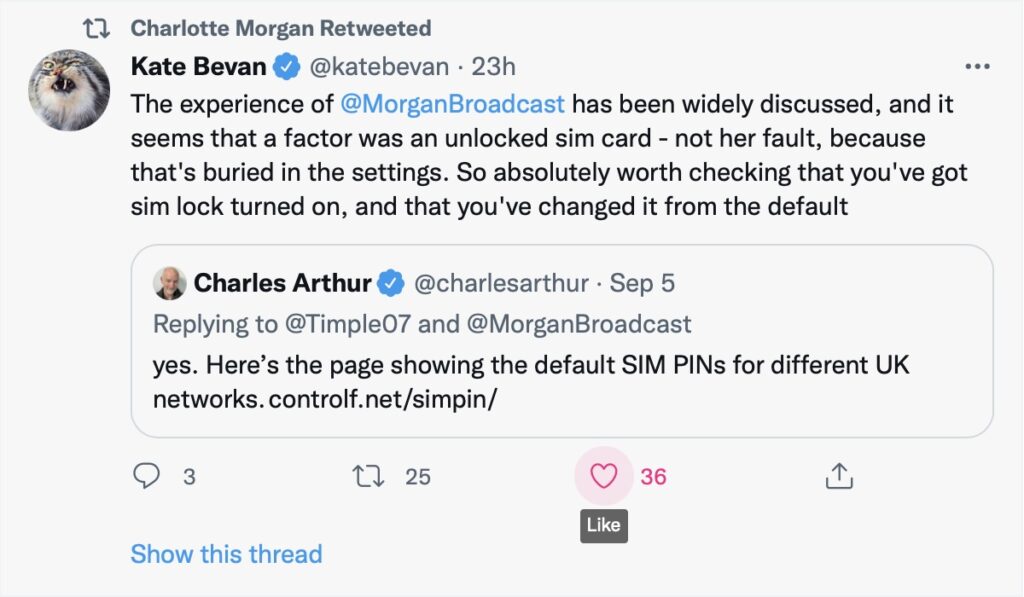
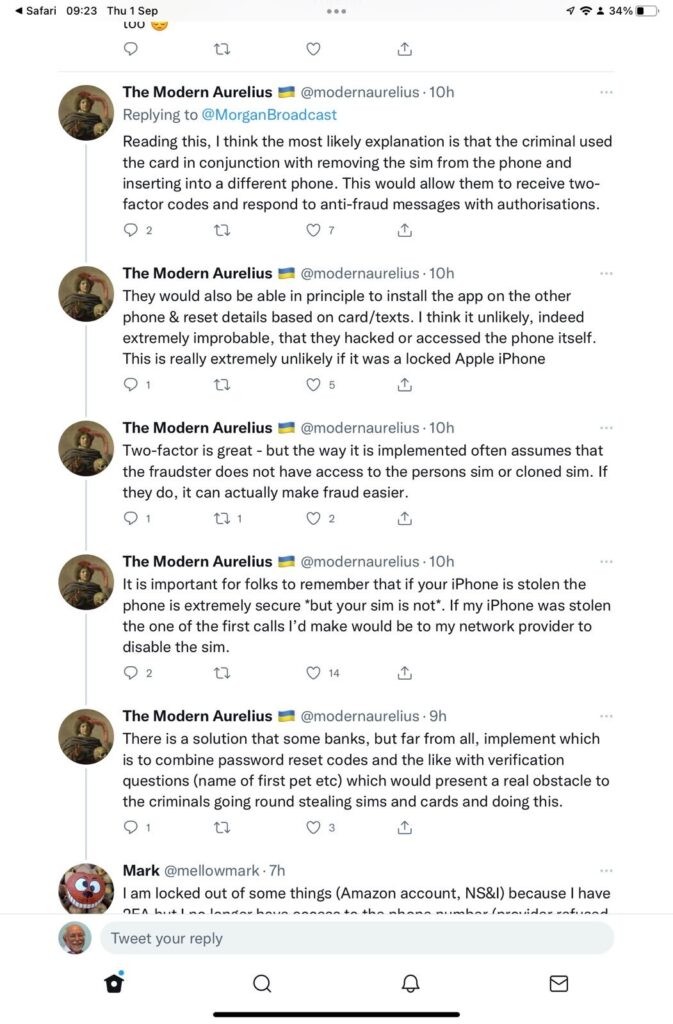
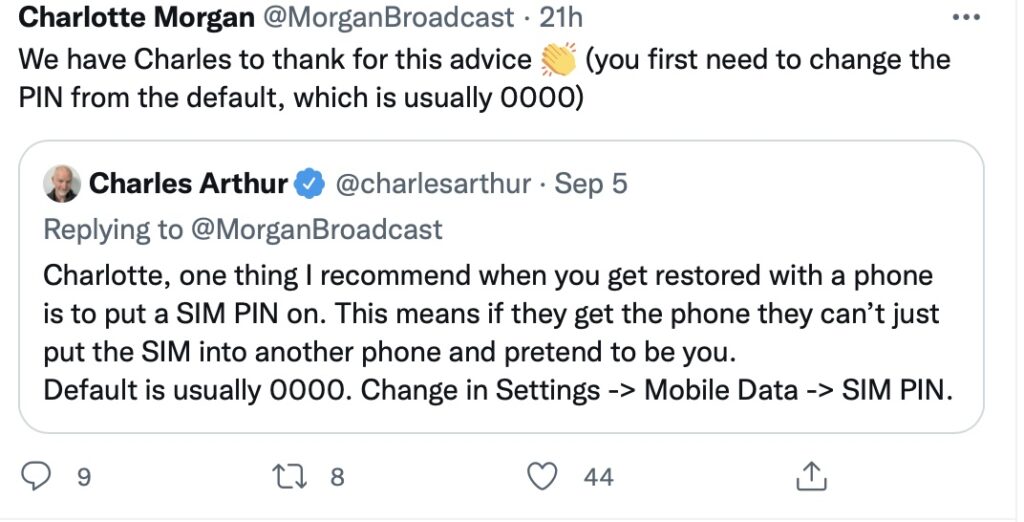
And this is the security loophole that the thief was exploiting. The default setting when you get your new phone, and insert the SIM is to leave the SIM unlocked. This means that the SIM can be taken out of the phone with your network details (and more), and inserted into another phone. Not really what you want, is it? So, lock the SIM to your phone, and by doing that, if the SIM is taken out – it is of no use in another phone. You will need to remember the new PIN you create which you will have to supply when you power-up your phone, or when you change it for a new/replacement. This is obviously an important piece of information to remember!!! There is no way you can recover the SIM PIN yourself if you forget it, you have to contact your carrier and get a new SIM and a PUK.
So what actually happened. This thread explains it well …
But what are the default SIM PINs that network operators use?
This link will be useful as it lists the default SIM PINs for the major network operators. These are the ones you need to change to your own personally chosen PIN.
It really is quite important. Change your SIM PIN and keep your credit cards separate from your phone.
Addendum: Remember – we had personal experience of SIM swapping and that’s written up in this post entitled “Identity theft”.
Great article Jenny! I missed this when the mag. came out a couple of weeks back. Our Jenny has an article in “The Pensioner” – the magazine of the Civil Pensioners’ Alliance (which I joined because of the good deals on Insurance products).
This article will record the progress of the planned switch-off of the analogue PSTN (public switched telephone network) by 2025, and its implications to all of our generation, as Openreach moves to implement a fully digital service. The issue was brought to the attention of the Cardiff u3a Computer Group by Jenny Sims, a group member, who has a number of roles including being Chair of the National Pensioners Convention (NPC) Digital Working party and an NPC Executive Member.
It’s an article that will change over the next few months and years, so please look back for updates and further information as we become aware of issues, problems and hopefully solutions.
What implications might this have for older people?
Digital services are not universally good across rural areas
There will need to be a solution to the issue of digital services requiring power – what happens if there’s a break in power supply, this has been highlighted recently after the storms brought down power lines in Scotland and NE England
Cell telephony doesn’t provide a 100% coverage as a backup to digital services
What implications might this have for people with certain disabilities?
It’s been reported to us that certain people with visual problems have been experiencing difficulties in the Salisbury pilot area with the withdrawal of the 1471 service, with call-back not working, and with needing to install a new phone number
A video showing the opportunities and issues for Telecare
Here’s a link to the Progress Openreach has reported by January 2022. Much of this is very technical, so some of the following information might be more readable.
Here’s a briefing from BT on the project; and an update on what’s happening in Wales forwarded to Jenny in her role sitting on the National Pensioners Convention. Which? have also published a briefing on the subject which I encourage you all to look at.
Jenny has also written the article below, which will hopefully appear in the latest Cardiff u3a magazine …
====
Ring, ring: Ready for the big ‘phone switchover?
Only three years until 2025 when all telephone providers will do the big “switchover” moving landline customers from the country’s traditional telephone network to digital technologies and analogue services are finally shut down.
Though BT published a timescale back in 2019, many older people’s organisations have expressed concern that the public have not been given enough information about the Public Switched Telephone Network (PSTN) moving to Voice Over Internet Protocol (VoIP), what it really means and how it could adversely affect older and vulnerable people.
Among them is the National Pensioners Convention (NPC), which represents 1.5 million members in Wales, England and Northern Ireland.
Among the big questions is what happens if there’s a break in power supplies and people need to access emergency services – because the new system will run off broadband – and handsets will have to be plugged into an electricity socket.
Providers say solutions will be found – which will include the provision of emergency battery-powered backups for phones and routers.
This scenario became a reality last November when Storm Arwen hit the UK, causing widespread power outages and left 9,000 homes without power for more than a week.
Jan Shortt, NPC General Secretary did interviews with Talk Radio and other stations, and heard from affected listeners.
She said: “They raised the issue of not being able to charge mobile phones and other devices and therefore not able to summon help. It is clear that the majority of the population had not heard of the digital switch.”
In January Ofcom held an online public meeting to give an update on the “switchover” rollout throughout the UK and provide an opportunity to ask questions.
Jeff Richards, an NPC Wales executive member and a retired Swansea BT engineer, attended. He said: “Unfortunately they did not answer any questions that I raised regarding vulnerable customers nor anything on power supply. I felt that my questions were merely swatted away.”
BT have agreed to meet the NPC to address their concerns – which include, who will pay for the battery packs (some around £160) – the customer or provider?
Virgin Media has already promised that vulnerable customers with “accessibility needs or don’t have a mobile phone” will be given an emergency backup line at no extra cost.
Unsurprisingly, customers in various areas have reported teething problems as the system is being rolled out. For example, people in the Salisbury pilot area with visual problems have experienced difficulties with the withdrawal of the 1471 service and the need to get new phone numbers.
Hopefully, in the three years left of the rollout, teething problems will have been sorted. But be prepared: only an estimated 1.5million out of 29million landlines have so far been converted – and one day those old phones will stop ringing!
I sent a long email to members after our last meeting of the session yesterday and thought it probably a good idea to post it on the website as well for reference, and for comment.
We’ve just finished our last meeting of the year – 17 of us met in our virtual state for a lively and very good natured (that means fun) session. Courtesy of Jim, I’m attaching a screenshot of those of us who took part.
We discussed next year, and how comfortable we felt about meeting in person again, and there was a general consensus that it was just too early to commit now to meeting as a group in September. That’s regretable, but completely understandable and a reasoning that I’m 100% in tune with. Until we can meet as a Group, in the same way as we used to meet, I won’t feel comfortable – especially in the small Meeting Room at URC.
There are other venues we could possibly meet in, and the Committee will be looking at possibilities for the re-start, and we will keep a “watching brief”, but as Phil Edwards said – the acid test will be when a crowd is possible at a Cardiff Blues match. Until then I think all of us have very understandable worries. Add the issue of Public Transport and mask-wearing and it really doesn’y make sense for us to take unnecessary risks when Zoom has been working so well for so many of us.
Over half the group has met at a meeting at some time since we started. The format of the meeting has been to go “round the screen” with attendees telling us what they’ve been up to, but more importantly the technology-related issues they’ve been facing. This has been very beneficial to all of us, so-much-so that I’ve rarely had to do much presentation. Being able to rely on the Group, or to “think on my feet” to provide solutions – it’s been great fun, and we’ve all learnt a lot I think. The Notes of the Zoom meetings have been written up and are on the Thought grazing website.
So … (and this is the point of this message) I wanted to let you all know that we’ve decided to continue with Zoom meetings for the time being. The first one of the new session being on Thursday 10th September at the usual time. They will then continue fortnightly (rather than 2nd and 4th Thursdays) like it used to be. I would like to encourage members who haven’t joined us on Zoom to consider giving it a go. If anyone would like me to help them setup Zoom ready for next session, please get in touch and we can arrange a one-to-one session to let you get some confidence on how it works. That’s how a few members in the attached screenshot joined Zoom and now they’re very active participants!!!
Zoom is always going to be a poor alternative to face-to-face meetings, but it has worked surprisingly well for those of us that have tried it out, and perhaps if you haven’t, then perhaps you might want consider giving it a go.
However, if you no longer want to receive these emails, and want to leave the Group, I would of course completely understand. Please let me know, or just leave the Group from the Beacon Members page. We would of course miss you and you could always rejoin once the “new normal” has been established! Your access to the Thought grazing website would in any case remain as long as you are a Cardiff U3A member.
Thanks for reading to the bottom of this long email.
Apologies for the slight delay; if you look on the Notice Board and the Guides Menu bar, you can see I haven’t been idle. All the guides are offered unread; I can’t recommend them as I haven’t looked at them yet, but I have used BDM publications on a few occasions in the past and they produce the “manuals” that you often see in WH Smith & Sons, and in their Motorway Service outlets. Pictorial and easy to read is how I’d describe them.
A good attendance again, up to 15 at one time – I was willing two more people to join to force the Gallery view to extend on to a fifth line; maybe next time.
A Review of items from the last meeting:
David H was happy to report that his issue with shielding and deliveries from Supermarkets was now resolved and that Tesco had offered to provide the service to them without the paperwork (as I understand it). Paul on the other hand described the trials and tribulations in getting Asda to amend their online order.
I reported back that I’d been unable to help Ann with her Nest problem, we’d given some suggestions to Margaret on WhatsApp about her router/printer problem, and to Christine (in the last notes) about her Digital TV antenna query. Jenny was going to follow-up her hardware issues with Neil next week.
Today’s issues:
Owen gave us the good news that U3A had purchased a subscription for Zoom and that he was maintaining a diary for any group wanting to use it. I requested that our weekly meetings be put in the diary.
Renee had received her new iPhone SE (review from The Guardian here) but was having problems with her internet connection – someone will have to help me, I’ve forgotten what the problem was!! Duh!
John was experiencing a number of problems with his MacBook Air with files being greyed out (presumably in Finder). He was going to do more research of the problem and get back to us. Perhaps Creating a Topic in the Computing Forum might be a good idea John? He was also disturbed that in setting up email for his wife on the computer that her email was now in the same system as his, whereas before it wasn’t. I suggested that this was almost certainly due to the necessity of them both needing to have separate Login IDs and accounts on the machine.
David H asked a question of Paul about the Honor phones, to which Paul replied it was wise to investigate whether they had the Google suite of programs available to them as Trump had barred the US from installing them – same for Huawei phones as well. If you bought an 8A (?) this would not be a problem as this model pre-dated the ban. These phones are available from Argos and Carphone Warehouse.
Jim showed us his new external DVD/CD Drive to replace one that had failed in his Laptop. [I forgot to write the model down – can you remind me] He also enquired whether anyone could help him preview photos on his Windows Laptop (outside his photo-editing software). The order in which the pictures occurred seemed to appear in different orders and so it was difficult to review to delete duplicates etc. Owen suggested that he might look at Irfanview. Someone else suggested that there were specific programs to sort out duplicates – indeed we dealt with that in an earlier meeting – dupeguru was used.
Marilyn asked whether it was safe now to upgrade to Catalina on her Mac. I agreed to check and for her, and did, and as she had no Legacy Software installed, it was now perfectly safe to upgrade.
Jenny gave an account of her work for the National Pensioners Convention (?) and asked members whether any of us had experience of providing training for older people. Some of us shared our rather jaundiced experience. We wish her good luck!
Christine alerted us to the fact that Ancestry was now available online through the Cardiff Library Service – but you had to have a current Library account, with a PIN to access it. I received an email alerting me to the fact that Kew was making a lot of its digital records available online during the Covid-19 lockdown – here’s a link to that. You need to have registered with them. Could be an opportunity for genealogy work?
Don gave a very positive account of his experience in using a TP-Link mesh network device to extend his WiFi network in his house. He also alerted us to a service available for Which? to sign-up for a Scams Newsletter. I told the group that I’d purchased another Trendnet WiFi extender device for outdoor use.
Ann thanked us for our advice to clean her Home button on her iPad with an alcohol-based solution to improve the performance of the button. She also enquired on whether anyone had experience of using any video-editing software. I thought I had some notes somewhere on the subject – maybe done for a Digital Group session, but I can’t find them currently. I did find however that I installed (and used) Shotcut and had also (but not purchased) Wondershare Filmora – these are cross-platform programs which work n both PC & Mac. I also mentioned that I thought you could do some basic editing in YouTube, and then download the finished work back to the home machine and delete the uploaded video(s). This feature of Windows 10 might be of use too. I can see that it might be an interesting idea to try a special Zoom meeting on video-editing – especially since I have to do some myself at the current time.
My notes:
Google (and Microsoft in recent adverts) is responding to the rise in the use of Zoom to extend the use of Google Meet (formerly just for business use) to everyone who has a gmail address. The problem with both of these is that you need to have a Google (or Microsoft) account to make use of the service. Zoom is service and platform independent as it’s web/cloud based.
Google and Apple combine to provide indirect method of doing contact tracing, but UK government decides to go alone with another NHS IT project. [Watch this site for details if and when it appears – there are also pages on other NHSx Covid IT services.]
I mentioned that I’d found an app to help me tune my guitar (Fender Tune), and that I’d also purchased (£4.99) an app called SongShift to copy Playlists from Spotify to Apple Music (and many other services as well) and back again. It works very well!
Finally, we looked at Phil’s experiences of plumbing in a new dish washer, but more interesting than that was his work in installing Ubuntu Linux on an old laptop. Here’s an article that explains the key differences between Windows and Linux. Something that I’d been meaning to do for some time now and had always intended as a Digital Project. Quite a few members were interested in this as the subject of a Zoom Digital Project and Phil and I will be putting our heads together to try and set this up. Watch this space.
I’ve operated this site as a mixed Public/Private website for quite a while now, but as we’ve recently decided to open up the Private area to more than just the Cardiff U3A Computer Group members, it also seems to make sense – at least to me – to gradually move away from using this site as a Public Blog as well, and make it a Members only website that you need to Register with to read the Private content.
If you’re a member of Cardiff U3A Computer Group – nothing has changed, your Login ID and Password have not changed; you may however see fellow U3A members contributing with Posts and Comments – make them feel at home!
I will not be posting Public Posts on this site from March 31st, 2020. The old posts will remain, I’m not intending to delete them, but new ones will ONLY appear on thoughtgrazing.com. I have provided a pointer to new posts on this Public site in the sidebar on the Home page.
The Flipboard magazine will be the same for both sites. I encourage you to look and see the content there.
This blog is one way I am offering to share with fellow Third Agers, what I have learned, and have experienced, through a lifetime of using IT. I think of this as ‘thought grazing’ by us ‘silver surfers’ – click on the link above for a fuller explanation – particularly for those members of the University of the Third Age in Cardiff.
The two most recent posts to the Blog appear in the feed below. To see them fully and either Comment, or Reply to a Comment, you will need to click on the title of the Post first so that it opens in a window by itself.
If you’re a Cardiff U3A Computer Group member, after Login, you will also see Private posts in the feed below, and be able to read the content of Member Posts, or Meeting Notes, from the Menu above.
Once you’ve logged in you’ll also be able to view some guidance on how to use the site from the Cardiff U3A Computer Group menu.
Enjoy!
David Harrison


 Apologies for the slight delay; if you look on the Notice Board and the