“When WhatsApp was acquired by Facebook in 2014, it promised netizens that its instant-messaging app would not collect names, addresses, internet searches, or location data. CEO Jan Koum wrote in a blog post: “Above all else, I want to make sure you understand how deeply I value the principle of private communication. For me, this is very personal. I was born in Ukraine, and grew up in the USSR during the 1980s
One of my strongest memories from that time is a phrase I’d frequently hear when my mother was talking on the phone: ‘This is not a phone conversation; I’ll tell you in person.’ The fact that we couldn’t speak freely without the fear that our communications would be monitored by KGB is in part why we moved to the United States when I was a teenager.”
Two years later, however, that vow was eroded by, well, capitalism, and WhatsApp revealed it would be “coordinating more with Facebook,” and gave people the opportunity to opt out of any data sharing. This time around, there is no opt-out for the sharing of data with Facebook and its tentacles. Koum left in 2018.”
So this all started 4 years ago, when WhatsApp announced a change to their Terms and Conditions (Ts&Cs) – the first change in many years, and the first since being taken over by Facebook. It was possible to opt out of this change which was announced as only to “improve the experience of Facebook users” (that’s kind of them – do I believe that?).
I don’t know whether I chose to opt out, I suspect I did, but I have no way of knowing!!! Whatever … I only had 30-days to opt out then, and I can’t go back and opt-out now.
I was alerted to the current impending change on February 8th, which is a take it, or leave it choice by this article in a well respected techie (UK-based) blog – The Register. It’s subsequently been updated, and may be updated again I suspect as more information is squeezed out of Facebook.
Before Christmas in a meeting of the Cardiff U3A Computer Group, I referred to the repatriation of UK-data to the US as a consequence of Brexit. So far Facebook and Google (and there could be more) have announced their attention to do just that, and others will undoubtedly follow. Free from Europe, our government has said we will follow GDPR (it had very little option), but the US tech companies see the wisdom of not having a European base for their (our) data and are hopeful of less stringent Federal privacy restrictions under a new Democratic Party controlled Senate committed to introducing legislation.
Once out of the European protection, we in Britain could in the course of time, and after the repatriation of Facebook data to California (read the article above), be deemed not to be part of the European area and so the protection offered by WhatsApp/Facebook suggested in this article in “The i“, would cease to apply. So the short-term acceptance of these Ts&Cs thinking they don’t apply to us, might be scuppered should the data-hosting move to the US.
As of today, I’m at a loss to know what to advise or do. I’m hopeful of further clarification in the days to come, but I’ll leave acceptance of the new Ts&Cs to the last few days before February 8th.
I was challenged with this question last Thursday when I told my family about the intended changes to the WhatsApp Terms and Conditions of Use. I didn’t reply to my IT-savvy son until this morning when I was first asked to agree to these new Ts&Cs. This is what I wrote …
“It starts with trust, and then you work away from that. It’s what a company does with information and whether you can then trust them to handle it properly. Google+ was a closed system that you opened up; Fb is an open system that even though it has Privacy Controls – which you need a degree to work out how to set them – essentially allows them to do anything with what appears on their platform.
You take a photo – you don’t retain copyright, you assign that right to them when you publish to the platform – you lose some control over what is done with the photo. You can’t opt out of adverts (understandably – that’s how they make there money) – you are conned into thinking that in allowing them, you will get a better experience.
For whom? For you – no, they’re just an annoyance to me, but for others they just drive people to buy stuff they might not want/need. For them – yes, that’s how they drive income and more.
So it’s the more that’s more interesting and insidious because what they do with that information leads to targeting people with posts, hence my reference to Brexit and Trump. [I had said in my brief first reply – Cambridge Analytica, Brext and Trump.] The algorithms behind the scenes work the data and susceptible people get targeted with posts as well, not just adverts. I could go on, but as I said – it’s all about Trust, and Fb as a company is one that I just don’t trust.
Getting data from WhatsApp was something they committed at take-over they wouldn’t do. Now they are starting to do just that. Next step targeted adverts on a platform which is advert free; then “posts from others you might be interested in” – not the encrypted ones, but ones from Public Figures. Then “oh! dear” we have to drop encryption because of new privacy laws in the US. [Aside: is it a coincidence that Google, Twitter and Fb appear to be more privacy focussed since the Republicans lost control of the Senate and they just might want to be on the right side of the argument that’s going to come in the US in the next four years ].
So I always logout of Fb to stop them tracking me; I suspect that WhatsApp will have a mechanism that prevents a user from being disconnected so Fb with these new Ts&Cs will be tracking as well as getting the other personal info from users.
“When WhatsApp was acquired by Facebook in 2014, it promised netizens that its instant-messaging app would not collect names, addresses, internet searches, or location data. CEO Jan Koum wrote in a blog post: “Above all else, I want to make sure you understand how deeply I value the principle of private communication. For me, this is very personal. I was born in Ukraine, and grew up in the USSR during the 1980s
One of my strongest memories from that time is a phrase I’d frequently hear when my mother was talking on the phone: ‘This is not a phone conversation; I’ll tell you in person.’ The fact that we couldn’t speak freely without the fear that our communications would be monitored by KGB is in part why we moved to the United States when I was a teenager.”
Two years later, however, that vow was eroded by, well, capitalism, and WhatsApp revealed it would be “coordinating more with Facebook,” and gave people the opportunity to opt out of any data sharing. This time around, there is no opt-out for the sharing of data with Facebook and its tentacles. Koum left in 2018.”
So this all started 4 years ago, when WhatsApp announced a change to their Terms and Conditions (Ts&Cs) – the first change in many years, and the first since being taken over by Facebook. It was possible to opt out of this change which was announced as only to “improve the experience of Facebook users” (that’s kind of them – do I believe that?).
I don’t know whether I chose to opt out, I suspect I did, but I have no way of knowing!!! Whatever … I only had 30-days to opt out then, and I can’t go back and opt-out now.
I was alerted to the current impending change on February 8th, which is a take it, or leave it choice by this article in a well respected techie (UK-based) blog – The Register. It’s subsequently been updated, and may be updated again I suspect as more information is squeezed out of Facebook.
You may remember in a Group meeting before Christmas I referred to the repatriation of UK-data to the US as a consequence of Brexit. So far Facebook and Google (and there could be more) have announced their attention to do just that, and others will undoubtedly follow. Free from Europe, our government has said we will follow GDPR (it had very little option), but the US tech companies see the wisdom of not having a European base for their (our) data and are hopeful of less stringent Federal privacy restrictions under a new Democratic Party controlled Senate committed to introducing legislation.
Once out of the European protection, we in Britain could in the course of time, and after the repatriation of Facebook data to California (read the article above), be deemed not to be part of the European area and so the protection offered by WhatsApp/Facebook suggested in this article in “The i“, would cease to apply. So the short-term acceptance of these Ts&Cs thinking they don’t apply to us, might be scuppered should the data-hosting move to the US. [I think it’s clear to me that those in the EU will continue to be offered an opt-out – the market is too large for them to enforce a retrospective acceptance, but we in the UK …. !!!]
[Clarification] I should have made it clear that it is not the data that’s being repatriated as this could be held on many servers all around the world, but it is the legal ownership of our accounts that is being repatriated. The US Tech Corps have been “troubled” by the number of Anti-Trust, and Anti-Competitive legal cases that have been brought against them in the EU just recently. Being found guilty can subject those companies to very high levels of fines. In addition the tax haven which was Ireland has been challenged which provides another impetus to move their (that is Facebook and Google) offices back to the US. So far Twitter and Apple have stood alone as companies that have decided to stay in Ireland, whilst Amazon is based in Luxembourg. So it’s not just Privacy that is a driver to repatriate our accounts.]
No certainties, just doubts and that’s where mistrust comes in.
As of today, I’m at a loss to know what to advise. I’m hopeful of further clarification in the days to come, but I’ll leave acceptance of the new Ts&Cs to the last few days before February 8th.
[NB. I’m posting both these articles on the Public Thought grazing site as well.]
Well … first you need to only download the software from the official links of the provider, eg LastPass, Dashlane or 1Password, or from the app store of your mobile device.
Then be assured that the passwords (if you use these downloads) are not stored on a central server anywhere. They are stored in encrypted form on your device. When you open a different device the password is transferred from one “vault” to another in encrypted form. The service provider just provides the encryption algorithm which it can’t have access to itself. So rest assured as long as you use the “official” downloads they’re very safe.
A good question! I certainly can state that mobile banking is safer from a mobile device than from an internet browser because the latter can be compromised because it’s more open to the internet and issues that you install anti-malware software to protect you.
I would judge that the fact that as all software downloaded onto these devices go through a “shop” maintained and supported by the hardware vendor that they have done checks on the software and the supplier before releasing it through the shop. That’s a very powerful first step and is why I’m a strong supporter of these “shops” and would be distressed if some alternative means of downloading software onto a mobile device was allowed.
However, nothing protects you against yourself and that’s where the hints and tips in the third part of my “Protect yourself online” talk come into play.
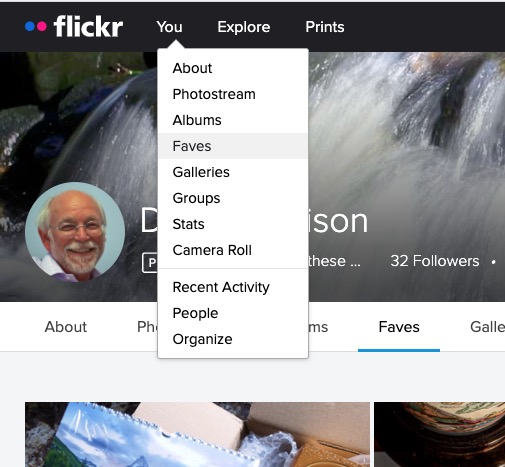
Most of the time people join flickr to showcase their photos, to get faves, and to get comments (hopefully both positive and constructive) to enable them to improve their photography. The photos you upload are shown in your flickr Photostream (or Camera Roll) which you can browse and put into Albums. You can create your own Galleries of your (and other people’s) images; Fave images that appear in your Activity stream (see later) and Follow people whose photos you like.
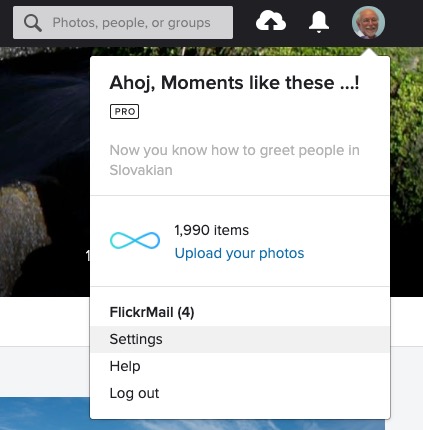
We’ll start by looking at the default privacy settings you can apply to the images you upload. The Settings page is accessed from your profile tab …
… which gives you access to a page with these headings …
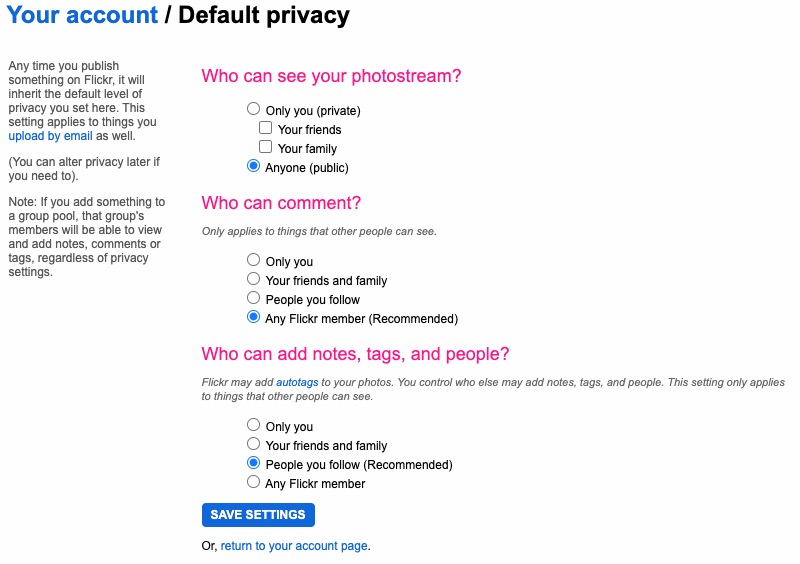
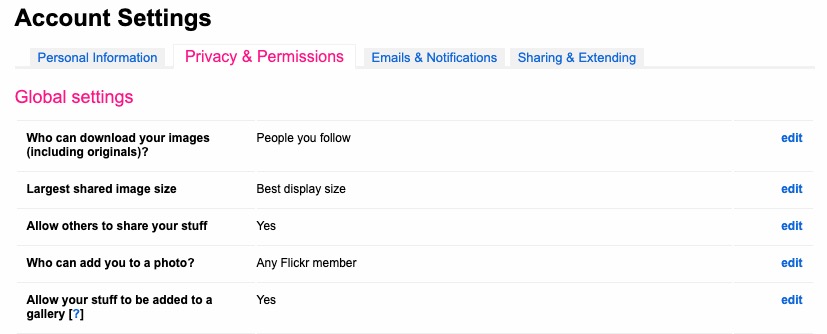
… clicking on Privacy and Permissions brings up this screen – from which you should first look at Defaults for new uploads …
Read carefully the Note: “if you add something to a group pool, that group’s members will be able to view and add notes, comments or tags, regardless of privacy settings.” There’s no privacy within a group. All members of the group can see all members’ photos. If you’ve declared your image to have restricted viewing to Friends, or Family however they will not be visible for public viewing in the group, even though the group page might be visible for public viewing.
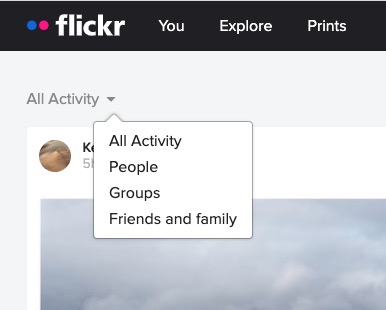
After uploading your photos they will (unless you’ve changed the default settings) appear by default in the Activity stream which you can access from the flickr logo …
… from which you will also be able to see the images of the people and groups you follow. This is the default view when you open Flickr on a mobile device.
Any photo you fave is then attached to your account so that you can return to view it on a later occasion.
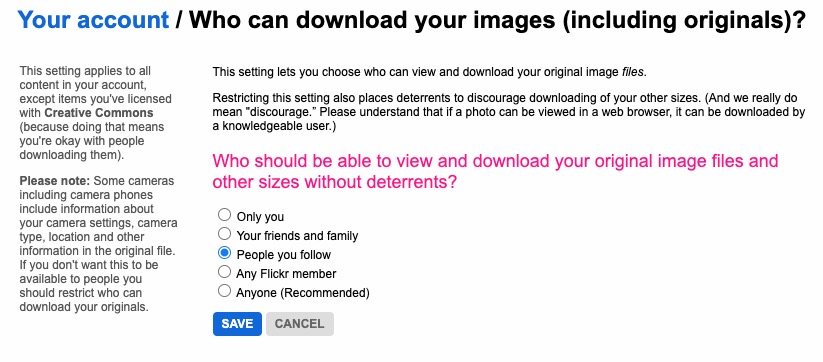
It is also possible – unless you’ve prevented it – for someone to download the photo, or add it to their own Photostream as their own! You might wish to check your settings to prevent that happening.
… and …
… so it’s important that you know what you’re doing when you follow someone – I certainly wouldn’t recommend the default setting of “Anyone”.
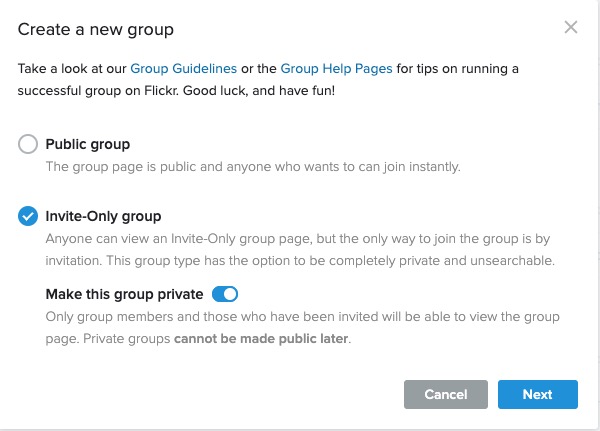
There are occasions however when you might wish to keep your photos completely private, or to share them privately within a Group. The settings in flickr to allow this are not exactly as intuitive as they might be so this post continues by seeking to help understand how you can “hide” your photos from the Public photostream, but to show them within a Group. Let’s start there.
Groups can either be Public, open to invited membership (or upon application to join) and then also to be Private. Note especially carefully the note attached to Invite-Only Group which can be either Public or Private … “Anyone can view an Invite-Only group page …”
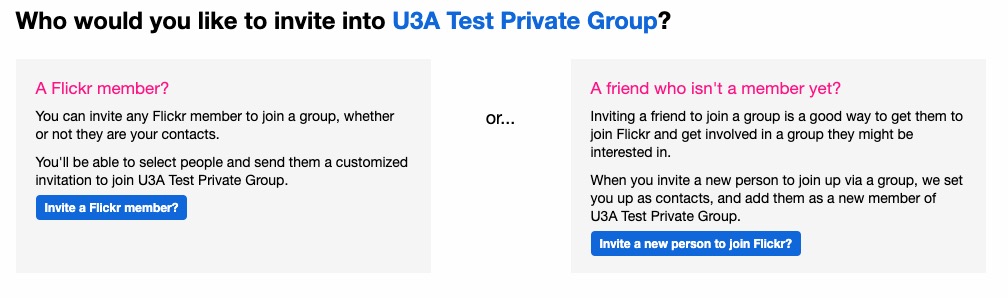
The last case is obviously the most restrictive and in this situation a Group is setup by a Flickr member and they invite either existing Flickr members, or non-members to join the group.
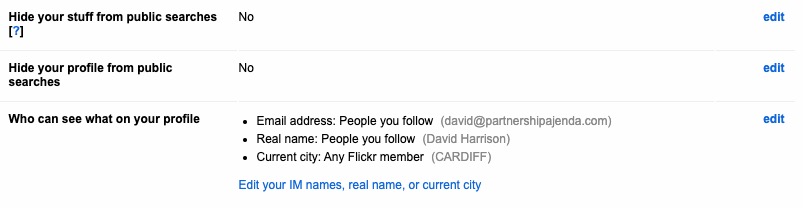
They will be sent an invite to join flickr, and the Group, as a member. You can therefore appreciate that you have to be a flickr member to view Photos which are in a Group. However if they’re not hidden from the Activity Stream by changing the default privacy settings (as above) and if it isn’t a Private group – they’ll still be visible to anyone unless you’ve also changed your search profile …
For the Invite-Only Group which has not been declared Private it is important to note that anyone (even non-Flickr members) can view the group page, so as we shall next, if you want your photos to be completely invisible to the outside world, you’ll have to do something else to make them invisible!!
If you want to keep your photos visible only to members of a Group, you need to specify on the Default privacy settings page either “Your friends”, or “Your family” depending upon the nature of the Group; similarly you should restrict Comments (and Notes, Tags and People) to “Your friends and family”.
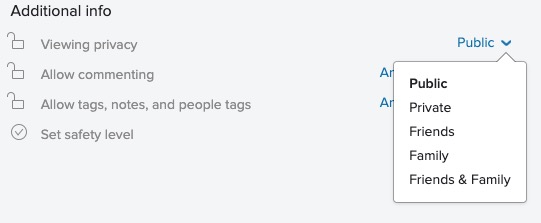
However these settings will then apply to every image that you upload and that might be more privacy than you really want, so you are able to choose the level of privacy on an image by image basis after you’ve uploaded them. This is done by looking at the information attached to an image after you’ve clicked on it in your Photostream …
… so, as an alternative, you could leave your Photostream relatively open using settings similar to the ones in the screenshots above and then restrict viewing of individual photos to Friends, or Family, etc. within Groups.
Five crucial questions you need to ask to find the perfect laptop.
With hundreds of models to choose from, you’ll want to a laptop that ticks the boxes and will last the test of time. One of the biggest decisions will be how much you want to spend – what many don’t realise is that if you’re after a good all-rounder for day-to-day tasks, it doesn’t have to be a lot.
We award Best Buys to our top-performing laptops, and our cheapest Best Buys costs less than £500. Plus if you’re willing to compromise you can find good models for as little as £150.
Top five questions to ask before buying a laptop
Before you start shopping for a laptop, it will help to know the answers to the following five key questions.
1. How much should I spend on a laptop?
Less than £200 – Intel Celeron or Atom processors, 2GB of Ram and 32GB of storage. Won’t be particularly fast, but fine for note taking and browsing the internet.
Less than £400 – Intel Pentium, Core i3, AMD Ryzen 3 and 4GB Ram. Fast enough for web browsing and research work. Aim for a Full HD screen and an SSD if you can.
Less than £600 – Intel Core i5, i7, AMD Ryzen 5, 7 and 8GB of Ram. Should be ideal for photo editing and some light video work. Look for a thin and light design, a Full HD screen and an SSD.
Less than £800 – As above, but in increasingly high-end designs. Look for great battery life on premium ultrabooks.
More than £800 – Some stunning designs, great screens and good speakers. High-end laptops will suit more intensive tasks, such as video editing or playing games. You can buy Apple MacBooks from £950 and above.
2. Operating system – what type of laptop do I need?
There are three major players when it comes to the software (operating system) your computer runs on. Windows, MacOS, and ChromeOS.
Buy a Windows 10 laptop if…
You prefer the familiarity of Windows
Have specialist software you can’t live without
Want a big variety of laptops to choose from
Buy a MacBook if…
You have a budget of at least £950
Value longevity and build quality
Use other Apple products, or are happy to learn a new operating system
Buy a Chromebook if…
You’re on a budget
Value simplicity
Don’t mind working in web-based applications
3. How powerful does my laptop need to be?
In short: If you need a laptop for light use and note taking, look for Intel Pentium or Intel Core i3 and at least 4GB of Ram for a great experience. Go for Intel Core i5 and i7 and AMD Ryzen 5 and 7 and at least 8GB of Ram if you’re a heavy user. Look for dedicated graphics from Nvidia and AMD if you want to game.
Processing power really matters if you’re planning on using a laptop for photo or video editing, or are otherwise a very heavy user, opening lots of programs and browser tabs.
When looking at laptop processors, you’ll see two main specifications beyond the product name: clock speed (measured in Gigahertz or GHz and number of cores) and Ram. Think of clock speed as the speed limit on a road and the number of cores as the number of lanes. As on a road, depending on traffic conditions – the tasks being done on your computer – a road might see a greater benefit from more lanes or a higher speed limit.
In the simplest way possible, more of both is better, and all of our reviews describe what sort of tasks a laptop is good for.
Think of Ram (Random Access Memory) like a desk and your hard drive like a filing cabinet. You pull files out of the cabinet and it takes a while, but once they’re on your desk, you can reach for them instantly. The same is true of Ram; once you have loaded a file from the hard drive, it’s now in the Ram and can be accessed almost instantaneously.
The bigger the desk you have, the more items you can access more quickly, and the same goes for Ram. Most mid-range laptops come with at least 4GB of Ram, and we’d tend to recommend 8GB for people who are heavy web users or usually have lots of documents and pictures open.
You can manage with less, but you’ll have to rein in your use. If you fill up your Ram, some of the things you’re working on will be moved back to the hard drive, making things feel a lot slower.
Some cheap computers come with 2GB – this is usually fine on a cheap Chromebook, but some Windows 10 laptops will struggle.
When you close a program or file, it is removed from the Ram and makes room for other things to be accessed immediately. This is part of the reason why closing programs you aren’t using can make your computer faster.
4. Screen – what size and resolution of laptop display do I need?
In short: Unless you have a very low budget, don’t settle for less than Full HD, no matter the size.
A laptop’s screen is one case where bigger isn’t always better. If you want a longer-lasting battery and a more portable device, you may want to go for an 11, 12 or 13-inch display; most of these will weigh between 1kg and 1.5kg.
The largest you’re likely to see is 15 or 17 inches, with weight increasing to around 2kg to 3kg.
Most machines on the shelves now have a Full-HD 1,920×1,080-pixel resolution display, and high-end models can have even sharper screens with even more pixels up to and beyond 4K Ultra HD. Generally, the higher the resolution, the sharper the picture.
Only cheaper laptops should have a lower screen resolution of 1,366×768. This is fine for most people, but if you like to have lots of items on screen at once you’ll prefer a higher-resolution display.
5. How much laptop storage do I really need?
In short: Go for an SSD unless you really, really need more storage at all times. Storage capacity, measured in the size of the hard disk drive (HDD) in gigabytes (GB) or terabytes (TB, equal to 1,000GB), determines how many things your PC can hold.
Documents, photos, music, movies, programs – they all take up space. Bigger is usually better, although solid-state drives (SSDs) are often more expensive for considerably less space. This is because they load much quicker and are completely silent.
We’re also seeing a lot of cheaper laptops (including Chromebooks) carrying eMMC (embedded Multi-Media Controller) flash storage, which is slower than SSDs and gives you very little storage space.
If you cleared out all the stuff on your computer you don’t actually need, how much space do you think you’d have? How much do you have now? Check ‘My Computer’ if you’re using Windows to gauge how big your next laptop’s storage needs to be.
Laptop battery life: manufacturer claims vs reality
In short: Manufacturer battery claims aren’t useful unless you’re only comparing models from the same brand. Use our reviews to get the full picture. Manufacturers often make heady claims about how long their laptops’ batteries last. Our tests ignore the manufacturer claims and involve multiple battery rundowns while simulating web browsing and watching videos.
If you’re buying a portable laptop that you intend to use when travelling or on your commute, make sure the battery life is at least six hours based on our reviews. We’ve tested some models that last for more than 10 hours before they need recharging.
But we’ve also found companies claiming 10 hours of battery life on average, while our own tests found 6.3 hours was closer to the mark.
Battery stamina on large, desktop-replacement models won’t be as crucial, as they’ll almost always be near a power socket, but we still mark them down if they run out of juice in under four hours.
It’s often useful to be able to send an image of your screen, or part of your screen to someone. In fact I use this facility all the time when creating these blog posts.
On the Mac, it’s very easy …
Press Cmd-Alt-3 to capture a complete screen
Press Cmd-Alt-4 to draw a window that you want captured
To be guided through the options you can
Press Cmd-Alt-5 and from the Options screen decider where you want to save your Screen shots [I save them to a Dropbox folder so they’re available between my two machines], and also choose the option for the type of screen capture you want, or even to Record a series of actions.
On the iPad/iPhone, it’s straightforward too. You can capture a screen by Pressing the Power Button and the Home Button together [It works best if you press the former just before you press the latter].
“It might be helpful for your notes if I run through my Windows 10 sequence. The relevant key on my laptop is labelled SYSRQ/PRTSC, so I have to press the ALT key at the same time to print the screen. This puts the image onto the clipboard, so I then have to save it somewhere. I usually go to Paint Shop Pro and paste it as a new image. One thing I am investigating is what happens if you have two pages at once on the screen. At the moment I can only print one of the pages, depending on which I click on.“
I’ve annoyed a few people over the years (well – one person at least) by pasting overlong URL’s in blogposts, and on WhatsApp. Ever since Google stopped supporting it’s own URL shortener I’d forgotten to go and look for an alternative to setup as an extension in my browsers (Safari, Chrome, Brave and Firefox) and more importantly to have as an app on my smartphone.
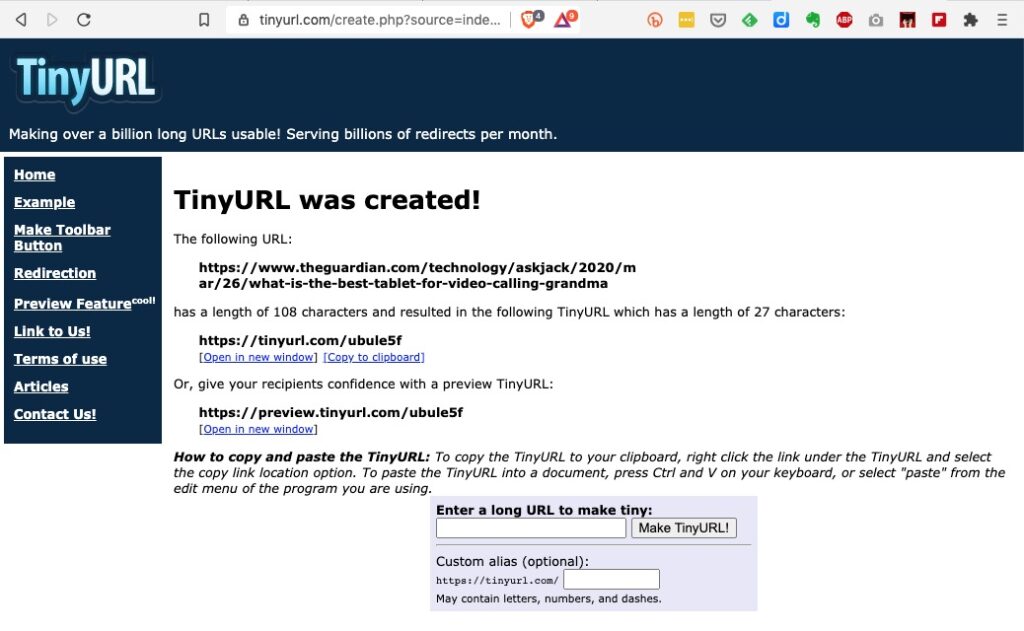
I’d used tiny.url for many years, but that generally meant you had to copy and paste the URL to a page you’d left open on the tiny.url page …
… and then once shortened you could copy the shortened URL to the email, WhatsApp, etc message.
But it would be much nicer if there was an extension which you could just click on from the page in question, and you’d get a shortened URL. That’s where bit.ly come in. It’s available both as an extension for Chrome, Brave and Firefox and as an app for iOS and Android.
To install bit.ly as an extension on Brave, go to Brave > Window > Extensions …
… click on Web Store …
… and type bitly, or bit.ly in the Search Box. Click on the bit.ly box and agree that you want to install it in Brave (or Chrome) …
… agree that you want to add the extension and then you will see it’s been added to your browser extensions …
It’s as straightforward as that. Now any time you want to shorten a URL, all you need to do is click on the bitly icon and (after creating a bit.ly account), the following dialogue box will come up …
… and you can then Copy the shortened URL that’s been created, wherever you want to.
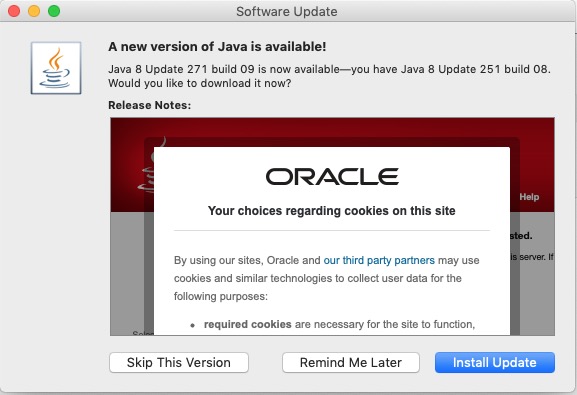
I was quite surprised to see when I reviewed the articles I’d posted over the years that I’d never written one specifically about Open Source software, and “free” software. Of course the topic has cropped-up quite a bit at Cardiff U3A Computer Group meetings, and I have referred to pieces of Open Source and “free” software on “Just thoughts …”, but I’d never put my ideas down about the reliability, philosophy, use and accessibility of Open Source and “free” software in general. Just as I write this – guess what popped-up on my screen …
… Java – an example of a programming language that has morphed into a software development environment whose component parts are all, or can be replaced by, open source modules. Java is an accepted piece of the architecture of a huge number of the systems we use everyday, as is Apache – the web-platform that powers most of the Internet’s servers. I mention these two as examples because it demonstrates how deeply elements of Open Source thinking is embedded into so many of the systems we use every day. Other ones would be Linux, and WordPress – a multi-platform operating system, and web-publishing software which the Cardiff U3A Group has looked at before. So, in a nutshell – open source is respectable!
What makes software open source then? Technopedia defines open source thus …
“Open source is a philosophy that promotes the free access and distribution of an end product, usually software or a program, although it may extend to the implementation and design of other objects. The term open source gained traction with the growth of the Internet because of the need to rework massive amounts of program source code. When source code is opened to the public it allows for the creation of different communication paths and interactive technical communities; it also leads to a diverse array of new models.”
… thus the code is generally very safe, because it can be inspected by anyone, and any changes in the code can be easily traced. The definition goes on to explain the following …
“Open source revolves around the concept of freely sharing technological information so that it may be improved through multiple insights and viewpoints. Since the technology is open source, the amount of work that needs to be done is reduced because multiple contributions are added by many individuals. This concept existed way before the age of computers and even before the industrial age when people shared and improved recipes for food and medicine, for example.
In terms of open source software, the code is often freely downloadable and changeable as long as the user sticks to what is agreed upon in the software license agreement. Open-source software is usually under the General Public License (GNU), but there are other free licenses like the Intel Open Source License, FreeBSD License and the Mozilla Public License.”
That doesn’t make it necessarily FREE, because developers can charge for the software they develop on the base of open source, however generally if it’s made available under one of the above licences it’s often the Support and Implementation that’s chargeable, not the software itself. Look for the licences (as above) to determine whether the software is genuinely Open Source and thus you should expect it to be “respectable” and “safe”.
So any open source software must adhere to the following criteria:
Free redistribution of the software.
The source code should be publicly available.
The software can be modified and distributed in a different format from the original software.
The software should not discriminate against persons or groups.
The software should not restrict the usage of other software.
Then there’s Free Software. As I’ve explained most Open Source is distributed free of charge, and the intention behind it was freedom of code, and freedom from intellectual property rights. The subtle difference with Free Software is that in the latter the emphasis is on freedom for the user to do whatsoever they want to do with the code. It is truly FREE! As a term and as expressed by the Free Software Foundation it predates the Open Source initiative and was the driving force behind the licences mentioned above. Thus free software must adhere to the following four pillars of freedom (which are rights and not obligations):
The freedom to deploy the software for any use case without any restrictions. For example, saying that the license of a program expires after 30 days makes it non-free.
The freedom to study how the software works and modify it according to your needs and preferences.
The freedom to freely re-distribute the software to assist someone in need. The redistribution can be done at a cost or at no cost.
The freedom to enhance the performance of the software and release your enhancements for the community to benefit—both programmers and non-programmers. You can do this at a cost or at no cost.
Now it starts to get a little bit more cloudy. There’s Freeware which might also be described as freememium, or shareware. I quote …
“Typically, freeware refers to a software that you can use without incurring any costs. Unlike open source software and free software, freeware offers minimal freedom to the end user.
Whereas it can be used free of charge, often modification, redistribution, or other improvements cannot be done without getting permission from the author.
As such, freeware is often shared without including its source code, which is atypical to open source software or free software.
Two of the most common types of freeware are Skype and Adobe Acrobat Reader. While both programs are free to use, their source codes are unavailable to the public.
Most developers usually market freeware as freemium or shareware with the intention of encouraging users to buy a more capable version.
Freemium refers to a program that is offered at no cost, but money (premium) is paid for extra, more capable features.
Shareware refers to a program that is initially available without any costs attached, and users are encouraged to distribute copies. However, that cost-free period usually lasts for a certain period; thereafter, a user is required to pay for continued use.”
Finally, you may come across the term “Donationware“. This is software that is distributed for free, but the author invites the user to make a contribution to the ongoing development costs (or the programmers coffee). It might also be described as “conscienceware”, or even “thankyouware”!!!
So armed with that information, it’s time for me to provide a list of the free software that I treasure the most.