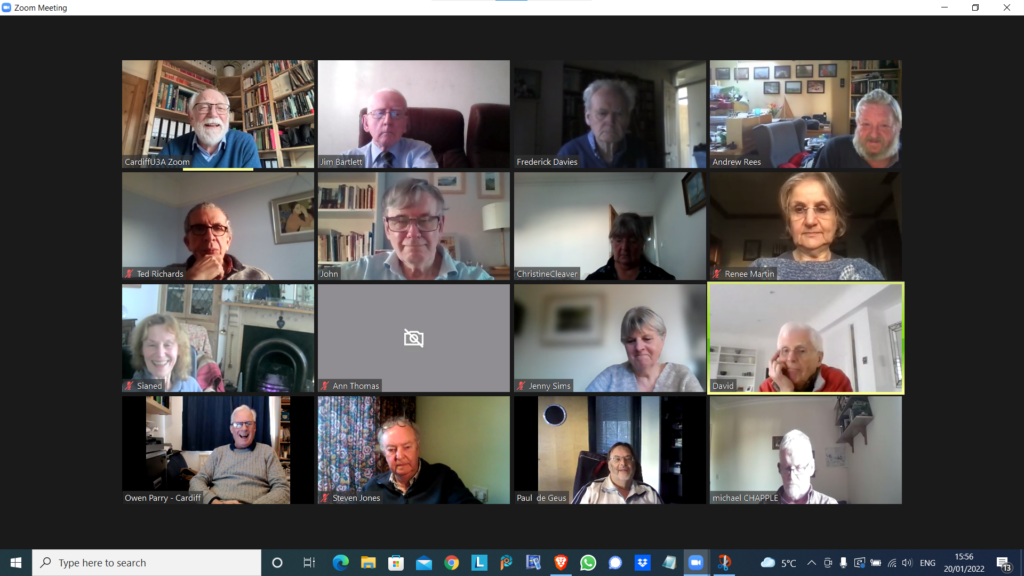
Zoom with a view!

Our last meeting on January 6th 2022

It was suggested that members might be interested in finding out how one group – the Computer Group – has handled and coped with the Covid pandemic by using Zoom. We haven’t actually met in person since the beginning of the 2020 session in September. We were quick out of the blocks however even before that and we held our first Zoom meeting on the 23rd April even before the Committee had taken out a subscription to Zoom I believe. Since then, almost without a break, we’ve met virtually every fortnight.

Supporting us in our meetings we’ve kept Notes and added them to our website – “Thought grazing” at https://thoughtgrazing.org – which any Cardiff u3a member is welcome to view by just sending an email message to computer@cardiffu3a.org.uk.

We’ve had an attendance of between 12 and 24 at our meetings with 16 being an average number, so that means probably 50% of the group have been able to participate at any meeting, but of course it’s not always the same 16!!! We’ve adopted a new way of organising the meetings to match with the virtual world, focussing on getting members to share issues and problems, matters of interest and general chitchat about matters digital. It’s become a much more social group with everyone encouraged and requested to participate – when it’s their turn at the very minimum. This has led to reduced time for presentations and facilitator-led talks. Some might say this is a good thing … I couldn’t possibly comment!

The pluses …

  • We’ve enjoyed each others company and supported each other through these difficult times.
  • The technology has really helped, since we’ve found screen-sharing to be an excellent way of showing and telling what we’re discussing. [Not having to rely on the venue WiFi has also been a real boon!]
  • The technology, I think, has actually made us much more inclusive as every member has a chance to make a contribution – far more so than when we met face-to-face.

... and the minuses.

  • Nothing can make up for meeting people face-to-face, the chance for casual chatter, the chance to add a cup of coffee or share lunch before (or after) the meeting.
  • Perhaps the number of informational presentations has dropped, but this doesn’t seem to have been a factor in attendance.
  • As a technology group we would hope that our members would find using Zoom relatively straightforward. Hopefully, we can still encourage some “lapsed” members to try this way of meeting, but we do accept that some memberts are perhaps “over-Zoomed” as well.

Could we manage so-called hybrid-meetings?

The occasional one-off event with some members remote on Zoom and some face-to-face might work but it would have to be a presentation-style meeting.

We have concluded that we might try an alternate meeting style when we are able to return to face-to-face, with Zoom meetings still being scheduled.

Would we miss meeting over Zoom?

In the end, probably not, because the benefits of face-to-face would outweigh any benefit from the new form of interaction, much as we like it. However, I think we’d want to take some of what we’ve learnt from our Zoom meetings into the way we organised our in-person meetings in the future. Roll on that day when Zoom doesn’t have that view!

Notes from Zoom meeting – 6th January 2022

We start a new year much in the same way as we ended the old one. I invited members to volunteer any digital gifts they’d received. Somewhat surprisingly there weren’t many. David Hughes had given his wife a smart watch so that they could monitor things like heart rates and blood pressure; Sianed had been promised an iPad and we discussed possible options – I was looking at doing the same with a present from my Jenny; Paul had bought some replacement Dect phones and wondered whether they would work when the PSTN switched to digital (more later); Jenny had got an Apple Watch and I “appointed” her as our specialist/expert moving forward; Steve had got a Chromebook and was looking to get the most out of it whilst concerned about what we’d discussed last time in respect of the possible problems with ongoing support of the operating system and finally Christine was looking at the possibility of a webcam as another possible solution to her ongoing bridge game issues. I had been given a Wacom Intuos tablet but hadn’t started using it.

We turned to issues.

Ann had other pressing issues as a lath and plaster ceiling had collapsed; Fred shared an amusing story dating from when he was working in London relating to a ceiling collapse as well.

Christine was looking at possibly trying to return her Lenovo laptop and she was advised where she could find the AEU date.

Don had started storing passwords in his Google Chrome browser. We expressed some reservations about doing that, our strong preference is for using a password manager, but for the Apple fraternity there might be a possibility of using Keychain.

Sianed mentioned that she’d started using an ecologically friendly/green search engine – ecosia. I said I would be interested in looking at it.

Ted had started a migration from his personal blogspot (Google) website to one based on using WordPress. I offered advice and assistance if required. I also told members that Phil had recently migrated this website – for the clog team his wife organised – to Google sites.

David H reported that after guidance from a friend he’d been advised of a system that allowed multiple calls to come into the same landline. I was surprised and had never heard of such a possibility. It would be interesting to find out more about such a system.

Renee had wanted to extract messages from her iPhone to make them a document. I promised to investigate a solution I’d used for my Jenny. This I found to be called iMazing.

We then had a brief discussion on the withdrawal of the PSTN service by the telcos by 2025. Jenny and I were going to write something for the Magazine on it, and were also to provide Tony Baines with a briefing to take to Region. Paul told us about the problems a cousin (in the Salisbury area where the initial trials were being carried out) who was blind had experienced with 1471 not working any more; he’d had to change his number and there didn’t appear to a call-back facility which he’d relied upon before.

Jenny then told us she’d received a note of briefings on good use of Zoom, and I offered to put a link to them on this website. You’ll see it here.

The meeting finished with a demonstration of the 1921 Census to be found on Find my past. I suggested that all members might offer to demonstrate a website they found useful. At the next meeting I would show the photo sharing site Flickr and how it works..

Notes from Zoom meeting – 10th December 2021

Two shots from the meeting. Ted had to leave us to attend to an urgent matter.

Apologies: Fred, Margaret, Sally Semlow – who hoped to join us again in the new year, Mario and Jonathan.

I suggested that we might list the successful and perhaps least successful presents/purchases we’d received/made in 2021. I kicked off with the Apple HomePod I’d bought for Jenny last Christmas which has turned out be one of the best bits of kit I’ve ever bought as a gift. The least successful was the Apple iMac 21.5″ (2015) I’d bought for her and which was under specified – criminal mistake on my part! In-between were FitBits, and Tags (which you connect to keys etc); maybe AirTags will be more successful – I need to investigate them more fully.

I reported that Which? have done a survey and written an article on the replacing of the PSTN Landline by 2025. Here’s a link to the article. Renee had requested help with transferring PDF to Pages (or Word) format. You can do it online from Adobe for free, or there are other online tools to do it as well. Otherwise, using the Brave browser, you can Open the PDF file, Save it in Document format; then Open, Select and Copy text onto the application you are using. This can’t successfully handle tables, however they can be treated as graphical images.

Jenny reported that she’d been over-successful; in getting a monitor in that a colleague had managed to buy 20 surplus monitors for £20!!! I said this was quite normal with surplus public sector equipment as they couldn’t be disposed of in other ways at zero cost.

Owen reported that he’d successfully employed an old USB speaker he’d got from a UCISA conference for his laptop. He felt that the purchase of an electronic PhotoFrame had been a bit of a failure due to the need to keep updating it from a USB stick, or WiFi, or SIM card.

David H said something about Heath MOT, a watch for testing blood pressure – I’m sorry I can’t remember the context.

Paul reported a failure (he felt) in the lifetime support for a Google Chromebook. You need to check the lifetime support span for these devices – they may be surprisingly short. [NB Apple’s tend to be longer on average.]

Jim felt that a table mount he’d bought for his phone had not matched his expectations.

Sianed reported that the pulse oximeter (for blood oxygen levels, and pulse readings) they’d bought had been a good investment – I agree.

Stella told us about the failure she’d had in doing some recordings off-screen of some films which had resulted in the sub-titles taking up 3/4 of the screen. On the other hand, she felt her purchase of an iPhone 8 on eBay for £200 had been a great buy.

Steve had been delighted by the purchase of his iPhone but had been alarmed by the heat generated during some activities which had led him to take the case off on occasion.

Ann was delighted with her Lenovo IdeaPad (£320) and said the switch to using SSD for external hard drives was a great success. She had been less pleased with a Toshiba laptop which had problems with the BIOS battery; difficulties in servicing but fortunately she’d not lost the hard disk in the repair.

Renee reported that HER stand for her iPhone had been a success (unlike Jim’s).

Don had started down the road of the “smart home” and reported that his smart plugs were a great success. [Another topic for a later meeting maybe.] His DashCam was a bit of a problem however and the updating of software was not easy – I believe he’d sought external assistance and had it done.

Christine was still experiencing the mammoth failure of her Bridge software, the Lenovo, and the WiFi extenders – I don’t know what else to say!!! On the other hand she was pleased with the Smart TV they’d bought.

John reported that he’d taken the camera he’d bought from JLP back – it was faulty. He was going to look into this again in the New Year – I offered to help.

Happy Christmas everyone.

Notes from Zoom meeting – 25th November 2021

I can’t find a Screenshot for this meeting – I think Jim said that he’d not taken one, but I could be mistaken. Some brief notes because it’s mostly history now.

Jenny raised a general issue about recording a meeting in Zoom and whether she was able to get a copy of it. We felt that was down to the group in the meeting to decide. Also … if anyone didn’t want to be recorded they should leave the meeting. She had been scammed with the inducement of a Google Play card, felt a bit embarrassed that she’d initially fallen for it – it appeared to come from a work colleague – but had realised that it was an email hack just in time.

Owen had been having problems with his son’s 5G router using a tablet and headset. In the end he had to tether the tablet to a phone and use the inbuilt 5G router. He also commented on the problem of WiFi systems not working when nearby networks were using the same channel – this probably needs to be the subject of a re-visit at a later meeting.

David H was being challenged with the need to renew a Covid Pass. We went through the process and agreed the paper version was easier than the online “passport” – a QR-code.

Stella told us about BT’s plans to replace PSTN analogue landlines by digital services by 2015. This was something most of the group knew nothing about. This might mean that several services needed to be changed – Lifelines; alarm systems – and there was the need to have back-up batteries for vulnerable people

Jim was having problems with grey boxes on Zoom screens – this was resolved (see Owen’s post on this blog).

Margaret was also having difficulty with the Covid app, and the way it worked with your NHS No, which you had to set up separately to then return to the Welsh NHS website. [Not great software architecture imho.] She also told us about the price differences she’d encountered by chance between Argos and Amazon on Black Friday – it’s always worth checking!

Paul told us about VOIP and alarm systems, they wouldn’t work without upgrades. Recommended Google Mesh system (£140) and told us about a BT scam call from India .

Mike mentioned the proliferation of 4G/5G masts in north Cardiff. At least we have the technology, not the case in a lot of rural Wales. [Also worth noting that the telcos have given notification of the switch-off of some 3G (and earlier) services where 4G is now available. Means some handsets may become redundant.

Don was having difficulty lining up his Avery labels for his printer. I can’t remember how we resolved this one for him.

Christine continued to try different solutions to her problem of playing bridge on two machines in the same house on the same network when using WiFi extenders. We’d tried a number of things already – turning off the security channel hadn’t worked; neither had turning off Norton. Could using a different WiFi channel be he answer – perhaps there was external interference? [No is the answer!!!]

… and that was about it.

Notes from Zoom meeting – 11th November 2021

A shortened meeting due to your host not having prepared anything to present for which I apologise. It’s been a bit hectic in the Harrison household just recently!

Steve, Owen, Margaret, Christine and Sally presented apologies. We wish the latter a continued good recovery to her broken shoulder and hope to see her in the New Year. We had an attendance that shall we call was fluid as we had members who had to leave to attend to taxi duties and others who arrived towards the end again due to other considerations. Our mug shots (thanks Jim) reflects the comings and goings.

There wasn’t much to review from the previous meeting but we await the outcome of Margaret’s discussions with TalkTalk and Christine’s experiments with using different email addresses with interest.

For today it was very much a “no issues”, “nothing to report” sort of day. Quite a change from normal, so the notes are relatively brief and as I hadn’t added any news stories to Flipboard that part of the meeting was also brief!

David‘s contribution was focussed on the use of his lookout on the Esplanade to watch the painting of the pier and the fireworks. Time well spent!

Stella reported she’d had a scam message from WhatsApp – very similar to the one that Jim had reported to the group on Signal. These are very upsetting and annoying but easy to notice – perhaps changes introduced by Ofcom will limit them in the future. One hopes so. She also advised us that she’d learnt last week of a process to check more rigorously for fraudulent claims involving online activity. This was bound to happen one day as the banks have been paying out large amount of money in compensation. Perhaps it would be a good idea if we all checked the Terms and Conditions of service providers more closely instead of just check-boxing them through in the same way as we’ve had to accept cookies, etc. She also told us of a funny interlude when she’d been unable to set a password for an account she was setting up with a bank. Eventually a clerk had created the account with a very basic password. She’s been unable to change it, so needs to go back to the bank for them to change it – if they can!!!

John was puzzled by the Covid Password Passport application procedure and whether voice recognition was being employed as the process requires you to video yourself whilst saying a number. I suspected that it was more facial recognition that was being used. I couldn’t imagine where my voice was kept on file. Others mentioned the online banking where “My voice is my password”. John pondered on whether Big Brother was alive and kicking in Covidland. He also reported that he’d gone to John Lewis with the possible intention of purchasing a new MacBook Pro but had decided that the purchase of a new Fuji Camera would be much more worthwhile – can’t disagree!

Don had purchased a U-Green USB smartcard adaptor for his Micro-SD card for his in-car camera system. He has yet to try it out. It cost £15 and has ports for CF, MS and standard SD cards as well. He also told us about the trials and tribulations of trying to delete an email address from his contacts in Gmail. It is a bit more convoluted than with other systems as Contacts in Googleland are part of Gmail. Elsewhere they’re a standalone application. So you have to follow a different process than you would have to in Microsoft or Apple worlds.

Jim reminded us that two-factor authentication (2FA) was being rolled out to Google accounts. He and Don had yet to have their chat about the user interface of AllDup.

Ann wanted to congratulate Owen on the splendid presentation and use of technology for the u3a AGM on Tuesday. [I had to admit I’d forgotten it was taking place, such is the happenings currently in my life.] She had been stimulated by the excellent experience and the prodding from Owen at a previous meeting to try and document her solution to the connect a printer by WiFi to a Sky router problem. So far she’s failed unfortunately because thinking the best way of documenting it would be to repeat the process, she’s been unable to reconnect. All is not lost however because she has a cable connection to her router which is working satisfactorily. She has said she won’t give up however and will try again. I commended her on her devotion and service to the group … but please don’t lose sleep over it!

Renee asked me whether it was sensible to upgrade MacOS to Monterey now. I said that was the version that had been supplied to me on my new MacBook Pro and it seemed OK. Some small cosmetic changes to the appearance of Finder and Safari; some rather larger (and worthwhile) changes to the way MacOS and iOS would work together. [I’ll share a link to a document on Signal for Mac users that describes what’s going on, the shortfalls and the benefits of the routeway between the two technologies.]

Fred had problems connecting to the meeting; it would appear that it was a problem at his end as no one else had experienced any difficulties. In general discussion in response to Sianed’s experience (see below), he reported that he’d been surprised to find £4k had appeared in his bank statement this week, which he’d reported to NatWest. It’s still there!

Sianed reported the unpleasant and worrying mistake that HSBC had made with her bank account – a withdrawal to go to the Halifax. She was concerned that if she hadn’t checked her account roughly twice a week, she might not have come across it. She (like John who had also experienced a mistake by a bank) was offered £50 compensation. Notwithstanding this, I reiterated that online banking was generally very safe, and that using banking apps on mobile apps even more safe because of physical measures such as fingerprints or facial scans.

Jenny arrived just before the end of the meeting and gave us a very brief and pleasing summary of her discussions with Irish journalists on getting broadband to older people. She advised them to use OpenReach’s Postcode checker and to use that information in lobbying for accelerated rollout of service.

And that was that. Mike, Paul and Jonathan had nothing to report.

Notes from Zoom meeting – 28th October 2021

The last shot of me in the loft!

Thanks Jim for the screenshot. One to treasure as I’ve now moved into new luxurious accommodation! The small front bedroom!

Apologies for the delay in posting these notes. I’ve been rather busy on multiple fronts. Hopefully things will begin to settle down now that holidays are out of the way, new Macs, new office setup, etc will become distant but pleasant memories.

We started the meeting reviewing the experience of the History Group’s Hybrid (face-to-face plus zoom) meeting. Generally felt that it worked reasonably well, and once the issue of microphones and cameras were resolved and the need for an external zoom admin added, the format could work well for presentation-style meetings. This raised the possibility of attempting similar meetings for this group, which we discussed and agreed to try after Christmas. The format to be trialled would be a monthly hybrid presentation meeting with a zoom meeting in between. Ann offered to help anyone after the first hybrid meeting try and join the zoom meeting afterwards. Paul offered some help as well, I believe.

Margaret had been experiencing frustration with TalkTalk (Tiscali) and as of the meeting her contract was not to her liking. This seems to be a perennial problem with broadband suppliers.

Owen had been struggling with Google’s changes to the way it enables publishing of Calendars to web pages, but thankfully this had now been resolved.

David had been caught in the gas/electricity supply problems and was now looking at Octopus as a possible supplier. He’d also been caught in the Tesco outage. Apparently that hack had cost the company £16m!! He’d also been engaged in trying to help an IT-scared person attempt to use new equipment. He also asked for advice on cataloging art material. Currently using Powerpoint, and after discussion we agreed that although a database would have been the most suitable platform, the number of records probably didn’t justify changing, or indeed using webpages – my suggestion (of course). Steve also mentioned using Imobilise as a possibility which was linked to insurance, but there might be a registration fee.

Paul quoted his TalkTalk experiences of late which meant that he would be moving to Fibre 150 for £28pm once OpenReach had installed a new socket and modem (£42). He also reported on a recent Gadget Shop programme that had reviewed Mesh systems ranging in cost from £100 to £350. The cheapest came out the best. TPLink was recommended.

Stella had been having problems with email with attachments, realising that she needed to change the message once she’d started it. Paul suggested right-clicking on the attachment to copy and paste it to a new message.

Sianed advised that booster jabs could now be sought by contacting CAVC on 02921841234.

John told us about his saga with using Trainline to book rail tickets and the scandalous £3.60 a minute phone charges he would have had to pay to get a refund on tickets. General advice from the group was to use a train-operating company rather than a ticketing company. So GWR, TfW or VirginRail are good alternatives.

Christine is trying to make their house eco-friendly had been switching things off. The surprising by-product had been that her Powernet devices seemed to work as they were supposed to. However she now felt that the problem with her and her husband playing bridge(?) in different rooms with other remote participants might be due to using the same email address. This she was going to investigate further.

Don told us that he had a TPLink system and that he was satisfied with it.He’d been trying out Alldup (advised by Jim) and had so far saved 28Gb of disk space. He was unsure of the interface and I suggested that he contact Jim offline for a chat. He also requested advice on a USB adaptor for different sized SD-cards. These would tend to be better than the micro-SD to SD-card convertors you usually get with the smaller format cards.

Jenny‘s mouse was broken! She’d had some discussions on Covid-Passports, and had been asked to give some advice to some journalists in Northern Ireland on the subject. We felt that it was up-to-them to investigate this as their local position was different to us in Wales.

All I have recorded for Ann is “booster letters” and “energy advice” – I’m afraid the “little grey cells” can’t translate that into a meaningful note!!

Jim reported that he’d learnt something about the way that Dropbox shared folders worked. The size of them was added to both the host and the users’ local storage allocation.

Steve added to the TalkTalk discussion. He was going to pay £27pm as opposed to Margaret’s £26pm. He was also looking at the possibility of getting a Chromebook as his PC was 8 years old and might be needing a rest!

I then went through the Flipboard articles I added highlighting Apple’s new machines, operating systems and the like; the controversy surrounding Facebook after the whistle-blower episode (still ongoing); and the proposal to block scam calls coming from overseas hiding behind UK mobile phone numbers.

Well I never – Gmail Archive

I’ve been “playing around” with my email accounts. I’ve decided to use my Apple iCloud account more as it makes a lot of sense as I organise emails by moving messages from Inbox/Sent mail into Mailbox folders setup on my iCloud – shared between my Apple devices.

It’s not difficult to forward messages from my Gmail account, just go into Gmail on a desktop/laptop (you can’t do this from the Gmail app on your mobile device) select Settings (the Gear wheel) and then Select All Settings, and then Forwarding and POP/IMAP …

… you can then set up a rule such as the one above.

You have a number of options of what you can do with the copy in your Gmail Inbox – as you won’t now be reading it from that spot – and I’ve chosen to Archive the copy …

But where is the archive?

The answer is that you have to scroll down to More on the left-hand side of the screen and select All Mail – and that’s where all the mail you’ve ever received resides.

Simples!

Notes from Zoom meeting – 30th September 2021

Thanks Jim for the screenshot; I’m glad it’s just your internet connection that’s unstable! We had apologies from Mike, Jenny, Jonathan and Margaret. I’d forgotten to send out the calling notice until David Hughes reminded me – my apologies if that caused problems for anyone wanting to join. I caused problems for myself by trying to run the session from my laptop as I wanted to be near the front door to receive a parcel, but that caused a different set of self-inflicted problems as I started up the wrong Zoom session – The History Group to be precise – and wondered why no one was joining the meeting. Duh! Still, it caused some merriment at my expense and the meeting continued in a very light-hearted manner.

As suggested at the last meeting, I started with a description of what Google Drive for Desktop replacing Back up and Sync means for users of Google Drive on Desktops or Laptops. It has very little impact upon the use of Google Photos on Mobile devices which still has a Backup and Sync option. The slides from the presentation are available here to download as a Powerpoint presentation to play offline – with active links; or to read/download as a clickable PDF file.

We then reviewed the notes from the last meeting. We noted that the issue of Margaret‘s Modem/external drives/computer being switched-off would need to be followed-up at the next meeting. We were pleased to see that Jonathan had been able to get away on holiday to Cornwall, despite his Covid-scare reported at the last meeting. We were even more pleased (and impressed) to hear that he’d solved his McAfee Popup situation – something I’d managed to add to the last meeting’s notes. Steve had looked at the link to change YouTube videos to MP3’s but hadn’t tried it yet. Ann had solved her Printer and SkyQ Modem issue with acknowledged assistance from Owen – she offered to write what she did up as a Comment to these notes.

I suggested I leave the review of news (Flipboard) to the end of the meeting.

Sianed had been troubled by a popup when accessing Gmail that she was being asked whether she wanted to grant access by Google to her accounts. I was of the opinion that this was normal Windows security (now) and that she could probably switch off the prompting from with in Windows (somewhere).

This “problem” enabled me to raise the issue that I felt I was not doing the best for the group in not being able to answer Windows “issues”, or attempt to “solve” Windows “problems”. During the meetings Owen and Paul were doing a sterling job of trying to provide answers, but I felt it would be useful if someone in the Group could take the “Windows brief”. After a brief discussion, I sort of persuaded Paul to take on that role. Many thanks.

Jim reported that he was continuing with his work in adding to the metadata stored with his digital photos. Some of it was recorded in the EXIF data of the photo, but some was not – being camera specific. He offered (and I accepted gladly) the offer for him to write-up what he’d discovered. I added that a similar situation occurred in the world of Adobe Lightroom in merging of EXIF data, and also shared a tip to always take one photo with your smartphone (which stored location data) alongside any photos taken with a digital camera – if you wanted to add location information to your picture in your photo editing software.

Ann described her solution to the printer problem mentioned above and offered to write it up. Many thanks.

Ted had also had a printer problem, to the extent he’d nearly bought a new printer! However, after a bit of research, he found that the problem – blocked printer heads – could be resolved by purchasing a kit costing less than £10 which he intended to apply. It was also suggested that putting the cartridge heads in a saucer of water can resolve the problem as well. I can’t verify whether this is a foolproof, or damage-less solution.

Christine was able to announce that she’d moved the VM Extender to another power outlet the previous day and they’d had perfect reception. Let’s just hope this continues and the problem of poor WiFi reception is behind them. She also had noticed that one of the Icons that had been visible from her Windows Start Icon – that for People (her Contacts) – had disappeared. A solution was proffered (forgive me if I’ve got this wrong): Right-click on the bar on the screen; choose the option to show People on the Taskbar.

Paul was having “fun” with a new dash-cam which used different cable connections – a rather common problem unfortunately with digital devices. We noted that the EU was trying to standardise on USB-C. We also noted that the lack of printed manuals with new devices was not as good for the planet as might be imagined because we had to print them quite often. It was therefore good for the supplier in terms of cost-reduction.

Steve reported that following the last meeting he’d been able to remove the McAffee pop-up reminder; we advised him that he could quite safely use the Windows Defender software rather than pay £4 extra to TalkTalk for McAffee.

Don (with new devices at home recently) would quite like a session on Connecting Devices to the Network. He recently used his phone to take snaps of meter readings as they had fallen foul of the companies going bust. He also described what appeared to be a rather strange scenario (at first hearing) where he was being asked whether he wanted to register a Direct Debit payment for PAYG for the London Exclusion Zone for his car. After some discussion we came to the conclusion it was a valid offer [Ann reported something similar after an experience of entering the Birmingham Zone – and suggested that going on the .gov.uk website might explain more.] It appeared that this would be a personal decision to make. Setup an account, or just remember to pay if you DID happen to enter a zone.

Renee asked for any information on alarm systems as her COD Security system had recently requested a large hike in costs. Paul suggested approaching O’Brien Systems (Swansea); other suggestions were Sonic Alarms and Cardiff Alarms. She asked whether it was OK to upgrade her MacOS and iOS systems now. I suggested waiting for iOS 15.1, but that point releases of MacOS were generally safe to upgrade, and Safari upgrades should always be done. Following the meeting I sent a message to the Signal Group about a new “feature” for MacOS which should possibly be installed when offered – Mac Device Support.

Stella requested advice and information about different disk formats. I explained the origins of NTFS, and why exFAT was better in many ways as it could be used for disks attached to either Macs or PCS. Paul mentioned that FAT32 was another format that was relevant in the Windows world, but there was a fundamental problem with what Stella was hoping to achieve. A disk formatted for use specifically when connected to a TV could not be read on a PC, and vice versa. This was a protection mechanism on the TV to prevent copyright infringement.

David Hughes told us he’d had great pleasure watching his niece play her harp from the college where she was playing but wondered whether there was anyway he could have watched it on the TV. We thought that either Google’s Chromecast, or Apple’s AirPlay might do the trick if his Smart TV supported either of these. Here’s a link for Android devices and here’s how to show an iOS screen on a TV. He also asked about the connection of a sound-bar to his new TV. I stated that for decent sound he would have to use a cable connection – usually HDMI – and not rely on a wireless solution. Others suggested that there might be a Setting to change the “environment” of what he was watching, ie Music, Drama, News, etc which might improve the quality of the sound. He also praised the route information provided by his Maps on his iPad which indicated the best way to get to M&S, now that his local store was closing.

Owen updated us on Beacon issues including the fact that Chrome currently doesn’t work, but Firefox does. He described how a hybrid (in person + zoom) meeting had gone, but that the sound quality on his laptop was probably not good enough – perhaps using external powered speakers (£20-£40) connected to the earphone jack would be necessary; I have some connected to both the TV in the kitchen (from Logitek) and to my iMac (from Creative). Much better sound quality than the internal speakers of both.

To end the meeting, which had now extended to nearly 2 hours – partly due to my trials and tribulations at the beginning – I went briefly through the items I had added to the Flipboard magazine. I highlighted the features that were in the new iOS 15 release (again, I caution on upgrading until 15.1 is released); an important security upgrade for older iPhones; changes in the way people will be able to switch Broadband suppliers; the changes proposed by the EU to standardise on one kind of phone/tablet/device charger (USB-C form); and the release of an app from the Met Office and Exeter University that might be able to predict (using AI) whether it’s going to rain in the next 90mins!

I’ve noted (apart from Don’s suggestion to look at connecting devices to a network) the following topics I may look at in the future – Virtual Private Networks; and ways of using Google Contacts and Google Calendar with native Microsoft/Apple applications.

I’ll also raise the signposting of this website on the Cardiff U3A site (thanks to Steve for alerting me to this) and send an email message to the Group also advising them of the way to access it – just in case they’d forgotten.

I asked members to consider reporting – using this page – any scams they’d encountered to the Which? Scam Alerts Service – which I encourage you all to subscribe to.

I’m grateful for Owen offering to host the next meeting whilst I take the last of our “autumn breaks” in sunny Aberystwyth – well hopefully it will be sunny.

Notes from Zoom meeting – 16th September 2021

Renee and Phil sent apologies for this meeting. Sally has had a terrible few months and is now recovering from a broken arm, but hopes to rejoin us asap. Phil might not be as active for a while as he and his wife are trying to work out a new exercise regime following the death of their of much loved Alfie who I’m sure you’ll have heard joining our meetings. Anyway, currently, they’re swimming on a Thursday afternoon which will curtail his attendance for a while until they sort other things out. Jeff (moving to Sully) and Barbara (grandparent duties) have advised me they’re leaving the group. I’ve had interest expressed in joining the group from Fiona Dyer. Lynne Taylor hopes to join us in the near future.

Amongst items included in the “news” section which has links in Flipboard were the Apple event for iPhones, Watches and iPads held on September 14th; how to check the status of internet services using downdetector.co.uk; a few posts on the UK Governments thoughts about re-defining data protection and GDPR – which seem to me to be doomed to failure; the launch date of Windows 11 – just remember to disable automatic upgrades!!! Then there were stories about anti-trust lawsuits involving Apple, Facebook (and Whats App and Instagram) as usual; how to use Siri; how to change a YouTube video to MP3; and an article explaining BlueTooth.

Margaret was upset at the fact that 3 were now going to charge her to use her phone whilst roaming after promising that this would not happen. An expected outcome of Brexit one suspects. She was also annoyed that TalkTalk were trying to increase her Broadband contract by £4pm (a 16% increase) – a common problem that can usually be reverted by saying you’re going to cancel your contract. She also wanted advice on whether to switch off her Sky Q Modem when away and whether any damage would happen to a hard disk when electricity was disconnected. The general consensus view was switch off all the competing equipment, but it would be safe to leave the modem on as it would automatically reconnect.

Paul had nothing much to add except to praise his All-in-One Sony PC . [I think he was getting at me and my love of Apple equipment and their relative longevity.]

Owen told us a story of the trials and tribulations about being a U3A Branch Chair, and how it occasionally leads to unexpected interventions – this time into holiday lettings. I’ll say no more.

Don (following on the theme) told us he’d passed David Cameron in Rock whilst on holiday. Thanks to his involvement in our group he’d now been delegated to be the “online expert” for his church [I guess I’ll have a few new queries relating to this moving forwards :-)]. He then told us the sad story of his wife’s bent iPhone that the Apple Store had suggested would be too expensive to upgrade (battery). He was now the proud owner of said bent phone and his wife had a new one! He then advised us about a deal he’d come across from a mobile provider: Talkmobile (Vodafone) – £4.95pm with unlimited texts, 3Gb data and roaming in the UK. He also related he got the same deal as would have been provided by uSwitch as that website wasn’t working.

Fred informed us that the Abergavenny Food Festival was taking place on the next weekend.

Jonathan had Covid in the house. Both he and Jools had been tested positive but they were both feeling fine. Annoying that the app pings you, but doesn’t tell you where the infection might have been caught. He also has a pesky popup problem which he’s subsequently resolved himself. Hurrah!!! I enclose his email to me telling me about it …

 I think I may have solved it. Over 24 hours now and I’ve not had a popup! After lots of trawling of forums and posts on the subject one of them suggested it might be an app which was unknowingly installed as part of an update of an entirely separate app. It appears in the app list as FA_RSS.exe. Sure enough it was in my apps and, having deleted it, no further McAfee popups. So far! Ive no idea what I downloaded it with.

I suspect it was McAfee itself!! Other advice from the group was to do a “deep scan” – might take a few hours; and also to look to see if an uninstall of McAfee might leave some bits behind – it would appear it does!!!

Steve was interested in the article on Flipboard about changing YouTube videos to MP3. I had to tell him I hadn’t read the article and he’d need to research it himself for further information. [I often just think … that might interest someone – without reading it. If I read everything, I just couldn’t function, neither could I remember anything!!!]

Jenny told us her paid employment had come to an end. It had been a steep learning curve in learning how to handle the website [perhaps I need to do another WordPress session???] but the main learning point was that you can’t work nine hours per day off a laptop. A separate monitor is required. I offered to make some suggestions and I posted these on the Signal group following the meeting.

Ann was having problems with a Lenovo PC and iPad not connecting to a HP Deskjet following (probably) a Sky Q Replacement. Printing using WiFi no longer seemed to work. I suggested she should look to see whether she could connect to the printer with an ethernet cable. Following the meeting Jonathan sent me this message …

I was thinking about the printer issue that was raised. I sometimes have problems getting my laptop to communicate with the printer – getting a message that the printer is offline when it isnt and things like that. I don’t know if this is too simple a solution but it usually works for me – not necessarily at the first try.

1. Turn off both router and printer at the plug. In fact remove the printer plug for a few minutes ( dunno why that should make any difference but it was a tip I read )

2. Turn on router first and allow time for it to connect.

3. Turn printer back on and give it a couple of minutes.

4. Try again to print.

In our case the communication problem never affects Jools ipad so it may be a completely different issue. For info, we are also on SkyQ and the new router we were sent does has two sockets on the back for connections, one of which could be used to hardwire to a printer. This is sometimes recommended as a way to reset printer network connections – too much of a faff in my case as they are too far apart.
Just a thought – dunno why it didnt pop into my head yesterday.

Christine continued to have problems with her VirginMedia extenders. She had tried moving them around without any success. I’m afraid I’m lost for ideas. It really should be now placed with VM to resolve satisfactorily with a house visit.

Sianed had cancelled her Office 365 subscription and was thankful for the advice to use LibraOffice. You’re welcome!

David noted the increase in Covid case for the young following festivals across the UK. He’d suffered an automatic upgrade issue during the meeting which explained his disappearance. A note worth remembering. Switch off automatic upgrades, but remember to do them all the same – but in your time, not the suppliers!!!! Finally he told us that his managed apartment group had decided to take out a contract for the provision of a Defibrillator at a cost of £1pd including training.

Notes from Zoom meeting – 22nd July 2021

I received apologies from Mike, Barbara, Sianed and Phil. If I’ve forgotten anyone, please forgive me.

I took the following notes, but as you will have gathered – I didn’t write them up until very, very, very recently – the morning of the September 16th meeting to be precise.

I introduced a whole range of topics which I’d put on Flipboard. They included Preparing (or otherwise) for Windows 11; Right to Repair; Connecting phones to TVs; and changes to the NHS Covid app, amongst others.

Fred reported that his TalkTalk problems had been resolved to some degree.

Ann advised us that the sequence on connecting to a Zoom meeting seemed to have changed and you needed to click on “Always start with camera”. Later in the meeting she reported back that close captioning was a real boon.

Margaret was having BlueTooth problems with microphone and audio; but she had managed to fix the BT missing extension, had downloaded the correct version and all was well now. She noted that the Zoom settings for speakers was not for her headphones (?).

Paul (apparently, because I have no idea what this means) told us that Vodafone improved battery ????

Owen advised that on the iPad using Safari with Google Search, the screen was showing a “Not a Robot” prompt to comply with; an unusual request; followed-up with an IP request which the CAPTCHA was impossible to read. Suggested fix – use the Chrome app for Google Searches.

David has the word Ping next to his name … why??? He wanted to show Google Photos on TV – he was advised how to do that. He was also having Washer/Dryer problems (I then have a note – “share sound with engineer”; I do apologise, I’ll do better this year, promise).

Stella told us about how she had avoided a PayPal scam.

John has the note R to Rep, third-party problem aginst his name … what does this mean?

Christine was having problems with VirginMedia; also archive was not working; there’s also a note “Button for sound” ??

Jim reported back on his confusion with the screen resolution of his laptop. Paul was able to talk him through the issue which they tested with a screenshot.

Don reported that the email addresses still appeared i the wrong order (sotty again, I don’t remember what this means); he also told us he’d changed his iPhone settings to cut-off certain apps from playing to reduce battery drain. He was looking to replace EE as his mobile provider as they had changed the PAYG arrangements. Alternatives were Smartie (on 3) – an alternative to GiffGaff (O2), or Libara (on Vodafone). He was advised to switch off Mobile Data whenever it wasn’t needed.

Steven has the words YouTube and USB against his name ??? He told us that he was looking at reviewing his broadband supplier and had a price of £31 from TalkTalk (Fibre 50/55) for a basic TV package and free calls to the UK/World.

Renee had raised a query about losing messages from Signal during an upgrade (which she probably had interrupted), and promised to send me the email exchange she’d had with the help desk.

Fred asked about Digital printing (3D printing), and we advised hi that we’d had a visit to Eagle Labs a couple of years ago and it might be a good idea to go again when we are able.